How to Build an AI Agent That Actually Works

On this page
A student messaged me at 2am with a screenshot of his API bill. $73. His agent had been running for six hours on a job that should have taken about forty seconds, stuck in a loop where it searched the web, decided it needed more context, and searched the web again. Over and over. He had built a machine whose only real skill was convincing itself it wasn't done yet.
That's the part the tutorials leave out.
I've built a bunch of these now, some for my own business, more alongside students who turn around and sell them to clients. The building is not the hard part. I promise. What separates a demo from something you'd put your name on is mostly restraint, plus knowing when the answer is "this shouldn't be an agent at all."
What an AI agent actually is
An AI agent is a language model that's been handed a goal, a set of tools it's allowed to call, and a loop. It looks at the goal, picks a tool, reads whatever came back, and decides what to do next. Then it does it again. It keeps going until it decides the goal is met, or until you cut it off.
That loop is the entire distinction.
A chatbot is a single turn. You ask, it answers from what it already knows, done. No tools, no follow-up actions, nothing happening in the world outside the chat window.
A traditional automation is the opposite problem. You define the steps ahead of time: new row in the sheet, look up the customer, send email B. Same way every single time, which is wonderful right up until the input doesn't match the shape you planned for.
An agent sits in between. It doesn't know the steps in advance. It figures them out at runtime based on what it finds, which is exactly why it's useful for messy inputs and exactly why it can burn $73 while you sleep. Same property, both directions. If you want the longer argument about where "agent" ends and "agentic AI" starts, I broke that down in AI agents vs agentic AI.
The five pieces every agent has
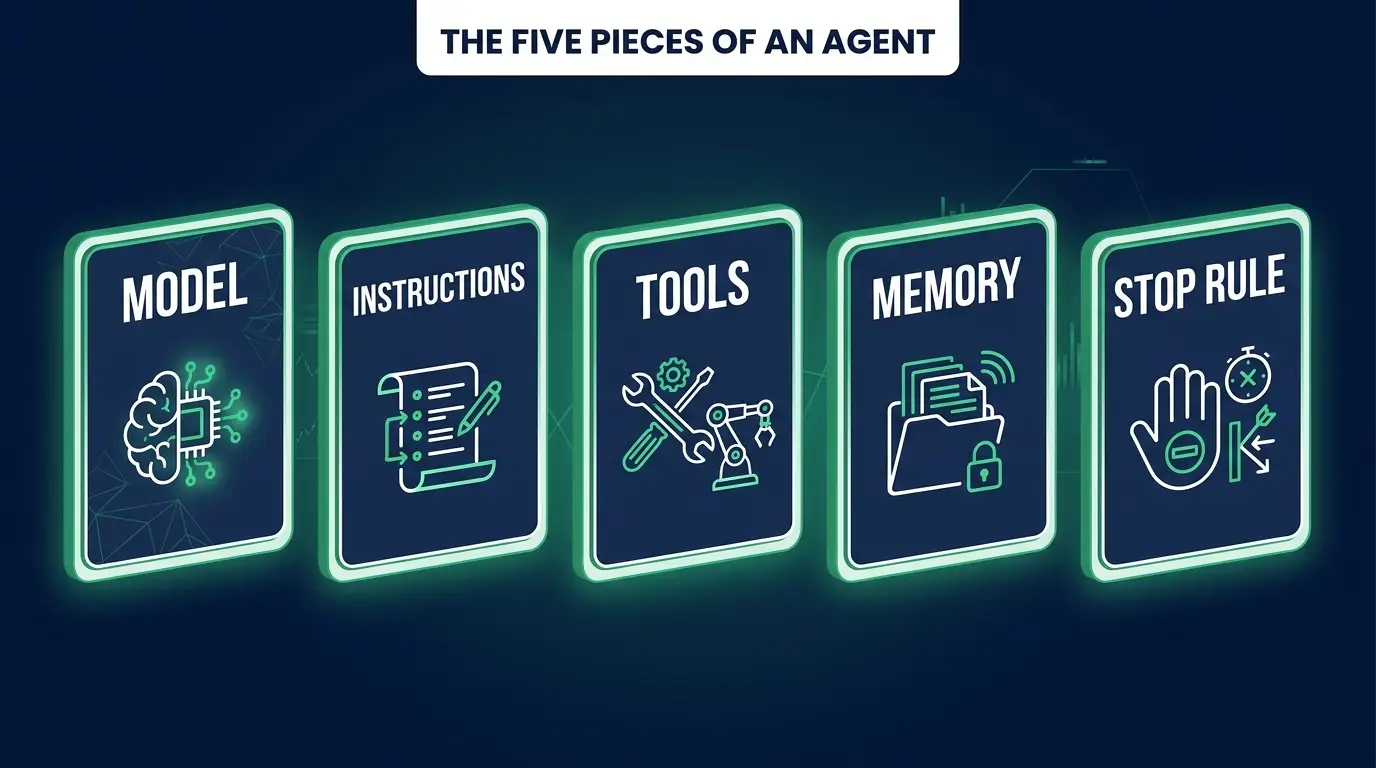
Strip away the framework marketing and every agent you'll ever build is five things: a model, instructions, tools, memory, and a rule for stopping.
The model is the brain doing the reasoning. Claude, GPT, Gemini, or an open-weights model you host yourself. Bigger models reason through multi-step problems better and cost more per run, so most production agents I've seen use a strong model for the deciding and a cheap one for grunt work like classification.
The instructions are your system prompt: who the agent is, what it's for, what it must never do, and how it knows when it's finished. People spend twenty minutes here and then wonder why the agent behaves like an intern who skimmed the job description.
Tools are the functions the model is allowed to call. Search a database, read a calendar, hit an API, create a draft. Without tools you have a chatbot with extra steps.
Memory and context is what the agent carries between steps and between runs. Short-term is the running conversation inside a single task. Long-term is anything you persist, usually a vector store or a plain database, so it remembers this customer's last three tickets.
The stopping condition is the one everybody skips, and it's the one that costs money. An agent needs a definition of done and a hard ceiling on iterations. Without both, "keep going until the goal is met" quietly becomes "keep going."
Building your first one
Pick a use case that is embarrassingly narrow. That's not me being cautious for the sake of it. Broad agents fail in ways you can't debug, because there are too many paths through them to reason about.
Bad first project: "an agent that handles customer support." Good first project: "when a lead form comes in, look the company up, decide if they're a fit based on my three criteria, and write me a Slack message with a recommendation." One trigger, one decision, and an output a human reads before anything happens.
I'd start in n8n rather than in code, even if you can code. Its AI Agent node puts the model, the tools, and the loop on a canvas where you can see them, and watching the execution log step by step teaches you more about agent behavior in an afternoon than a week of reading. If you've never touched it, my n8n tutorial covers nodes and triggers first.
The rough shape looks like this. Node names shift between n8n versions, so treat it as the map and not the turn-by-turn.
- Trigger. Webhook from your form, or a Gmail trigger, or a schedule. Whatever kicks the run off.
- AI Agent node. Drop it in, connect a chat model to it (you'll need an API key from your provider), and write the system prompt.
- Tools. Attach them to the agent node. Start with one. An HTTP Request tool that hits a company-data API is plenty for lead research.
- Output. Send the result somewhere a human sees it. Slack, an email draft, a row in a sheet.
Then run it fifteen times with real data. Not three. Fifteen, and include the ugly inputs: the person who typed "asdf" into the company field, the lead whose website is down. Read the execution log every time and watch which tool it reached for. You'll be surprised at least twice, and those surprises are the actual lesson.
Once the canvas version makes sense and you want the same thing in code, the Claude Code SDK (now the Claude Agent SDK) hands you the agent loop, tool use and permissions already built, so you write the narrow part and skip the plumbing.

Giving it tools
The tool descriptions matter more than the tool code, which took me way longer to learn than it should have.
The model can't see your implementation. It sees the name, the description, and the parameter names, and from that alone it decides whether this tool is right for what it's trying to do. I once had an agent flat-out refuse to use a database lookup I'd spent an hour wiring up. The description said "queries the customers table." Technically true, and completely useless. I changed it to "Look up a customer by email address. Returns their plan, signup date, and open support tickets. Use this before answering any question about a specific customer's account," and it started calling it every time.
Write descriptions like you're onboarding a contractor who isn't allowed to ask you a single question. What it does, what it returns, when to use it, when not to. Name your parameters like a human would (customer_email, not param1).
Two more things that bite people. Give the agent fewer tools than you want to, because past roughly a handful models get noticeably worse at picking correctly. And return errors as readable text instead of throwing. An agent that gets back "no customer found with that email" can recover. One that gets a raw stack trace usually spirals.
The guardrails part nobody skips twice
My rule, and I've never regretted it: version one of any agent produces a draft, never an action.
It writes the email into a draft folder. It posts the proposed reply into Slack with an approve button next to it. A human looks, a human clicks. You keep that human in the loop for weeks, and you only take them out of a specific step once you've watched that step come out right dozens of times in a row.
The failure mode you're guarding against is the agent doing something confidently and wrong, forty times, to real customers, at 3am on a Saturday.
The rest is boring and non-negotiable. Cap the loop at something like ten iterations so a confused agent stops instead of spinning. Set a hard spend limit in your API provider's dashboard, which is the one thing that would have saved my student's $73. Log every run with its token count so you know your real cost per execution before you quote a monthly price. And never give an agent credentials that can delete things or move money. Not as a v1 rule. As a permanent one.
When you should NOT build an agent
Most of the time. Genuinely.
If you already know the steps, write the automation. A workflow with an if/else branch is cheaper by an order of magnitude, runs in milliseconds instead of seconds, produces the identical result every time, and when it breaks you can point at the exact node. None of that is true of an agent, and clients feel the difference even when they can't name it.
I've watched people wrap an LLM around "when a Stripe payment succeeds, add the customer to a Mailchimp list" and feel very modern about it. That's a webhook and two nodes. Adding a reasoning loop to it just added a way for it to fail.
The honest test: does this task have a step where a human currently has to judge something? Read an unstructured email and work out what the person actually wants. Look at five sources and decide which one is relevant. If there's real judgment in the middle, an agent earns its keep. If it's rules all the way down, you're paying tokens for determinism you already had. Worth studying the ones that clear that bar in AI agent examples and best AI agents.
The people making money at this, and it's a real number, roughly $500 to $2,000 a month per client on retainer, are the ones who can tell the difference on a discovery call and then actually deploy and maintain the thing. Anybody can build a demo over a weekend. What clients pay for is somebody running a workflow their revenue depends on. That's the shape of the AI automation career path, and the roadmap version is in how to become an AI automation specialist.

FAQ
Do I need to code to build an AI agent? No. Tools like n8n let you build a working agent on a visual canvas with no code, and plenty of people are billing clients for exactly that. Code helps once you want custom tools or tighter control over the loop. Start visual, add code when the visual approach starts fighting you.
How much does it cost to run an AI agent? It depends on the model and how many times the loop turns, but a typical single-task run lands somewhere between a fraction of a cent and a few cents. The danger is the run that doesn't stop. Set a max-iteration limit and a hard spend cap in your provider dashboard before your first live run, and log token usage per execution so you can quote clients from real data.
What's the difference between an AI agent and a chatbot? A chatbot answers from what the model already knows and stops. An agent can call tools, read what comes back, and decide its next move in a loop until the job is done. Agents change things in the world; chatbots produce text.
How long does it take to build my first agent? A narrow one, an afternoon. Getting it reliable enough to trust with a client's inbox takes a couple of weeks of running it on real data and tightening prompts and tool descriptions based on what actually goes wrong.
Which model should I use? Any current frontier model will handle a first agent fine, and they leapfrog each other often enough that picking based on this month's benchmark is a waste of energy. Build so you can swap the model with a dropdown, then test the candidates against your own task.
Which framework should I build on? Depends on how much control you want versus how fast you want to ship. The tradeoffs between the main options are compared in the best AI agent frameworks.
Is this different from building a chatbot? Yes, and the distinction matters more than it sounds. A chatbot responds. An agent decides and acts, which is where both the value and the risk come from. AI agent vs chatbot covers where the line sits.
If your first agent loops forever, or picks the wrong tool, or confidently drafts a customer something nonsensical, you haven't failed at this. You've met the part of the job that separates people who watched a video from people who ship.
If you want to build that judgment properly, the AI automation path inside CodingPhase walks you through the thinking and not just the clicking. Diamond membership is $42/month or $255/year with a 7-day money-back guarantee, and the Tech Accelerator is $1,500 one time for lifetime access plus live weekly mentorship if you want someone looking over your shoulder while you build.
Either way, go build something small this week. Make it draft the email instead of sending it. You'll learn more from watching it be wrong safely than from any guide, mine included.