Claude Code SDK: How to Build Your First Agent With the Claude Agent SDK
On this page
Before I wrote a word of this post, I made a scratch folder on my Mac, installed both versions of the SDK, and ran the TypeScript compiler and mypy over every line of the agent you're about to build. Both came back clean.
I did that because of what I found when I searched "claude code sdk." A lot of what ranks still imports from @anthropic-ai/claude-code, which today is the package for the Claude Code terminal app itself, not the library. Others use a Python package that stopped getting updates at version 0.0.25. You copy the snippet, it half works or doesn't work at all, and you assume you're the problem.
You're not. The thing got renamed, and a lot of the internet didn't get the memo.
I build codingphase.com (Laravel on the back end, Inertia and React on the front) with Claude Code every single day. So this is the guide I wanted when I sat down: what the SDK is now and when to reach for it over the plain API, plus a small agent that actually compiles.
What the Claude Code SDK is, and why it's called the Agent SDK now
The Claude Code SDK is the engine inside Claude Code, handed to you as a library. You get the agent loop, the built-in tools (read and edit files, run shell commands, search the web) and the context management, but you drive it from your own TypeScript or Python instead of typing into a terminal.
In late September 2025, Anthropic renamed it the Claude Agent SDK. Their migration guide says the new name reflects that it's for building agents beyond coding, which matches what people were already doing with it. The packages changed with it:
- TypeScript:
@anthropic-ai/claude-codebecame@anthropic-ai/claude-agent-sdk - Python:
claude-code-sdkbecameclaude-agent-sdk(import it asclaude_agent_sdk) - Python options class:
ClaudeCodeOptionsbecameClaudeAgentOptions
One breaking change catches everybody migrating old code. The SDK no longer uses Claude Code's system prompt by default. You get a minimal one unless you ask for the old behavior with systemPrompt: { type: "preset", preset: "claude_code" }. If an old tutorial's agent feels dumber on the new package, that's usually why.
People still search "Claude Code SDK" far more than the new name, so I'll use both here. They're the same product.
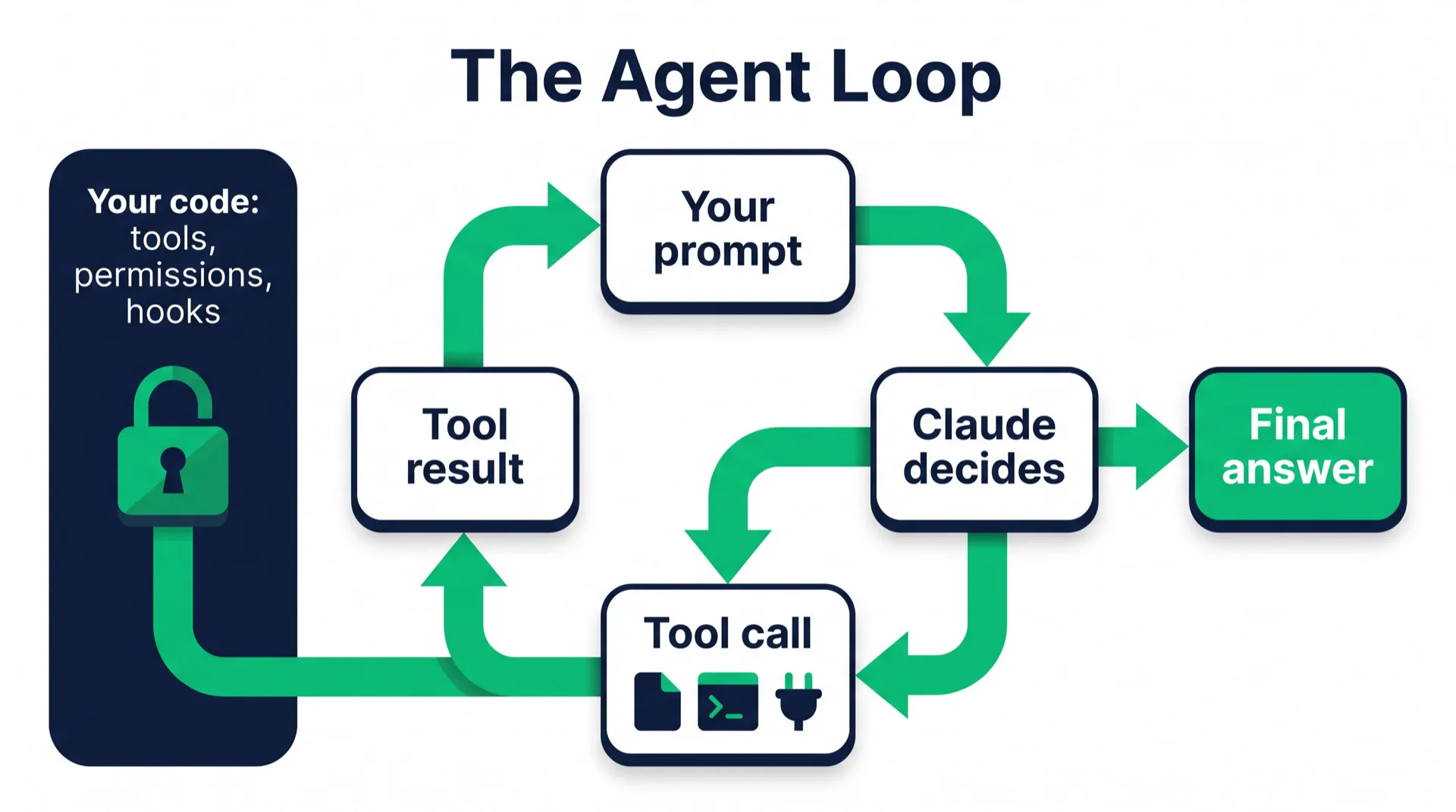
The loop itself is simple. Claude reads the task, decides whether it needs a tool, calls it, reads the result, and goes around again until it produces an answer with no more tool calls. With the plain API you write that loop yourself. With the SDK it's already written, and you just consume a stream of messages.
One detail that surprises people: the SDK runs the actual Claude Code binary under the hood. Both packages ship a native build of it, so you usually don't install Claude Code separately. It also means your "library" is spawning a process, which matters when you deploy.
Agent SDK vs Messages API vs Claude Code: pick the right one
This is the question I'd answer before writing any code, because a lot of people reach for the SDK when they don't need it.
| You want to... | Use | Why |
|---|---|---|
| Work on your own codebase, interactively | Claude Code (the CLI) | It's already the best interface to this engine. Don't rebuild it. |
| Embed an agent that reads files, runs commands, and calls tools inside your own app or script | Agent SDK | You get the loop, tools, permissions, sessions, and hooks for free. |
| Make one call and get text or JSON back (summaries, classification, extraction, a chat reply) | Messages API via the regular client SDK | No subprocess, no filesystem, fewer moving parts. You own the tool loop if you add tools. |
| Have Anthropic host the whole agent and its sandbox | Managed Agents | Anthropic's hosted option, configured through the Claude API. |
My rule of thumb: if the job fits in a single request and response, use the Messages API. If you don't know how many steps it will take before it starts, and those steps touch files, commands, or tools, that's the SDK's home turf.
There's also a middle path people forget. If you work in PHP or Go or anything that isn't TypeScript or Python, you can run the CLI headless with claude -p "your task" --output-format json and parse the output. Same loop, no SDK.
What you need before you start
Not much:
- Node.js 18+ for TypeScript, or Python 3.10+ for Python. (My Mac's system Python is 3.9, and pip flatly refused to find the package. I let uv pull in 3.12 and moved on.)
- An Anthropic API key from the Claude Console, exported as
ANTHROPIC_API_KEY. - Comfort reading async code. You'll be looping over an async iterator, and that's most of it.
A word on billing, because it confuses a lot of people. With an API key you pay per token, pay-as-you-go. If you run the SDK on your own machine while logged in to a Claude subscription, Anthropic's help center currently says that usage draws from your plan's limits (a separate monthly "Agent SDK credit" was announced for June 15, 2026, then paused). But if you're building something other people will use, the docs are clear: you can't offer claude.ai login in your product without Anthropic's approval. Use API keys. I break down the plans in Claude Code pricing.
The SDK also works through Amazon Bedrock, Google Cloud, and Microsoft Foundry if your company already pays for Claude that way. You flip an environment variable like CLAUDE_CODE_USE_BEDROCK=1 and configure that cloud's credentials.
Install the Claude Agent SDK
TypeScript (new project):
mkdir seo-audit-agent && cd seo-audit-agent
npm init -y
npm pkg set type=module
npm install @anthropic-ai/claude-agent-sdk zod
npm install --save-dev tsx
type=module lets you use top-level await, and tsx runs TypeScript files directly. I added zod explicitly because custom tools use it for their input schemas, and the SDK lists Zod 4 as a peer dependency.
Python (with uv):
uv init
uv add claude-agent-sdk
Python (with pip):
python3 -m venv .venv
source .venv/bin/activate
pip install claude-agent-sdk
Then set your key in the same shell you'll run the agent from:
export ANTHROPIC_API_KEY=your-api-key
The SDK doesn't read .env files on its own. If your key lives in .env, load it yourself with something like dotenv before you call the SDK. When I tested, the current versions were 0.3.281 for TypeScript and 0.2.159 for Python. They move fast, so don't be shocked if yours is higher.
Build a small agent, step by step
Here's the agent. It audits a folder of markdown blog posts, which is a job I actually care about since this site's blog runs on markdown files with front matter. It checks each post for a title, a meta description under 155 characters, and at least one internal link, then hands the problems back to your code as structured data you can do something with.
Make a posts/ folder, drop two or three .md files in it (break one on purpose, say by deleting its meta description), and follow along.
Step 1: The smallest agent that works
import { query } from "@anthropic-ai/claude-agent-sdk";

for await (const message of query({
  prompt: "List the markdown files in ./posts and tell me which one looks shortest.",
})) {
  if (message.type === "result" && message.subtype === "success") {
    console.log(message.result);
  }
}
query() starts the agent loop and returns an async iterator. Every message that comes back is a step: a system init message, Claude's reasoning, a tool call, a tool result, and at the end a result message with the final answer. Here we only print the last one.
Run it with npx tsx agent.ts. It works. It's also wide open, because we haven't told it what it may and may not touch. Step 2 fixes that.
Step 2: Lock down the tools and the budget
Most of an agent's safety lives in its options object. Here's what each one I use is doing:
toolsdecides which built-in tools Claude can even see.["Read", "Glob", "Grep"]means noEdit, noWrite, noBash. It can't attempt what it can't see.allowedToolspre-approves tools so they run without asking. It doesn't restrict anything by itself. That distinction trips up a lot of people, so keep it in your head.permissionMode: "dontAsk"turns any call that would have needed approval into a denial. For a script with nobody watching, a hard "no" beats a prompt nobody will answer.maxTurnsandmaxBudgetUsdare your circuit breakers. Set both from day one.settingSources: []stops the SDK from loading settings, CLAUDE.md files, and MCP configs from your machine and project. More on why in the mistakes section.modelpicks the model. I useclaude-sonnet-5for a job like this: fast, and $2/$10 per million input/output tokens. Swap inclaude-opus-5-5for harder multi-step work,claude-fable-5-1for the heaviest reasoning, orclaude-haiku-4-5when cost matters most.
Step 3: Give it a custom tool
This is my favorite part, and the part a lot of quick tutorials skip. A custom tool is just a function in your code that Claude can call. You define it with tool(), wrap it in an in-process MCP server with createSdkMcpServer(), and pass that server in mcpServers.
Why bother, when Claude could just write the issues in its final answer? Because then you're parsing prose. With a report_issue tool, every problem lands in a typed array you control, ready to write to a database or post to Slack or fail a CI job.
The tool's full name follows the pattern mcp__<server>__<tool>, so ours becomes mcp__audit__report_issue. That's the string you put in allowedTools.
Step 4: The finished agent (TypeScript)
Save this as audit.ts:
import { query, tool, createSdkMcpServer } from "@anthropic-ai/claude-agent-sdk";
import { z } from "zod";

type Issue = { file: string; problem: string; fix: string };
const issues: Issue[] = [];

// 1. A custom tool: Claude calls it, your code gets structured data back
const reportIssue = tool(
  "report_issue",
  "Record one problem found in a blog post. Call it once per problem.",
  {
    file: z.string().describe("Path of the markdown file"),
    problem: z.string().describe("What is wrong, in one sentence"),
    fix: z.string().describe("The concrete fix you recommend"),
  },
  async (args) => {
    issues.push(args);
    return { content: [{ type: "text", text: `Logged issue #${issues.length}` }] };
  }
);

// 2. Wrap it in an in-process MCP server
const auditServer = createSdkMcpServer({
  name: "audit",
  version: "1.0.0",
  tools: [reportIssue],
});

// 3. Run the agent loop
for await (const message of query({
  prompt:
    "Audit every markdown file in ./posts. Check that the front matter has a title, " +
    "a meta_description under 155 characters, and that the body has at least one " +
    "internal link starting with /blog/. Call report_issue for every problem you find.",
  options: {
    model: "claude-sonnet-5",
    systemPrompt:
      "You are a careful SEO editor. You never edit files. You read them and report problems.",
    tools: ["Read", "Glob", "Grep"],
    mcpServers: { audit: auditServer },
    allowedTools: ["Read", "Glob", "Grep", "mcp__audit__report_issue"],
    permissionMode: "dontAsk",
    maxTurns: 30,
    maxBudgetUsd: 1,
    settingSources: [],
  },
})) {
  if (message.type === "assistant") {
    for (const block of message.message.content) {
      if (block.type === "tool_use") console.log(`-> ${block.name}`);
    }
  } else if (message.type === "result") {
    console.log(
      `\n${message.subtype} after ${message.num_turns} turns, $${message.total_cost_usd.toFixed(4)}`
    );
  }
}

console.table(issues);
Run it:
npx tsx audit.ts
You'll see a line for each tool Claude calls (Glob to find the files, Read for each one, report_issue per problem, and possibly a ToolSearch call, since tool search is on by default and loads custom tool schemas on demand). Then a summary line with how many turns it took and what it cost, and finally a table of every issue it found.
Notice what's missing. You never wrote a loop that checks for tool calls or code that feeds results back to the model, and you never touched the message history. The SDK handled all of it, and that's pretty much the whole pitch.
Step 5: The same agent in Python
Save this as audit.py:
import asyncio
from typing import Any

from claude_agent_sdk import (
    AssistantMessage,
    ClaudeAgentOptions,
    ResultMessage,
    ToolUseBlock,
    create_sdk_mcp_server,
    query,
    tool,
)

issues: list[dict[str, Any]] = []


@tool(
    "report_issue",
    "Record one problem found in a blog post. Call it once per problem.",
    {"file": str, "problem": str, "fix": str},
)
async def report_issue(args: dict[str, Any]) -> dict[str, Any]:
    issues.append(args)
    return {"content": [{"type": "text", "text": f"Logged issue #{len(issues)}"}]}


audit_server = create_sdk_mcp_server(name="audit", version="1.0.0", tools=[report_issue])


async def main() -> None:
    options = ClaudeAgentOptions(
        model="claude-sonnet-5",
        system_prompt="You are a careful SEO editor. You never edit files. You read them and report problems.",
        tools=["Read", "Glob", "Grep"],
        mcp_servers={"audit": audit_server},
        allowed_tools=["Read", "Glob", "Grep", "mcp__audit__report_issue"],
        permission_mode="dontAsk",
        max_turns=30,
        max_budget_usd=1.0,
        setting_sources=[],
    )

    prompt = (
        "Audit every markdown file in ./posts. Check that the front matter has a title, "
        "a meta_description under 155 characters, and that the body has at least one "
        "internal link starting with /blog/. Call report_issue for every problem you find."
    )

    async for message in query(prompt=prompt, options=options):
        if isinstance(message, AssistantMessage):
            for block in message.content:
                if isinstance(block, ToolUseBlock):
                    print(f"-> {block.name}")
        elif isinstance(message, ResultMessage):
            print(f"\n{message.subtype} after {message.num_turns} turns, ${message.total_cost_usd or 0:.4f}")

    for issue in issues:
        print(f"{issue['file']}: {issue['problem']} -> {issue['fix']}")


asyncio.run(main())
Run it with uv run audit.py (or python audit.py inside your venv). The Python options use snake_case versions of the same names, and the @tool decorator takes a plain dict of types instead of a Zod schema. One small difference I hit while type-checking: in Python, total_cost_usd can be None, which is why there's an or 0 in there.
A quick honesty note: I type-checked both files against the current packages (tsc in strict mode, mypy --strict) and confirmed they install and compile. I didn't publish token counts or costs from a run, because those change with your files and the model.

Tools, permissions, and MCP, minus the jargon
Once the agent above runs, these three things are where you'll spend your time.
The built-in tools
The SDK ships Claude Code's toolset: Read, Write, Edit, Glob, Grep, Bash, WebSearch, WebFetch, and friends like Agent for spawning subagents. A useful way to think about scope:
- Read-only analysis:
Read,Glob,Grep - Analyze and modify: add
Edit - Full automation: add
Bash, and now it can run your tests, install packages, and delete things
Only climb that ladder when the job needs it.
How permissions are decided
When Claude tries to use a tool, the SDK checks things in a fixed order: your hooks first, then deny rules, then ask rules, then the permission mode, then allow rules, then your canUseTool callback if nothing decided yet.
The permission modes are default, dontAsk, acceptEdits, bypassPermissions, plan, and auto. The one to be scared of is bypassPermissions. The docs spell out that allowedTools doesn't constrain it: pair allowedTools: ["Read"] with bypassPermissions and Claude can still run Bash, Write, and Edit. If you need a tool gone, put its bare name in disallowedTools or leave it out of tools.
Hooks: rules the model can't talk its way around
A hook is your own function that runs at points in the loop, like right before a tool call. Since hooks run before everything else, they're where hard rules belong. This one refuses any attempt to read a .env file:
import { query, type HookCallback } from "@anthropic-ai/claude-agent-sdk";

const blockSecrets: HookCallback = async (input) => {
  if (input.hook_event_name !== "PreToolUse") return {};
  const path = String((input.tool_input as { file_path?: string }).file_path ?? "");
  if (path.includes(".env")) {
    return {
      hookSpecificOutput: {
        hookEventName: "PreToolUse",
        permissionDecision: "deny",
        permissionDecisionReason: "Secrets files are off limits.",
      },
    };
  }
  return {};
};

for await (const message of query({
  prompt: "Summarize the config files in this project",
  options: {
    allowedTools: ["Read", "Glob"],
    hooks: { PreToolUse: [{ matcher: "Read", hooks: [blockSecrets] }] },
  },
})) {
  if (message.type === "result" && message.subtype === "success") console.log(message.result);
}
Telling Claude in the system prompt not to read secrets only asks nicely, and models sometimes misread a request. The hook runs in your code, so there's nothing to misread.
Connecting MCP servers
MCP (Model Context Protocol) is how your agent talks to outside systems: GitHub, a database, Slack, your own app. You already built an in-process one in Step 3. External ones go in the same mcpServers option, either as a local command (stdio) or a URL (HTTP):
options: {
  mcpServers: {
    github: {
      type: "http",
      url: "https://api.githubcopilot.com/mcp/",
      headers: { Authorization: `Bearer ${process.env.GITHUB_TOKEN}` },
    },
  },
  allowedTools: ["mcp__github__list_issues"],
}
MCP tools need explicit permission. acceptEdits mode doesn't cover them, so list them in allowedTools, either one by one or with a server wildcard like mcp__github__*. If you want the bigger picture, I wrote about running an n8n MCP server, and the pattern carries straight over.
How I actually use this on codingphase.com
Here's why I care about this SDK more than most libraries: everything I've built up around Claude Code comes along for the ride.
My repo has a CLAUDE.md with rules that aren't optional, like "lesson content is edited in markdown, never in the database" and the exact frontmatter quirks that have broken our imports before. There's also a memory directory where Claude keeps a few dozen notes on how this project works, down to which local MySQL install to start and which pricing figures are canonical. I go deep on that setup in Claude Code memory.
There are skills for specific jobs, like the design pass I require before any front-end work. And there are MCP servers, including one we built into the Laravel app itself with the laravel/mcp package, so Claude can pull signup and revenue numbers through read-only tools instead of me writing SQL by hand.
For big jobs I fan out subagents in parallel, each in its own git worktree so they can't trip over each other's files. Claude Code subagents covers how that works.
The SDK can load all of it. By default, query() reads the same user and project settings the CLI does: .claude/settings.json, CLAUDE.md files, skills, and .mcp.json. So a script I write can inherit years of house rules without me pasting them into a prompt.
That's also why I turned it off in the audit agent above. On a server or in CI, you usually don't want any of that leaking in.

Common mistakes (I've made most of these)
Importing the old package. @anthropic-ai/claude-code is the CLI now. If a snippet imports query from it, the tutorial predates the rename. Switch to @anthropic-ai/claude-agent-sdk, and in Python, claude_agent_sdk with ClaudeAgentOptions.
Forgetting your machine's settings leak in. On your laptop, the SDK happily loads your personal ~/.claude settings and the project's CLAUDE.md. Your agent behaves one way locally and differently in CI, and you lose an afternoon figuring out why. For anything deployed or automated, pass settingSources: [] (Python: setting_sources=[]) and configure what you need in code. Python users: versions 0.1.59 and older treated an empty list like "load everything," so upgrade first.
Thinking allowedTools is a whitelist. It's a pre-approval list. Unlisted tools still exist and fall through to the permission mode. To remove a tool, use tools or disallowedTools.
Reaching for bypassPermissions to make prompts go away. It works, in the sense that it approves nearly everything. Subagents inherit it, too. Use dontAsk with an explicit allow list for headless jobs instead.
No budget cap. An agent that loops on a confusing task will keep spending until something stops it. maxTurns plus maxBudgetUsd costs you two lines.
Swallowing errors. A single query() throws after it yields an error result, and an MCP server that fails to connect doesn't throw at all. It just shows failed or needs-auth in the init message, and Claude may quietly fall back to other tools. Wrap the loop in try/catch and check server status on the system init message if a server matters.
Shipping claude.ai login in a product. Fine for your own scripts. Not fine for an app other people log into, unless Anthropic approved it. Use API keys.
Using the SDK for a one-shot job. If you just need a summary of a string, the Messages API is simpler, faster, and has no subprocess to babysit.
What you end up with
If you followed along, you now have a working agent that:
- Finds and reads every post in a folder without you listing the files
- Can't edit, write, or run shell commands, even if it wanted to
- Reports problems through a typed tool, so your code gets clean data instead of prose
- Stops itself at 30 turns or one dollar, whichever comes first
- Behaves the same on your laptop and in CI, because it ignores local settings
That's a real foundation. Swap the prompt and the tool and it becomes a changelog writer, a broken-link checker, a support-ticket triager, or a nightly report on your own data. If you want more ideas for where agents earn their keep, AI agent examples has a pile of them, and how to build an AI agent covers the design thinking before any code.
The lesson I'd keep from all this: the model decides what to try, your code decides what's allowed. Most agent disasters come from getting those two backwards.
FAQ
Is the Claude Code SDK the same as the Claude Agent SDK?
Yes. Anthropic renamed the Claude Code SDK to the Claude Agent SDK in late September 2025. The npm package is now @anthropic-ai/claude-agent-sdk and the Python package is claude-agent-sdk. The old names are either repurposed (the npm one is now the Claude Code CLI) or no longer updated.
Does Claude Code use the Claude Agent SDK? They share the same engine. The Agent SDK exposes the agent loop, tools, and context management that power Claude Code, and it runs the Claude Code binary under the hood. Think of Claude Code as one product built on that runtime and the SDK as your way into it.
What's the difference between the Claude Code SDK and the Claude API? The Claude API (Messages API) is request and response. If Claude wants a tool, it tells you, and your code runs the tool and sends the result back in a loop you write. The Agent SDK runs that loop for you, executes built-in tools like file reads and shell commands, and adds permissions, hooks, sessions, and MCP.
How much does the Claude Code SDK cost? The SDK itself is free to install. You pay for model usage. With an API key that's per-token pricing, for example $2 input and $10 output per million tokens on Claude Sonnet 5. Run on your own machine under a Claude subscription, Anthropic currently counts it against your plan's usage limits. Details in Claude Code pricing.
Can I use my Claude Pro or Max subscription with the Agent SDK? For your own personal scripts, yes, and the usage draws from your plan limits. For a product you offer to other people, Anthropic doesn't allow claude.ai login without prior approval, so use API keys (or Bedrock, Google Cloud, or Foundry).
TypeScript or Python? Whichever your app is written in. The features are close to identical and the option names map one to one (camelCase in TypeScript, snake_case in Python). I lean TypeScript because Zod schemas give the custom tool arguments real types for free.
Is the Claude Agent SDK only for coding agents? No, and that's the whole reason for the rename. The built-in tools lean toward files and commands, but with custom tools and MCP servers it's a general agent runtime. The audit agent above never writes a line of code.
How does it compare to LangChain or other agent frameworks? The Agent SDK is Claude-only and comes batteries-included: file tools, shell, permissions, and context compaction out of the box. Frameworks like LangGraph or CrewAI are model-agnostic and give you more control over orchestration but less built in. I compare them in best AI agent frameworks, and if you're choosing between coding tools rather than building one, see Cursor vs Claude Code.
If you got the audit agent running, stop for a second, because that's a real skill. You wrote code that hands a model a goal, fences it in, and gets structured work back. Plenty of working developers haven't done that yet.
It's also the kind of skill I see companies hiring for: wiring AI into real systems with guardrails you can explain to your boss. If you want a guided path into that work, our AI automations career path walks you from the basics to job-ready, and how to become an AI automation specialist lays out the whole road. You don't have to figure it out alone. Come build with us.