Claude Code Subagents: How to Create, Use, and Not Overuse Them
On this page
This morning I typed one message into Claude Code and seven agents went to work at the same time.
Five of them were writing blog posts for a cluster about Claude Code (this post is one of them, which is a little funny). One was refreshing some older pages on codingphase.com. The last one was updating a batch of n8n content. None of those jobs needed to know what the others were doing, so there was no reason to run them one after another while I sat there watching a cursor blink.
That's what Claude Code subagents are for. And also, if I'm honest, what they get misused for, because once you see seven agents running in parallel you start wanting to spawn one for everything. Don't. I'll get to why.
By the end of this you'll know what a subagent actually is, how it differs from your main session, how to write your own, and the situations where a subagent makes Claude slower and more expensive instead of faster.
What a Claude Code subagent actually is
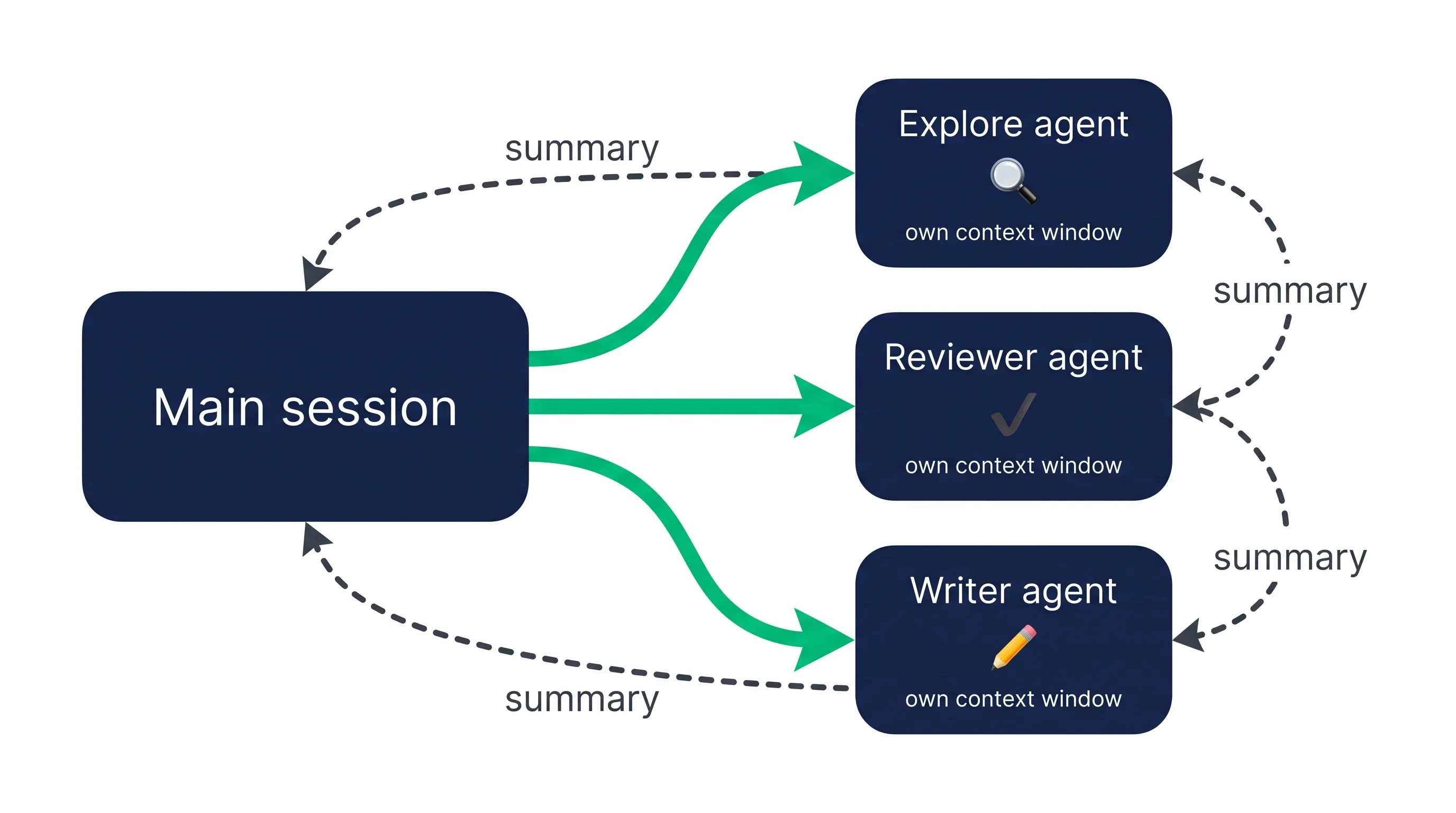
A subagent is a separate Claude instance that your main session hands a task to. It runs in its own context window, with its own system prompt, its own tool permissions, and (optionally) its own model. When it finishes, it sends back a summary. Your main conversation never sees the fifty files it read or the three hundred lines of test output it scrolled through. It just gets the answer.
That last part is the whole trick.
Every file Claude reads in your main session stays in your context. Every grep result, every stack trace, every failed command. On a big codebase that fills up fast, and a crowded context makes Claude worse at the thing you actually asked for. A subagent does the messy reading somewhere else and comes back with a tidy report.
Here's what a subagent does not get, according to the official subagents docs: your conversation history. It starts fresh. It receives its own system prompt, the task message Claude writes for it, your CLAUDE.md files (except for the built-in Explore and Plan agents, which skip them for speed), a git status snapshot, and any skills you told it to preload. That's it.
So if you spent twenty minutes explaining to Claude why the billing table has a weird legacy column, the subagent doesn't know that. Whatever it needs has to be in the brief or in CLAUDE.md. More on that in the mistakes section, because it's the one that bites everybody.
Built-in subagents vs custom ones
You're already using subagents even if you've never written one. Claude Code ships with built-ins and delegates to them on its own.
Explore is the one I see most. It's read-only (Write and Edit are denied), it's built for searching and understanding a codebase, and it skips CLAUDE.md and the git snapshot so it starts quickly. When I ask something like "where do we attach guest payments to a user by email?", Claude usually fires off an Explore agent, which crawls the Laravel services and controllers and comes back with the three files that matter. My main session stays clean. You can also ask for a thoroughness level: quick, medium, or very thorough.
Plan does the codebase research when you're in plan mode, also read-only.
General-purpose gets every tool available to subagents and handles tasks that need both exploring and changing code.
There are a few smaller helpers too, like claude-code-guide, which answers questions about Claude Code itself, and statusline-setup, which runs when you configure your status line.
Custom subagents are the ones you write. They're Markdown files with a bit of YAML at the top, and they're where subagents go from "nice default behavior" to "this knows how my project works."
Where subagent files live
Custom subagents live in one of a few places, and the location decides who can use them:
| Location | Scope | Priority |
|---|---|---|
| Managed settings | Your whole organization | 1 (highest) |
--agents CLI flag |
The current session only | 2 |
.claude/agents/ |
This project | 3 |
~/.claude/agents/ |
Every project on your machine | 4 |
A plugin's agents/ folder |
Wherever the plugin is enabled | 5 (lowest) |
When two subagents share a name, the higher priority wins. So a project-level code-reviewer beats the personal one in your home folder, which is usually what you want.
My rule of thumb: if it encodes how this codebase works, it goes in .claude/agents/ and gets committed so the whole team has it. If it's about how I like to work (my review style, my preferred test commands across projects), it goes in ~/.claude/agents/.
One gotcha from the docs worth knowing. If ~/.claude/agents/ didn't exist when you started your session, Claude won't notice a newly created folder until you restart. So if your first agent "doesn't exist," restart before you start debugging your YAML.
How to create a subagent
A subagent file has two parts. Frontmatter on top configures it. The Markdown body underneath becomes its system prompt.
---
name: code-reviewer
description: Reviews code for quality and best practices
tools: Read, Glob, Grep
model: sonnet
---

You are a code reviewer. When invoked, analyze the code and provide
specific, actionable feedback on quality, security, and best practices.
Only two fields are required:
nameis the unique identifier, lowercase with hyphens. It can't contain a colon or start with a hyphen.descriptiontells Claude when to delegate to this agent. This is the field that decides whether your subagent ever gets used, so write it like a trigger. The docs also suggest adding a phrase like "use proactively" if you want Claude to reach for it without being asked.
The optional fields are where the control lives. These are the ones I actually use:
toolsis an allowlist, as a comma-separated string or a YAML list. Leave it out and the agent inherits every tool subagents are allowed.disallowedToolsis the opposite: start from everything and remove a few.disallowedTools: Write, Editgives you a read-only agent in one line.modeltakessonnet,opus,haiku,fable, a full model ID, orinheritto match your main session.permissionModesets how it handles permission prompts (default,acceptEdits,auto,dontAsk,bypassPermissions,plan).maxTurnscaps how many agentic turns it gets before stopping.skillspreloads the full content of named skills into the agent at startup.memorygives it a persistent memory folder atuser,project, orlocalscope, so it can learn across sessions.isolation: worktreeruns it in a temporary git worktree, which is great when you want an agent to try something risky without touching your working copy.
There are more (mcpServers, hooks, effort, background, color, and a few others), and the list keeps growing, so check the subagents reference when you need something specific.
What happened to the /agents wizard?
A lot of older tutorials tell you to run /agents and click through an interactive setup. That's out of date. As of Claude Code v2.1.198, /agents no longer opens the creation wizard. It prints a reminder to either ask Claude or edit .claude/agents/ directly.
Asking Claude is the easier path anyway. Something like:
Create a project subagent in .claude/agents/ that runs our Pest test suite after code changes and reports only the failures. Make it use Haiku and keep it off the Write tool.
Claude writes the file. Then you open it and read it, because the description it writes is often too vague, and the description is the part that matters most.
How to call a subagent
There are three ways, from loosest to strictest:
- Plain language. "Use the test-runner subagent to fix the failing tests." Claude decides, and it usually listens.
- An @-mention. Type
@and pick the agent from the typeahead (they show up as@agent-<name>). This guarantees that agent runs. - The whole session.
claude --agent code-reviewerruns your entire session as that agent.
And if your description is good, Claude will delegate on its own without you naming the agent at all.

Three subagent files you can copy
These are written for a Laravel + React app because that's what I build every day, but swap the commands for your stack and they'll work anywhere.
1. A read-only code reviewer
---
name: code-reviewer
description: Reviews the current diff for bugs, security issues, and broken conventions. Use proactively after any non-trivial code change, before committing.
tools: Read, Grep, Glob, Bash
model: sonnet
---

You are a senior reviewer for a Laravel 12 + Inertia/React codebase.

1. Run `git diff` to see what changed. Only review changed lines and
   the code they directly touch.
2. Check for: missing authorization on new routes, N+1 queries,
   unvalidated request input, and React components that fetch data
   the controller should pass as props.
3. Read CLAUDE.md conventions and flag anything that breaks them.

Report back as a short list grouped by severity (must fix / should fix /
nit). Include file and line for each item. Do not rewrite code.
If you find nothing worth flagging, say so in one line.
Notice what's missing: Write and Edit. A reviewer that can "helpfully" fix things will quietly rewrite your code in ways you didn't ask for. Keep it read-only and make it report.
2. A test runner that only reports failures
---
name: test-runner
description: Runs the test suite and reports only failing tests with the relevant error. Use proactively after code changes and whenever the user asks to run tests.
tools: Bash, Read, Grep
model: haiku
maxTurns: 15
---

Run `php artisan test --parallel`. If it fails to start, check
.env.testing and report the startup error instead of guessing.

For each failing test, return:
- the test name and file
- the assertion that failed, in one or two lines
- your best guess at the cause, labeled as a guess

Do not return passing tests. Do not paste full stack traces.
Do not edit any files.
This is the purest case for a subagent. Test output is long, repetitive, and almost entirely useless once you know which three tests broke. Letting it pour into your main context is how you burn through a session. The official cost guide says the same thing: delegate verbose work like running tests or processing logs so only the summary comes back. And since this job is mostly "run a command and read the output," Haiku handles it fine for a fraction of the cost. The docs recommend exactly that for simple subagent tasks.
3. A front-end builder that starts with a design brief
---
name: frontend-builder
description: Builds or edits React components and Blade views to a design brief supplied by the caller. Use when UI work is delegated and a written brief exists.
tools: Read, Grep, Glob, Edit, Write, Bash
model: inherit
skills:
  - design-taste-frontend
---

You build UI to the brief you are given. The brief names the page kind,
the audience, and the direction for each view. Follow it.

- Reuse existing primitives before creating new ones. Search the
  components folder first.
- Use the project's color tokens. Never hardcode hex values.
- After editing, run `npm run build` and report any type or build errors.

Return: the files you changed, one line on what each change does,
and anything in the brief you could not follow and why.
This one comes straight out of a rule in my own CLAUDE.md. Front-end work on codingphase.com always runs through a design skill first, and the rule is specific about delegation: when front-end work goes to a subagent, the orchestrator (my main session) runs the design skill first, works out the direction, and hands the subagent a concrete brief. The subagent builds to the brief. The reasoning is simple enough. A subagent starts cold, so it has no idea what the page is supposed to feel like unless somebody writes that down for it.
The skills field preloads the skill into the subagent as a backstop. But the brief does the heavy lifting. A subagent can't ask you clarifying questions mid-task the way your main session can, so the thinking has to happen before you hand the work off.
When subagents help (and when they hurt)
A subagent is worth spawning when the work is big and the answer is small.
"Search the codebase and tell me where guest checkouts get claimed." "Run the tests and tell me what broke." "Review this diff." "Write this blog post and tell me the file path." Lots of tool calls go in, a paragraph comes out, and that ratio is the sweet spot.
The docs put it in almost the same terms. Stay in the main conversation when the task needs back-and-forth, when planning and implementation share a lot of context, when it's a quick targeted change, or when latency matters (a fresh subagent has to rebuild context before it can do anything). Reach for a subagent when the output is verbose, when you want to lock down tools or permissions, or when the work is self-contained and can come back as a summary.
Parallel runs are where they shine
The seven agents from this morning worked because the jobs were truly independent. The post on Cursor vs Claude Code doesn't need to wait for the post on Claude Code pricing. Neither one cares what the n8n refresh is doing. Launched in one message, they run side by side, and I review the results as they land.
If those jobs had been sequential (say, write the pricing post, then write a comparison that quotes its numbers) parallel agents would have been a mistake. The second one would have started with stale assumptions and I'd have spent the saved time fixing it.
What subagents cost you
Subagents don't make work free. Each one is a full Claude instance doing its own reading, and every file it opens costs tokens whether or not you ever see it. Seven parallel agents means seven separate contexts filling up at once. On a subscription plan that shows up as usage; on an API key it shows up on your bill.
And the summaries aren't free either. The docs warn directly that running many subagents that each return detailed results can consume significant context in your main conversation. Seven agents each sending back a two-page report is fourteen pages landing in the context you were trying to protect. That's why every file above ends with instructions about what to return and what to leave out.
Over-spawning is the most common way to waste them
My repo's CLAUDE.md has an explicit warning about spawning more subagents than a task warrants. The failure it guards against looks like this: you ask a simple question, Claude fans out three Explore agents to cover "every angle," and a lookup that should have been one grep turns into three cold-started agents and a pile of overlapping summaries.
If you already know the file, just read the file. If the question is one search, run the search. A subagent pays off when the search is wide and you only need the conclusion.
Common mistakes with Claude Code subagents
Writing a vague description. "Helps with code" gives Claude nothing to match against, so your agent never gets picked. Say when: "Use proactively after code changes," "Use when the user asks to run tests." The description is a trigger, and trigger words should match the way you actually talk.
Assuming it knows what you know. The subagent didn't see your conversation. If the fix depends on something you explained ten minutes ago, put it in the brief or in CLAUDE.md. Otherwise you get a subagent confidently doing the reasonable thing you ruled out an hour ago.
Then there's the tools field. Leave out tools and the agent inherits everything, which for a reviewer or researcher is an invitation to surprise edits. And leave out instructions on what to return and you'll get an essay back every time; tell it the shape you want (a list, a file path, failures only, under ten lines).
Running dependent tasks in parallel. If task B needs task A's output, they aren't parallel. Run A, read the result, then brief B.
Using the priciest model for grunt work. Leaving model off means the agent follows your session's model. If you're on Opus, your "run the tests" agent is on Opus too. Put model: haiku on the boring ones.
Nesting without noticing. By default, subagents can spawn their own subagents up to three levels below the main conversation. That's useful for real divide-and-conquer work and a runaway cost for everything else. If an agent should never delegate, leave Agent out of its tools list. You can also cap depth with the CLAUDE_CODE_MAX_SUBAGENT_SPAWN_DEPTH environment variable (set it to 1 to turn nesting off).

Where subagents fit in the bigger picture
If you've read my breakdown of how to build an AI agent, subagents will look familiar. They're the orchestrator-and-workers pattern: one agent holds the plan and hands out focused jobs to workers with narrower tools. Claude Code just gives you that pattern as a config file instead of a framework. If you want the full landscape of tools doing this, my list of the best AI coding agents and the roundup of AI agent frameworks cover it.
Two related Claude Code features are worth knowing so you pick the right one. Skills load instructions on demand into whatever agent is running; they don't create a new context. Memory (your CLAUDE.md files) is the standing context every session and most subagents start with, which is why it matters so much here. I go deep on that in Claude Code memory. And if you want to run these patterns from your own code instead of the terminal, that's the Claude Code SDK.
FAQ
Does Claude Code use subagents automatically?
Yes. Claude reads each subagent's description and delegates when a task matches. It also uses the built-in Explore agent on its own for codebase searches. If you want to guarantee a specific agent runs, @-mention it.
Can Claude Code run multiple subagents at once?
Yes. Independent subagents can run in parallel, and you can ask for that directly ("research these three modules in parallel using separate subagents"). The docs list a default cap of 20 running at the same time, adjustable with CLAUDE_CODE_MAX_CONCURRENT_SUBAGENTS.
Can subagents spawn their own subagents?
By default, yes, up to three layers below your main conversation. At the depth limit the Agent tool is withheld. You can lower the limit with CLAUDE_CODE_MAX_SUBAGENT_SPAWN_DEPTH.
Do subagents see my conversation history?
No. A regular subagent starts fresh with its own system prompt, the task Claude writes for it, your CLAUDE.md files (Explore and Plan skip these), a git status snapshot, and any preloaded skills.
Are Claude Code subagents worth it?
For verbose, self-contained work like searches, test runs, reviews, and independent writing tasks, yes. They keep your main context clean and let unrelated jobs run in parallel. For quick edits or anything that needs back-and-forth with you, they add startup time and tokens without much payoff.
What's the difference between a project and a user subagent?
A project subagent lives in .claude/agents/ inside the repo and applies only there, so commit it and your team gets it too. A user subagent lives in ~/.claude/agents/ and follows you into every project. If both have the same name, the project one wins.
I've been teaching people to build real things since 2016, and the thing that surprises students most about working with AI agents is how much it feels like managing people. A good brief gets good work back. A vague one gets you something plausible and wrong. Subagents just make that lesson impossible to ignore.
If you want to go from "I've heard of agents" to building automations that actually save a business time, the AI Automations career path is where I'd start. Write your first agent file today, keep it read-only, and see what it brings back.