The Best AI Agent Frameworks in 2026 (and When to Use Each)
On this page
A team I was talking to earlier this year spent their first quarter building a customer-support agent on a framework somebody picked because it had the most GitHub stars. Three months in, they were ripping it out. The thing worked fine in a demo. Then a real conversation would branch in a way they hadn't planned for, the agent would loop, and there was no clean way to say "if the refund is over 200 dollars, stop and ask a human." They had picked a tool built for quick multi-agent chat when what they needed was tight control over a workflow. So they started over.
I think about that story every time someone asks me which AI agent framework is best. The honest answer is that the question is slightly wrong. There is no best one. There's the one that matches the shape of your problem, and there are five or six that will fight you the whole way if you guess.
So here are the ones that actually matter in 2026, what each is genuinely good at, and the kind of project where I'd reach for it. No leaderboard, just the trade-offs I wish that team had heard before they wrote a line of code.
What an agent framework actually does (and whether you need one)
Strip away the marketing and an AI agent is a loop. The model looks at some goal, decides on an action, calls a tool, reads the result, and decides again. It keeps going until the job is done or it gives up. If you want the plain-English version of that, I wrote a whole piece on how to build an AI agent that starts from zero.
A framework is the scaffolding around that loop. It handles the plumbing you'd otherwise write yourself: keeping track of conversation state, wiring tools to the model, retrying when a call fails, passing work between multiple agents, logging what happened so you can debug it at 2am.
Here's the part nobody selling you a framework will lead with. You might not need one. If your agent calls two tools and answers a question, the raw model API plus a bit of your own code is often cleaner than dragging in a dependency with its own opinions about everything. Frameworks earn their weight when the coordination gets hard: many tools, many steps, many agents, or state that has to survive across a long-running task. Below that line, they can be more ceremony than help.
Keep that in your back pocket as we go. Half of picking the right framework is being willing to pick none.

How I judged these
Everyone weights this differently, so here's my scorecard up front, and you can adjust it to your own situation.
Control. When something goes wrong, how easily can you see why and change it? A framework that hides the loop is lovely in a demo and miserable in production.
Multi-agent support. Some jobs want one competent agent. Some want a small team of them handing work back and forth. The frameworks differ wildly here.
Data and retrieval. If your agent lives or dies on pulling the right document, the quality of the retrieval layer matters more than anything else.
Learning curve and code you'll actually maintain. A framework you can't reason about six months later is a liability, however clever it looked on day one.
Who's behind it and where it's going. Agent tooling moves fast. A library with a real company or a serious community behind it is a safer bet than a solo project that might go quiet.
One thing I deliberately did not weigh: hype. Star counts and launch-week Twitter threads tell you what's popular this month, not what you'll be glad you chose next year.
LangGraph, when you need control over the flow
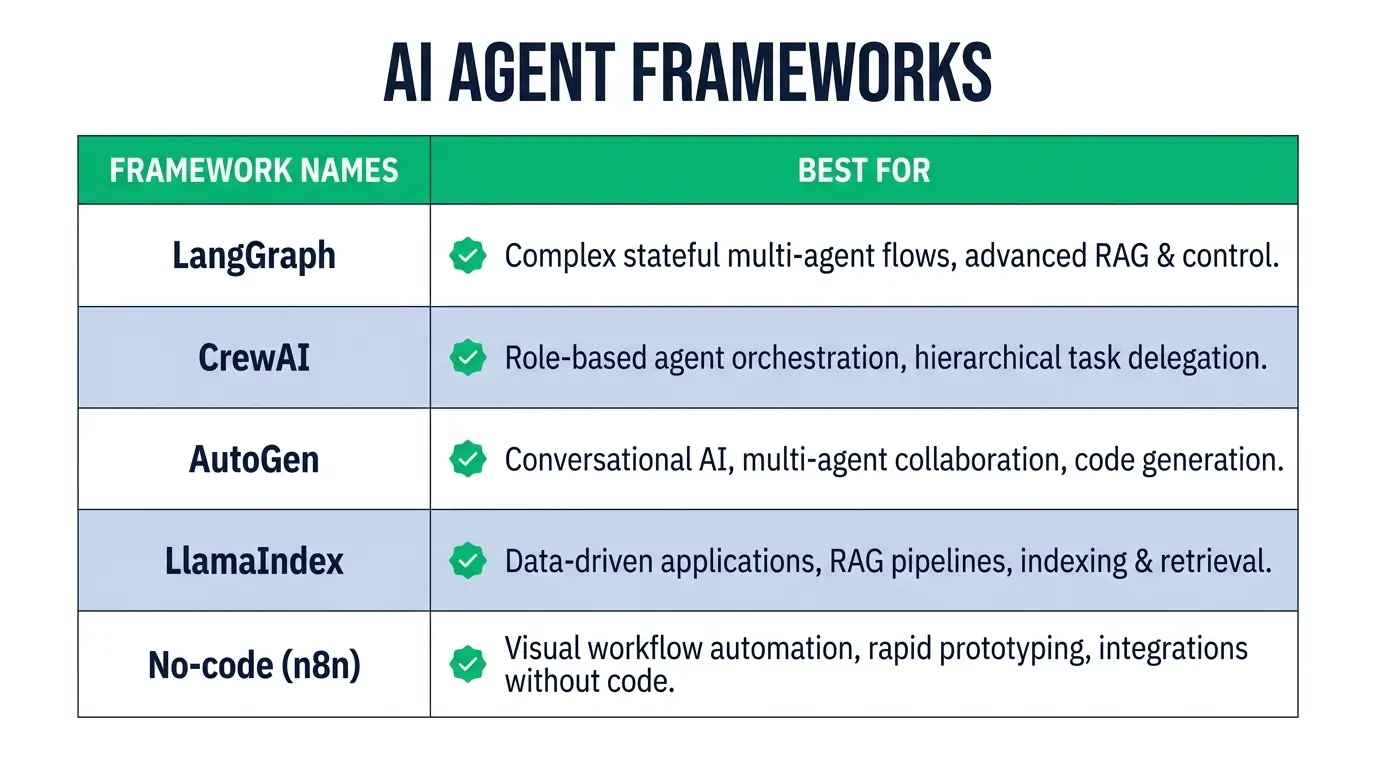
LangGraph, from the LangChain team, models your agent as a graph. Nodes are steps, edges are the paths between them, and state travels along explicitly. That sounds academic until you hit the exact wall that support team hit. When you need to say "after this step, branch based on this condition, and if the amount is high, route to a human," a graph is the natural way to express it.
This is my default when the workflow is the point. Cyclic reasoning, human-in-the-loop approvals, long-running processes where you need to pause and resume, anything where you want to inspect the state at each hop and know precisely what the agent will do next. It gives you control that the more magical frameworks hide from you.
The cost is real, though. It's the steepest of the mainstream options. You're thinking in graphs and state machines, which is more upfront design than handing a couple of agents a goal and letting them chat. For a weekend prototype it's overkill. And LangChain, the broader ecosystem it sits in, has a reputation for heavy abstractions that some developers actively avoid. LangGraph is tighter and lower-level than classic LangChain, but you're still adopting that world.
Pick LangGraph when reliability and explicit control matter more than speed of first draft, and when your agent's logic is genuinely a flowchart with branches and loops, not a straight line.
CrewAI, when you want a team of agents fast
CrewAI took the opposite bet, and it's a good one for a lot of people. You define agents as roles. A researcher, a writer, a critic. You give each a goal and a set of tools, describe the tasks, and CrewAI orchestrates them working together. The mental model is a small crew of coworkers, which is exactly why it clicks so quickly for beginners.
What I like about it is how little friction there is between an idea and something running. If you can describe the team you'd hire to do a job, you can more or less describe it to CrewAI. For content pipelines, research-and-summarize workflows, and plenty of internal tools, it gets you to a working multi-agent system in an afternoon.
The trade-off is the flip side of that ease. The higher-level abstraction that makes it fast also means less fine control when an agent goes off the rails. Debugging a crew that produces a subtly wrong answer can involve more guesswork than debugging an explicit graph. For a lot of projects that's a fine price. For a high-stakes production flow where every branch needs to be pinned down, you may outgrow it.
Reach for CrewAI when you want role-based multi-agent behavior quickly and you value shipping over surgical control. It's one of the friendliest on-ramps to the whole world of AI agents.
AutoGen and the Microsoft Agent Framework, built for conversations and enterprises
AutoGen came out of Microsoft Research and made its name on conversational multi-agent systems, agents that talk to each other (and to you) to solve a problem, including patterns where a human sits in the loop as one of the participants. It's strong when the work is genuinely a back-and-forth: agents debating, refining, calling code, checking each other.
Microsoft has been consolidating its agent story under the Microsoft Agent Framework banner, pulling AutoGen's research ideas together with the more production-minded Semantic Kernel lineage. If your company already lives in the Microsoft and Azure world, that gravity is worth taking seriously. Being close to the platform your infrastructure and compliance already run on is a real advantage, not a footnote.
The honest caveat is that this space has been moving and rebranding, so you'll want to check the current state of the framework and its docs rather than trust a blog post's snapshot, including this one. Pick this lane when you want conversational multi-agent patterns and, especially, when an enterprise Microsoft stack is your home turf.
LlamaIndex, when the agent is really about your data
If I had to name the thing LlamaIndex is best at, it's connecting a model to your data and doing it well. It grew up as a data framework, ingestion, indexing, retrieval, the whole RAG backbone, and it has since grown solid agent capabilities on top of that foundation.
That heritage is the reason to choose it. When your agent's real job is to answer questions over your documents, search a knowledge base, and reason across large piles of unstructured text, the quality of the retrieval layer is the quality of the whole product. LlamaIndex treats that layer as the main character rather than an add-on.
If your agent is mostly orchestration and tool calls with light retrieval, another framework may fit the loop better. But for a document-heavy, knowledge-base-heavy assistant, starting from the data side is the sane order to build in. You can always add orchestration around a strong retrieval core more easily than you can bolt good retrieval onto a system that treated it as an afterthought.

OpenAI Agents SDK, when you're all-in on OpenAI and want lightweight
OpenAI's own Agents SDK is the deliberately small option. It's a lightweight framework for building agents with OpenAI's models, with clean primitives for tools, handoffs between agents, and guardrails, without the sprawling surface area of the bigger ecosystems.
The appeal is honesty about scope. If you're building on OpenAI models anyway and you want something that feels native to that stack, this gets you moving with very little to learn. Less abstraction to fight, fewer layers between you and the model, a codebase you can actually hold in your head.
The obvious limit is right there in the name. It's built around OpenAI. If part of your plan is swapping between providers, or you're betting on open models you'll host yourself, a more model-agnostic framework saves you pain later. Choose the Agents SDK when you're committed to OpenAI and you'd rather have a thin, legible tool than a Swiss Army knife.
Anthropic's answer is the Claude Agent SDK, the same agent loop that runs Claude Code, packaged for your own apps. Same tradeoff, different provider. I walk through building with it in my Claude Code SDK tutorial.
The no-code path: n8n and Make
Now the part a lot of framework roundups skip, either out of snobbery or because they assume you want to write orchestration code. Plenty of people shouldn't. If you're a marketer, an operator, or a founder who wants an agent wired into your actual tools without babysitting a Python project, a visual platform is the right call, and I mean that without any hedging.
n8n is where I usually point people here. It's a workflow-automation tool with real AI-agent nodes, so you drag steps onto a canvas, connect your apps, drop an agent node in the middle, and you've got something that reads an email, decides, and acts, no deploy pipeline required. It connects to hundreds of services out of the box, which for automation work is most of the battle. I've written a full intro to what n8n is if you want the tour.
Make sits in similar territory with an even more visual, blocks-on-a-canvas feel. Both trade some ceiling for a lot of accessibility. You won't get the fine-grained, code-level control of LangGraph, and complex custom logic eventually strains against the visual model. But for a huge range of real automations, getting an agent live this week beats a more powerful one you're still architecting next month.
Here's the reframe I want you to keep: the best framework is the least powerful one that still does your job. Power you don't use is just complexity you have to maintain.
How a beginner should actually choose
If you're early and a little overwhelmed, ignore the buffet and do this instead.
Start by writing down what your agent does in one plain sentence. "It reads support emails and drafts replies." "It researches a topic and writes a summary." That sentence tells you more than any comparison table.
If the sentence is basically a workflow with branches, you want control, so LangGraph. If it's a small team of roles collaborating, CrewAI gets you there fastest. If it's answering questions over your documents, LlamaIndex. If you're locked into OpenAI and want to stay light, the Agents SDK. And if you don't want to write orchestration code at all, n8n, and don't let anyone make you feel that's cheating.
Then build the smallest version that runs and see where it hurts. You'll learn more from one janky working agent than from three weeks of reading comparisons like this one. The framework you can debug will serve you better than the one that benchmarks well but hides its reasoning.
If you want the grounding underneath all of this, the model, prompting, and Python that make any of these frameworks make sense, that's exactly what the career paths at CodingPhase are built to teach in order, and you can see the full catalog on the courses page.
FAQ
What is the best AI agent framework? There isn't a single best one, and anyone who names one without asking about your project is guessing. For explicit control over a workflow, LangGraph. For fast role-based multi-agent teams, CrewAI. For data-heavy assistants, LlamaIndex. For an OpenAI-native lightweight build, the OpenAI Agents SDK. For no code at all, n8n. Match the tool to the shape of your problem.
Do I need a framework to build an agent? No. If your agent calls a couple of tools and answers, the raw model API plus your own code is often cleaner. Frameworks pay off when coordination gets hard: many tools, many steps, multiple agents, or state that has to persist across a long task. Below that, they can add more overhead than they remove. Here's a walkthrough of building one so you can feel the difference yourself.
LangGraph vs CrewAI, which should I pick? They optimize for opposite things. LangGraph gives you explicit, graph-based control, ideal when your logic has branches, loops, and human approvals you need to pin down, at the cost of a steeper learning curve. CrewAI gives you fast, role-based multi-agent orchestration that's far easier to start with, at the cost of fine-grained control when something goes wrong. Pick LangGraph when reliability and precision win. Pick CrewAI when speed to a working prototype wins.
Are no-code platforms like n8n real agent tools or just automation? Both, and that's the point. n8n started as workflow automation and now has genuine AI-agent nodes, so you get a real agent wired into hundreds of services without maintaining a codebase. You give up some ceiling on custom logic. For most business automations, that's a trade worth making.
You don't have to pick perfectly. You have to pick something small, ship it, and learn where it strains. That's the whole game, and it's a lot less scary once you've built one end to end. If you want a guided way in, from Python fundamentals to putting an agent in front of real users, come learn with us at CodingPhase. Start with one working agent. The rest gets clearer from there.