Claude Code Memory: How CLAUDE.md and Auto Memory Actually Work
On this page
A couple of lessons on codingphase.com once shipped with empty tests. The "map" lesson and the "reduce" lesson, both interactive, both looking completely normal in the player. The cause was a YAML quirk. A double-quoted string with quotes inside it broke the frontmatter parse, our importer quietly fell back to a simpler parser that couldn't read the lesson steps, and the lessons went in with nothing to check.
Tracking that down was the easy part. The annoying part came after: a fresh Claude Code session the next day would have known none of it, and happily written the next lesson with the exact same quoting.
That's the thing people miss about Claude Code. It's brilliant inside a session and it has amnesia between them. Every session starts with a fresh context window. Whatever you worked out yesterday is gone unless it's written down somewhere Claude reads at startup.
That somewhere is memory. In Claude Code it comes in two flavors: CLAUDE.md files, which you write, and auto memory, which Claude writes for itself. I build codingphase.com (Laravel plus Inertia and React) with Claude Code every day, and my project's CLAUDE.md is one of the most valuable files in the repo. I'll show you pieces of it, because the real thing teaches more than a template.
How Claude Code memory works
Two mechanisms carry knowledge from one session to the next. The official memory docs put them side by side, and the split is simple once you see it:
| CLAUDE.md files | Auto memory | |
|---|---|---|
| Who writes it | You | Claude |
| What's in it | Instructions and rules | Learnings and patterns |
| Scope | Project, user, or org | Per repository, shared across worktrees |
| When it loads | Every session | Every session (the first 200 lines or 25KB of the index) |
Both load at the start of every conversation, and both are context. Nothing enforces them. Claude reads your CLAUDE.md and tries to follow it, but nothing forces it to. CLAUDE.md content is delivered as a user message right after the system prompt. If something must happen every single time, like a lint run before every commit, you want a hook, which runs as a shell command whatever Claude decides.
I'll come back to that, because mixing up "memory" and "enforcement" is the root of a lot of frustration.
Where CLAUDE.md files live
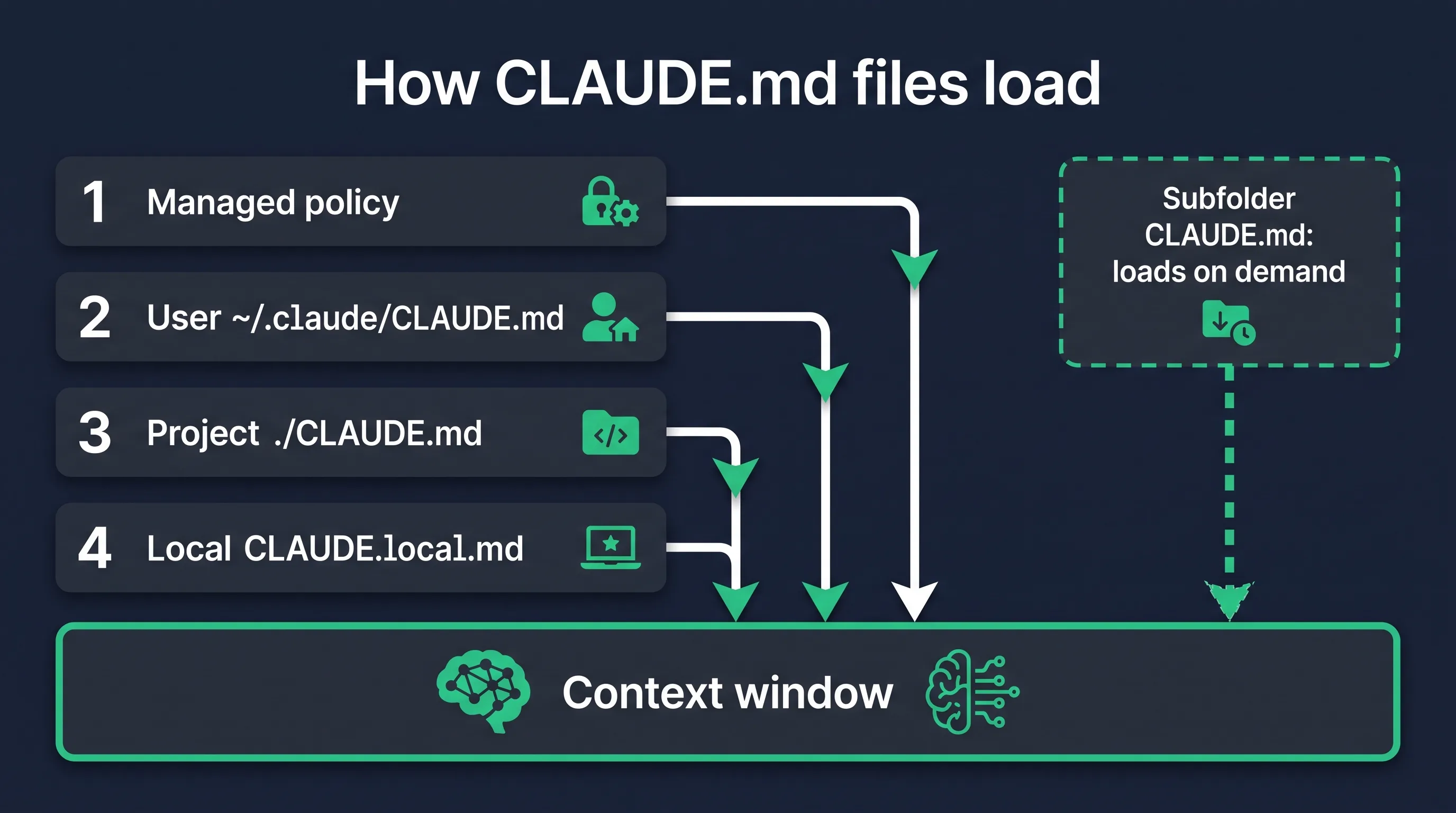
There are four scopes. Listed from broadest to most specific, which is also the order they load in:
- Managed policy. Org-wide instructions IT deploys to every machine. On macOS it's
/Library/Application Support/ClaudeCode/CLAUDE.md, on Linux and WSL/etc/claude-code/CLAUDE.md, on WindowsC:\Program Files\ClaudeCode\CLAUDE.md. Individual users can't exclude it. - User instructions at
~/.claude/CLAUDE.md. Your personal preferences, applied to every project on your machine. - Project instructions at
./CLAUDE.mdor./.claude/CLAUDE.md. This is the one you commit so the whole team (and every teammate's Claude) shares it. - Local instructions at
./CLAUDE.local.md. Personal notes for one project, like your sandbox URL or preferred test data. Add it to.gitignore.
If you've never set any of this up, the project file is the one that matters. Start there.
One newer wrinkle: Claude Code can also read an AGENTS.md, the instruction file other coding agents use. By default it reads AGENTS.md only when there's no CLAUDE.md or CLAUDE.local.md in your working directory or above it. If you have both and want both, put @AGENTS.md at the top of your CLAUDE.md, or change the Project instructions setting in /config.
How the files load (this part trips people up)
Claude Code walks up the directory tree from where you launched it. Start a session in foo/bar/ and it loads foo/bar/CLAUDE.md, foo/CLAUDE.md, and any CLAUDE.local.md files sitting next to them.
They don't override each other. Everything gets concatenated, ordered from the filesystem root down to your working directory, so the file closest to where you launched is read last. Within a single directory, CLAUDE.local.md goes after CLAUDE.md, which means your personal notes are the last word at that level.
Subdirectories work differently. A CLAUDE.md in src/billing/ doesn't load at launch. It loads on demand, the moment Claude reads a file inside src/billing/. That's genuinely useful in a big repo: the billing rules only cost you context when Claude is actually in billing code.
A few smaller details worth knowing:
- Block-level HTML comments (
<!-- like this -->) get stripped before the content reaches Claude. Handy for notes to human maintainers that shouldn't cost tokens. - A CLAUDE.md up to 4 MiB loads in full. Anything bigger is skipped entirely. You should never get anywhere near that, though (more on size below).
- Project-root CLAUDE.md survives
/compact. After compaction Claude re-reads it from disk. Nested files and path-scoped rules come back as Claude touches matching files again. If an instruction vanished after compaction, it probably only ever lived in the chat. - Run
/contextand look under Memory files to see exactly which files loaded. When Claude seems to ignore a rule, check this first. Half the time the file just isn't in the list.
The commands: /init, /memory, and friends
/init generates a starter CLAUDE.md. Claude analyzes the codebase and writes down the build and test commands and whatever conventions it can spot. If a CLAUDE.md already exists, it suggests improvements instead of overwriting. It also pulls in rules from other tools it finds, like .cursorrules or .github/copilot-instructions.md, which is nice if you're coming over from Cursor (I compared the two in Cursor vs Claude Code).
Treat what /init gives you as a first draft. It writes down what it can see in the code. The valuable stuff is what it can't see, and you'll have to add that by hand.
/memory lists every CLAUDE.md and CLAUDE.local.md location across your user and project scopes, including ones that don't exist yet. Pick one and it opens in your editor (creating it if needed). It's also where you toggle auto memory on or off and open the auto memory folder.
Two more that belong in your toolbox. /context shows what's loaded, as above. And /doctor (v2.1.206 or later) proposes trims for a checked-in CLAUDE.md. It cuts things Claude can derive from the code, like directory layouts and dependency lists, and keeps pitfalls, rationale, and conventions that differ from tool defaults. That's a pretty good summary of what a CLAUDE.md is for, honestly.
Imports and .claude/rules
A CLAUDE.md can pull in other files with @path/to/file syntax:
See @README for the project overview and @package.json for available npm commands.

# Git workflow
- @docs/git-instructions.md
Relative paths resolve from the file doing the importing, not from wherever you launched. Imports can nest up to four hops deep. If an import points outside your project (say, into your home directory), Claude Code asks you to approve it the first time. And if you want to mention a path without importing it, wrap it in backticks.
The catch with imports is that they save you nothing. They help you organize, but imported files load at launch, same as the CLAUDE.md that references them, so splitting a 400-line file into four imported 100-line files costs exactly the same context.
My own CLAUDE.md does something slightly different, and I think it's the better habit for long reference material. It links to docs with plain markdown links, like [docs/ADMIN-DESIGN-SYSTEM.md](docs/ADMIN-DESIGN-SYSTEM.md). A plain link isn't an import. Claude opens the file only when the task calls for it, so the full admin design spec doesn't sit in context while I'm writing a blog post.
For real savings you want .claude/rules/. Drop markdown files in that folder, one topic each, and they load like CLAUDE.md does. The trick is the paths frontmatter:
---
paths:
  - "src/api/**/*.ts"
---

# API rules
- Every endpoint validates its input
- Use the standard error response format
A rule with paths only loads when Claude reads a file matching the pattern. That's how you keep API rules out of a CSS session. You can also keep personal rules in ~/.claude/rules/ for every project on your machine.
Auto memory: the notes Claude writes itself
This is the newer half of Claude Code memory, and it's on by default.
As Claude works, it saves notes for itself in ~/.claude/projects/<project>/memory/. The <project> part comes from the git repo, so every worktree and subdirectory of the same repo shares one memory directory. It's machine-local: your laptop's memories don't sync to your desktop or to cloud sessions.
Inside you get a MEMORY.md index with one line per memory, plus one topic file per memory. Each memory has a type in its frontmatter, one of four:
userfor your role, expertise, and working preferencesfeedbackfor corrections you gave and approaches you confirmedprojectfor ongoing work, deadlines, and decisions Claude can't get from the code or git historyreferencefor where to find things outside the project, like a dashboard or issue tracker
The loading rule matters. Only the first 200 lines or 25KB of MEMORY.md, whichever comes first, loads at the start of a session. The topic files don't load at startup at all; Claude opens them with its normal file tools when one looks relevant. So the index is effectively a table of contents, and a bloated index gets truncated. Claude Code nudges Claude to shorten MEMORY.md when it gets close to the limit.
Mine, after a few months on codingphase.com: the memory directory has three dozen files. A few lines from the index (trimmed a little, and I swapped dashes for colons):
- [No time estimates on lessons](no-time-estimates-on-lessons.md): NEVER show durations/completion times anywhere in lesson or course UI (user feedback: scares people from starting)
- [Empty bootstrap/providers.php](empty-bootstrap-providers.md): AppServiceProvider never runs; model hooks go in the model's booted(), not a provider
- [Trading journal removed](trading-journal-removed.md): legacy feature deleted 2026-07-08; tables pending drop; never re-add trading code
And one full memory file, trimmed and simplified:
---
name: no-time-estimates-on-lessons
description: NEVER display durations or completion-time estimates on lesson/course UI
type: feedback
---

Never show how long a lesson or course takes anywhere in the learning UI:
no "~8 min" in lesson headers, no "14m" chips in the course outline.

**Why:** definite time commitments scare people away from starting a course.

**How to apply:** the backend can keep storing estimated_minutes, but no UI
surface in the lesson experience renders it.
I didn't write that file by hand. It came out of a session where I had Claude rip the time estimates out of the lesson UI, and it saved the correction on its own. Sessions since then have respected it without me bringing it up. The Why line is the part I like most. It means Claude can make a sensible call in a situation the rule didn't spell out.

The honest downside: auto memory is Claude's judgment about what's worth keeping, and its judgment isn't yours. Occasionally it saves something that was true for a week. Everything in there is plain markdown, so open the folder through /memory once in a while and delete what's stale. If you'd rather not have it at all, flip the toggle in /memory, set "autoMemoryEnabled": false in a project's settings, or set CLAUDE_CODE_DISABLE_AUTO_MEMORY=1.
Want something saved on purpose? Just say "remember that the API tests need a local Redis instance." That goes to auto memory. If you want it in CLAUDE.md instead, say "add this to CLAUDE.md."
Memory vs context vs skills
These three get blurred constantly.
Context is the working set for this one session, meaning your messages plus everything Claude has read or run so far. It's big, and it's temporary. When the session ends, so does the context.
Memory is what gets written to disk and poured back into context when the next session starts. CLAUDE.md and the MEMORY.md index load every time, so everything in them costs tokens in every session, including the sessions where it's irrelevant.
Skills are packaged procedures that load on demand. At startup Claude only sees each skill's short description. The full SKILL.md enters the conversation when you or Claude invoke it. That makes skills the right home for long, multi-step workflows that only matter sometimes.
My CLAUDE.md leans on this. The blog section tells Claude to run the humanizer skill on every draft, and the frontend section says to invoke the design-taste-frontend skill before touching any UI. CLAUDE.md holds the one-line trigger, and the skill holds the long procedure. If I pasted both skills into CLAUDE.md, every session would pay for pages of design rules even when I'm fixing a queue job.
Then there are hooks, which aren't memory at all. A hook is a guarantee. If you catch yourself writing "ALWAYS run the tests before committing" in capital letters for the third time, that's a sign it should be a hook.
How to write a good CLAUDE.md
Rereading my own file for this post, I noticed something. Almost none of the good rules came from sitting down to "write documentation." Nearly every one exists because something broke, and the rule records what broke and why.
Take the lessons section. It opens with "Markdown is the single source of truth," then explains the consequence of ignoring it: "A DB-only edit WILL be silently overwritten by the next import." Then it tells the empty-tests story from the top of this post, including the exact cause: double-quoted strings with embedded quotes "break the parse, the importer silently falls back to a parser that can't read steps:, and the lesson imports with empty tests (this is how the "map"/"reduce" lessons shipped broken)."
Or the importer guard. The lesson importer now refuses to run when the course slug doesn't match an existing course. The CLAUDE.md explains why that guard exists: a slug typo, or a mismatch between local and production slugs, "used to silently create a duplicate published course at catalog price." That's how a second "Master CSS Flexbox" course ended up live in production in July 2026.
Or the blog rule I'm following while I write this: "Double-quote every front-matter value containing a colon." It's followed by what happens if you don't. The whole YAML block fails and a post called ai-automation-certifications went live titled "Ai Automation Certifications." The rule ends with "It fails quietly, so nothing looks wrong until you read the live page."
Every rule in a good CLAUDE.md is a scar with the story attached.
The story is what makes it work. "Quote YAML values" is a rule Claude can follow. "Quote YAML values because an unquoted colon silently drops the whole frontmatter block" is a rule Claude can reason from, so it also catches the colon in the excerpt, or in some field I forgot to list.

So what goes in, and what stays out?
Put in:
- Commands Claude can't guess: the import command, how to run the one validation sweep that matters, how to start your local database
- Conventions that differ from the defaults. My admin section says "Tokens only" and "No hardcoded hex," and that everything negative (churn, refunds, declines) uses the danger pink
#F22487. Claude would never infer that color rule from the code alone - Traps. Our test-writing section warns that "A
forEachthat assigns on every match keeps the LAST one," and calls it "the single most common failure in this codebase (three lessons so far: backgrounds, product card, social row)" - Facts that change rarely but matter a lot, like the canonical pricing my blog posts must quote
- Pointers to deeper docs, as plain links
Leave out:
- Anything Claude can read from the code in two seconds. The directory tree, the dependency list, what framework you use
- Multi-step procedures that only apply sometimes. Those are skills
- Rules that must never be broken. Those are hooks or permission settings
- Secrets. Your project CLAUDE.md is committed to git. Credentials don't belong there, or in any memory file
The official guidance is to target under 200 lines per CLAUDE.md. Mine sits at 190, and I'll admit some of those lines are very long, so it's heavier than the line count suggests. It's a file I have to prune, and I'd be lying if I said I do it as often as I should.
Be concrete enough to verify. The docs' own examples are good: "Use 2-space indentation" beats "format code properly," and "Run npm test before committing" beats "test your changes." A rule you can't check is a rule Claude can't check either.
Common CLAUDE.md mistakes
Bloat. The file grows one "just in case" line at a time until it's 600 lines of mixed importance. Longer files eat context and the docs say plainly that they reduce adherence. The fix is boring: move file-type-specific rules into path-scoped .claude/rules/, move procedures into skills, and delete anything you can't remember the reason for.
Stale rules. This one is sneaky, because a stale rule is worse than a missing one. Claude follows it confidently. If the codebase moved on and the CLAUDE.md didn't, you've written instructions for a project that no longer exists. Contradictions are the other half of this: if two rules disagree, Claude may pick either one. When you change how something works, change the rule in the same commit.
Restating the code. /init loves to produce an architecture overview. "Controllers live in app/Http/Controllers." Claude can see that. Every line like it costs tokens and pushes the rules that matter further down. /doctor cuts exactly this kind of content for a reason.
Rules with no reason. "Never edit the lessons table directly." Why not? Without the reason, Claude can't handle the edge case, and in six months you won't remember either. Write the failure next to the rule.
Using memory as a lock. "NEVER push to main" in CLAUDE.md is a strong suggestion. A deny rule in your permission settings, or a hook, is a lock. Use the lock for anything that would be a disaster.
FAQ
Where is the CLAUDE.md file located?
The one most people mean is the project file, at CLAUDE.md or .claude/CLAUDE.md in your repo root. There's also a user-level file at ~/.claude/CLAUDE.md for all your projects, a gitignored CLAUDE.local.md for personal project notes, optional files in subdirectories that load on demand, and a managed policy file your company can deploy.
Does Claude Code remember things between sessions? Yes, but only what's written to disk. Each session starts with a fresh context window. CLAUDE.md files and the first 200 lines (or 25KB) of the auto memory index load at the start of every session. Anything that only existed in the chat is gone.
How do I create a CLAUDE.md?
Run /init inside Claude Code to generate one from your codebase, then edit it. Or run /memory, pick the project file, and write it yourself. Either way, the best additions come later, the second time Claude makes the same mistake.
How long should a CLAUDE.md be?
Anthropic's guidance is under 200 lines per file. Past that, move scoped rules into .claude/rules/ with paths frontmatter so they only load when relevant. Splitting into @imports doesn't help size, since imports load at launch too.
Should I commit CLAUDE.md to git?
Commit the project CLAUDE.md so your team shares it. Keep CLAUDE.local.md out of git. Your auto memory lives in your home directory, not the repo, so it isn't committed at all.
What's the difference between CLAUDE.md and README.md?
A README explains the project to humans. A CLAUDE.md tells an agent how to work in it: the commands and traps it would otherwise get wrong. Some overlap is fine. If you want Claude to see the README, import it with @README.
Is Claude Code auto memory the same as the Claude API memory tool?
No. Auto memory is a Claude Code feature that writes to ~/.claude/projects/<project>/memory/ on your machine. The memory tool is an API feature for developers building their own agents on the Claude platform, where your code decides where memories are stored. If you're building agents yourself, see how to build an AI agent and the Claude Code SDK.
Do subagents get my memory?
Subagents don't load the main conversation's auto memory (forks are the exception, since they inherit the parent conversation). A subagent can keep its own separate memory if you turn on its memory field. More on that in Claude Code subagents.
Why is Claude ignoring my CLAUDE.md?
Run /context and confirm the file is listed under Memory files. If it is, the rule is probably vague or contradicted by another file. If it has to happen every time, make it a hook.
The funny part is that writing a good CLAUDE.md makes you better at the thing underneath it. To write "this breaks because of that," you have to understand why it broke. Claude Code moves fast, and it's the best leverage I've had as a developer (I ranked it against the rest in the best AI coding agents, and broke down what it costs in Claude Code pricing). But the memory file only gets good when you know your own system well enough to write down its scars.
If you're still building that understanding, you're in the right place. We've been teaching people to code since 2016, and the whole point is getting you to where you can read what the agent wrote and understand why it broke, well enough to write the rule that stops it happening twice. Open a session tonight, run /memory, and write down one thing you're tired of repeating. That's a start.