n8n Pricing in 2026: Every Plan, What It Costs, and When It's Free
On this page
A student messaged me last month with a screenshot of his Zapier bill. Four hundred and something dollars for the month. He runs a tiny automation side hustle, maybe five clients, and the tasks had crept up on him one Zap at a time until the invoice stopped being funny.
His next line was the reason I'm writing this. "Someone told me n8n is free. Is that actually true or is it one of those free that costs money?"
Good instinct. Because the honest answer is both.
So here's the whole picture of n8n pricing and what n8n will really cost you: every Cloud plan with the actual numbers, what "free" means when you host it yourself, and the licensing fine print people keep getting wrong. I checked every figure below against n8n's own pricing page and docs in September 2026.
How much does n8n cost?
n8n costs nothing if you self-host the Community edition, and €24/month for the cheapest Cloud plan (€20/month if you pay yearly). Pro starts at €60/month. Business, the paid self-hosted tier, starts at €800/month, and Enterprise is custom. Every plan includes unlimited users and workflows.
That's the whole answer in one breath. The rest of this post is about which of those numbers is yours.
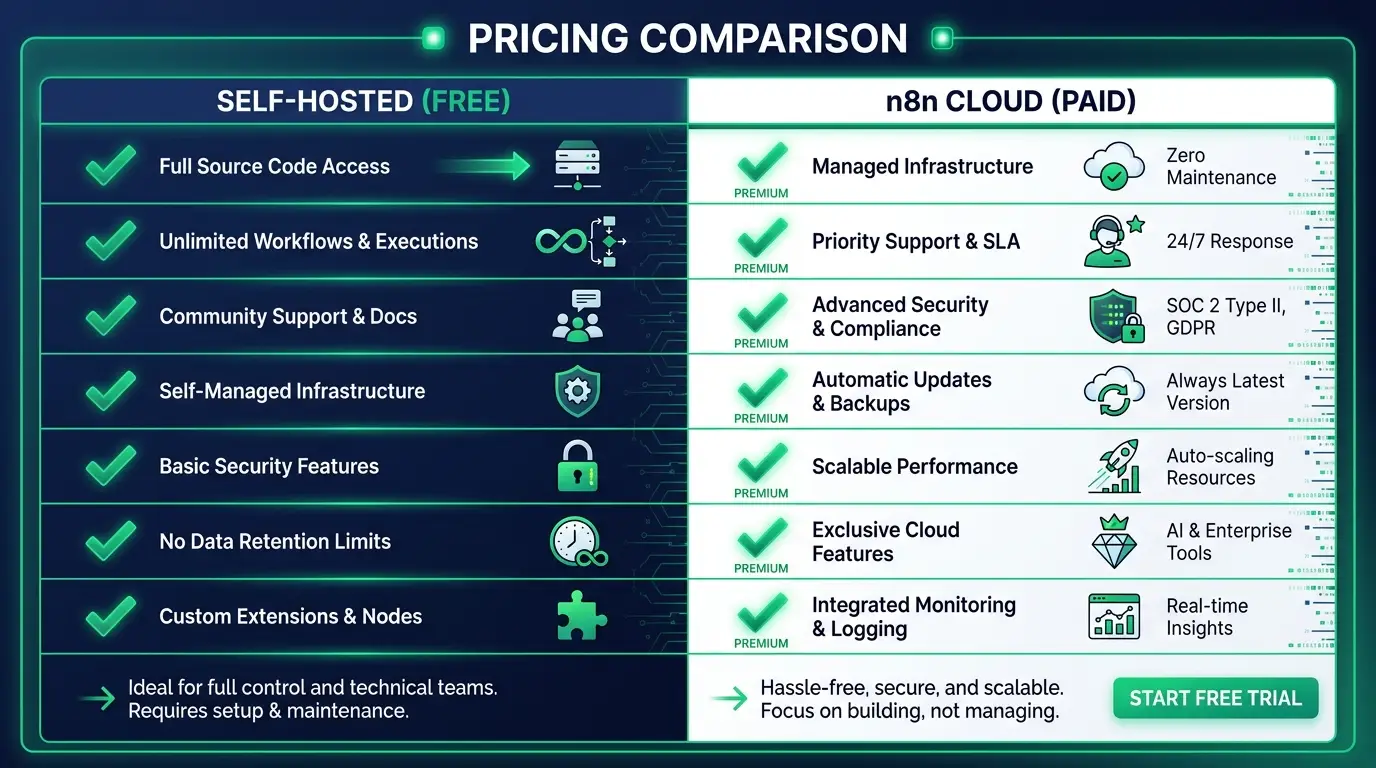
Self-hosting trades money for effort. Cloud trades effort for money. Most of the decision comes down to which trade fits your life right now.
n8n pricing plans at a glance
n8n bills in euros. If you're in the US you pay the dollar equivalent at the day's exchange rate, so your card statement will wobble a little month to month. Annual billing saves 17%.
| Plan | Monthly billing | Billed yearly | Executions / month | Where it runs |
|---|---|---|---|---|
| Community | Free | Free | Unlimited | Your server |
| Starter | €24/mo | €20/mo (€240/yr) | 2,500 | n8n Cloud |
| Pro | €60/mo | €50/mo (€600/yr) | 10,000 | n8n Cloud |
| Pro (larger tier) | €145/mo | €1,450/yr | 50,000 | n8n Cloud |
| Business | €800/mo | €667/mo | 40,000 | Your server |
| Enterprise | Custom | Custom | Custom | Cloud or your server |
A few details from the plan cards that matter more than they look:
- Starter gets 5 concurrent executions, 1 shared project, and forum support. Fine for a handful of workflows. Tight if several fire at the same second.
- Pro jumps to 20 concurrent executions (50 on the 50k tier), 3 shared projects, 7 days of insights, admin roles, global variables, workflow history, and execution search. Execution search alone saves you hours when a client asks "why didn't my lead come through Tuesday?"
- Business is aimed at companies under 100 employees. It adds SSO, SAML and LDAP, separate dev and prod environments, Git version control, and 30 days of insights. You host it, n8n gives you a license key.
- Enterprise adds 200+ concurrent executions, 365 days of insights, log streaming, external secret stores, and dedicated support with an SLA.
Two perks almost nobody mentions. If your company has fewer than 20 employees, n8n's Start-up Plan takes 50% off Business. And every Cloud plan ships with monthly AI Assistant credits (2,300 on Starter, 5,700 or 13,700 on Pro) for help building workflows, though they don't roll over.
What counts as an execution
An execution is one complete run of a workflow, start to finish, no matter how many nodes it has or how much data it moves. A two-node workflow and a forty-node workflow each cost one execution per run. That's the unit every n8n Cloud and Business plan meters.
Sit with that for a second, because it's the single most important thing in this article.
On Zapier, every action step counts as a task. A Zap that grabs a form entry, checks a condition, updates a spreadsheet, and sends a Slack message can burn three or four tasks in one run. Fire it a thousand times and you've spent three or four thousand. Make does something similar with its per-module credits.
On n8n, that whole workflow is one execution. For simple two-step automations the difference barely shows. For the meaty multi-step workflows real businesses build, it's the difference between a bill that scales gently and one that mugs you. My student's Zapier invoice wasn't high because he had a lot of clients. It was high because each client's automation had a lot of steps.
Where executions still sneak up on you is frequency. A workflow on a one-minute schedule runs about 43,000 times a month. That's more than the Pro 10k allowance by itself, even if it does nothing useful on most runs. Swap schedule triggers for webhooks wherever the source app supports them, and your execution count drops to the number of times something actually happened.
If you do blow past your limit on Business, n8n keeps your workflows running and charges overage later (€4,000 per extra bucket of 300,000 executions, per their pricing FAQ). On Cloud, the fix is moving up a tier.

Is n8n free?
Yes, if you self-host. The Community edition is free forever, with unlimited workflows and executions, and you pay n8n nothing. n8n Cloud has no free plan. It has a 14-day free trial with Pro features, 1,000 executions, and no credit card, then you pick a paid plan or your workspace gets deleted.
The self-hosted version is the same editor, the same integrations, the same Code node. If you've ever installed WordPress on a server, it's the same mental model. The app costs nothing. You just need somewhere to put it.
What you get for free:
- The full visual workflow builder and every integration
- Unlimited workflows and unlimited executions
- Your data sitting on your own infrastructure, which matters a lot if you handle client data or anything regulated
There's also a middle step. Register your email inside a self-hosted instance (Settings, then Usage and plan, then Unlock) and n8n calls it Registered Community: still free, plus folders, debug in editor, and custom execution data.
What stays behind a paid license, even when you host it yourself: SSO, environments, projects, workflow and credential sharing, Git version control, external secrets, and log streaming. Those are team and governance features. A solo builder or a small agency can run for years without touching any of them.
One warning on the trial. When it expires, n8n deletes the workspace. You get 90 days to download your workflows, so export anything you built before you walk away.
Is n8n open source?
Not by the official definition. n8n is "fair-code": the source is public on GitHub and free to self-host, but it's licensed under n8n's own Sustainable Use License, which restricts commercial use. n8n itself doesn't call the product open source for that reason.
People call n8n open source constantly, including plenty of tutorials that rank for it. I get why. You can read every line of the code, fork it, and run it for free. For most people that feels open.
But the Open Source Initiative's definition doesn't allow limits on how you use software, and the Sustainable Use License has three:
- You can use or modify it only for your own internal business purposes, or for non-commercial or personal use.
- You can distribute it only free of charge and for non-commercial purposes.
- You can't strip out n8n's licensing, copyright, or other notices.
On top of that, any source file with .ee. in its name falls under a separate n8n Enterprise License and needs a paid key. n8n actually started out under Apache 2.0 with the Commons Clause and switched to the Sustainable Use License in March 2022.
Here's why this matters for your wallet, especially if you want to freelance. According to n8n's license FAQ, you can:
- Use n8n to run your own business
- Build workflows for clients on your instance, as long as the clients can't create or edit them
- Charge clients for building, setting up, and maintaining workflows, plus training and consulting
- Use n8n behind the scenes in your own product, where users trigger automations you built
You can't:
- Host n8n as a service and let clients build their own workflows
- Let your product's end users build or configure workflows, whether through your own UI, the API, MCP, or an AI agent acting for them
- White-label n8n or fork it into your own automation product
So the automation agency model (you build, clients get the results) is explicitly fine on the free edition. Reselling n8n access is not. If your idea lives in the gray zone, email license@n8n.io before you build it, not after.
The true cost of self-hosting
I promised honesty, so here it is. Free is not the same as free.
When you self-host n8n, you're not paying n8n. You're paying in other ways, and pretending otherwise is how people end up frustrated.
A server. n8n has to run somewhere. A small cloud box from a provider like DigitalOcean or Hetzner runs a few dollars a month, and a Raspberry Pi in your closet costs you electricity. Not scary money, but not zero. If you'd rather not manage the box yourself, there's a whole cottage industry of managed n8n hosts that sit between DIY and n8n Cloud on price.
Your time to set it up. You need to get it installed, usually with Docker, point a domain at it, and set up HTTPS so it's not sitting naked on the internet. If you've done this before, it's an hour. If you never have, budget an afternoon and some Googling. I wrote up the whole process in how to self-host n8n so you're not piecing it together from forum threads.
Ongoing maintenance. Updates, backups, the occasional night where something breaks and it's on you to fix it, not a support team. Not a heavy load once it's stable, but it never quite drops to zero.
AI model fees. This one catches everybody. If your workflow calls OpenAI or Claude, you pay that provider for every call, on Cloud or self-hosted. n8n's AI credits cover the assistant that helps you build workflows, not the AI nodes inside them. (n8n Cloud does sell top-up Gateway credits if you'd rather not manage your own provider accounts.) For AI-heavy workflows, the model bill can easily outgrow the n8n bill.
So self-hosted n8n is better described as unmetered than as free. You stop paying per execution and start paying with a little ownership. For some people that's the best deal in automation. For others it's a headache they'd gladly pay to skip, and there's no shame in that.
Which n8n plan should you pick?
Let me make this concrete, because "it depends" is a useless answer.
Just learning? Take the 14-day Cloud trial, build three real workflows, and see how many executions they actually burn. You'll know more after two weeks than after two hours of reading pricing pages.
Solo, a few workflows, don't want to touch a server: Starter at €20-24/month. Watch that 2,500 cap and the 5 concurrent executions.
Freelancer or small team running client work in production: Pro. Execution search and workflow history pay for themselves the first time something breaks at a client. Or self-host, if you're comfortable in a terminal, since unlimited executions on a cheap server beats any Cloud tier once volume climbs.
High volume, or data that can't leave your infrastructure: self-host the Community edition. If you're an aspiring automation freelancer, learning to self-host is a skill worth having anyway. Clients pay for people who can run the whole thing.
A company that needs SSO, environments, and Git: Business (half price if you're under 20 people) or Enterprise.
Plenty of people start on Cloud to learn, then move to self-hosted once volume makes the math obvious. That's a normal path. You don't have to marry your first choice.
n8n vs Zapier and Make on price
Zapier and Make both meter the small units of work. Zapier counts tasks, Make counts credits (it called them operations until 2025), and either way a busy multi-step workflow eats your allowance fast. The pricing is friendly at low volume and gets aggressive right when your automations start doing serious work. That's by design.
n8n comes at it from the other side. Self-hosted, you're not metered at all. On Cloud, you're metered by whole-workflow executions, a far gentler unit than per-step. The more complex and high-volume your automations, the more that compounds in your favor.
Where n8n loses, and I won't hide it: Zapier is easier on day one, and so is Make, honestly. More polished onboarding, more hand-holding, and Make has a free plan that doesn't expire, which n8n Cloud doesn't. And n8n's entry price is higher. Starter at €24 costs more than Make's cheapest paid plan. n8n asks more of you up front and pays it back in cost and flexibility later.
If you want the full head-to-head, I broke it down in n8n vs Zapier. For the Make side, see what Make.com is and how Make.com pricing works, and there's a wider view in Zapier alternatives if you're shopping the whole field.

FAQ
Is n8n free? Yes, if you self-host the Community edition. You run it on your own server and pay n8n nothing, however many workflows or executions you run. The costs are the server and your time. n8n Cloud, the hosted version, is paid, with a 14-day free trial.
How much does n8n cost per month? n8n Cloud Starter is €24/month billed monthly or €20/month billed yearly, for 2,500 executions. Pro is €60/month (€50 yearly) for 10,000 executions, with a 50,000-execution tier at €145/month. Self-hosted Business starts at €800/month (€667 yearly). US customers pay the dollar equivalent.
Does n8n have a free plan? Not on Cloud. n8n Cloud offers a 14-day trial with 1,000 executions and no credit card required, then you need a paid plan. The only free-forever option is the self-hosted Community edition, which has no execution limits.
Is n8n open source? Not officially. n8n is source-available and "fair-code" under its Sustainable Use License, which limits use to internal business, personal, or non-commercial purposes. Because of those limits, n8n doesn't call itself open source under the OSI definition. For most users and agencies, the practical freedoms are close.
Can I use free self-hosted n8n for client work? Yes, with a line you shouldn't cross. You can build and run workflows for clients on your own instance and charge for that work. You can't give clients access to build or edit workflows themselves, or resell n8n as a hosted service. That needs a commercial agreement.
How much does n8n AI cost? n8n doesn't charge separately for AI nodes. They count as normal executions. You pay your AI provider (OpenAI, Anthropic, and so on) for the model calls. Cloud plans include AI Assistant credits for help building workflows, but those don't cover the models your workflows call.
What happens if I go over my execution limit? On Cloud, you upgrade to a bigger tier. On Business and Enterprise, n8n keeps your workflows running and bills overage later, which for Business is €4,000 per extra 300,000 executions. The sales team reaches out before that point.
Is n8n cheaper than Zapier? For most real workflows, yes, and the gap grows with complexity. Zapier charges per task, so every step counts. n8n charges per full-workflow execution, and self-hosted n8n removes that cost entirely. For one or two simple zaps, Zapier's free and low tiers can come out cheaper.
Is there a free alternative to n8n? Self-hosted n8n itself is the free option most people want. If you need something that's free with zero setup, Make and Zapier both have free plans with small monthly limits. My Zapier alternatives roundup compares the field.
Do I need to know how to code to use n8n? No to start. You can build a lot with the visual nodes alone. It leans more technical than Zapier, and you can drop into JavaScript or Python when a workflow demands it. Our n8n tutorial walks you through your first real workflow, and what is n8n covers the basics if you're brand new.
If your automations are still small, don't overthink this. Start the free trial or spin up a cheap self-hosted box and build something real, maybe one of these n8n workflow templates and examples. The pricing question mostly answers itself once you can see how often your workflows actually run.
The bigger win is learning to build the automations at all, because that's the skill people pay for. If you want to get properly good at it, from the fundamentals to selling it as a service, that's what we teach inside CodingPhase. Come browse the courses and look at the best AI automation tools worth learning first. You've got this, and we're here to help you turn it into something real.