Web Content Specialist: What the Job Is, What It Pays, How to Get Hired

On this page
We pulled the Google results for "web content specialist" while planning this post, and I laughed a little when I saw them.
Almost the whole first page was job boards. LinkedIn, Indeed, Robert Half, ZipRecruiter, one listings page after another. Exactly one result tried to explain the job.
That tells you two things. Companies are hiring for this title right now. And almost nobody is telling you what the work is before you apply.
So that's what this is. What a web content specialist does on a normal week, what the role pays, how it differs from the titles next to it, and how I'd get hired into it with no degree and no "web" job on your résumé yet.
What a website content specialist actually does
A web content specialist publishes and maintains the pages on a company's website inside a content management system (CMS). They keep that content accurate and ready for search, and they ship the updates other teams ask for, usually without waiting on a developer.
That's the short version. The longer one: you own the site day to day.
Marketing wants a new landing page for Thursday's campaign. You build it from the page templates. Legal says the privacy policy changed. You update it and check that every page linking to the old version still works. Someone in sales notices the pricing page shows last year's numbers. You fix it before lunch.
You're also the person who notices problems nobody asked you about. A broken image on the careers page. A blog post with no meta description. A form that stopped sending leads to the CRM two weeks ago. Catching that last one saves a company real money, even if nobody throws you a party for it.
It's a revenue job wearing a content job's name. For a lot of businesses the website is where the sale happens, so somebody has to keep it working.

A normal week in the job
Most of a web content specialist's week is a queue of requests: new pages, copy edits, image swaps, SEO fixes. Whatever time is left goes to small improvement projects you pick yourself once the queue is under control.
Picture a mid-sized company running WordPress or something like it.
Monday: you triage the request board. Twelve tickets came in over the weekend. Three are urgent, five can wait, and four are really the same request written by different people.
Tuesday: you build two landing pages for a product launch, write the meta titles and descriptions, compress the hero images, add alt text, and send preview links to the product manager.
Wednesday: someone changed a URL and didn't set up a redirect. You find out from a 404 report, add the redirect, and update the internal links pointing at the old address.
Thursday: content audit hour. You pull last month's analytics, find the ten pages losing traffic, and write up what you'd change on each.
Friday: you update the style guide because three different people spelled the product name three different ways this month, and you'd like that to stop.
Launch weeks are busier than that. Quiet weeks are quieter. Either way you usually see your work go live the same afternoon, which I think is one of the most satisfying parts of the job.
Web content specialist vs web content manager vs web content administrator
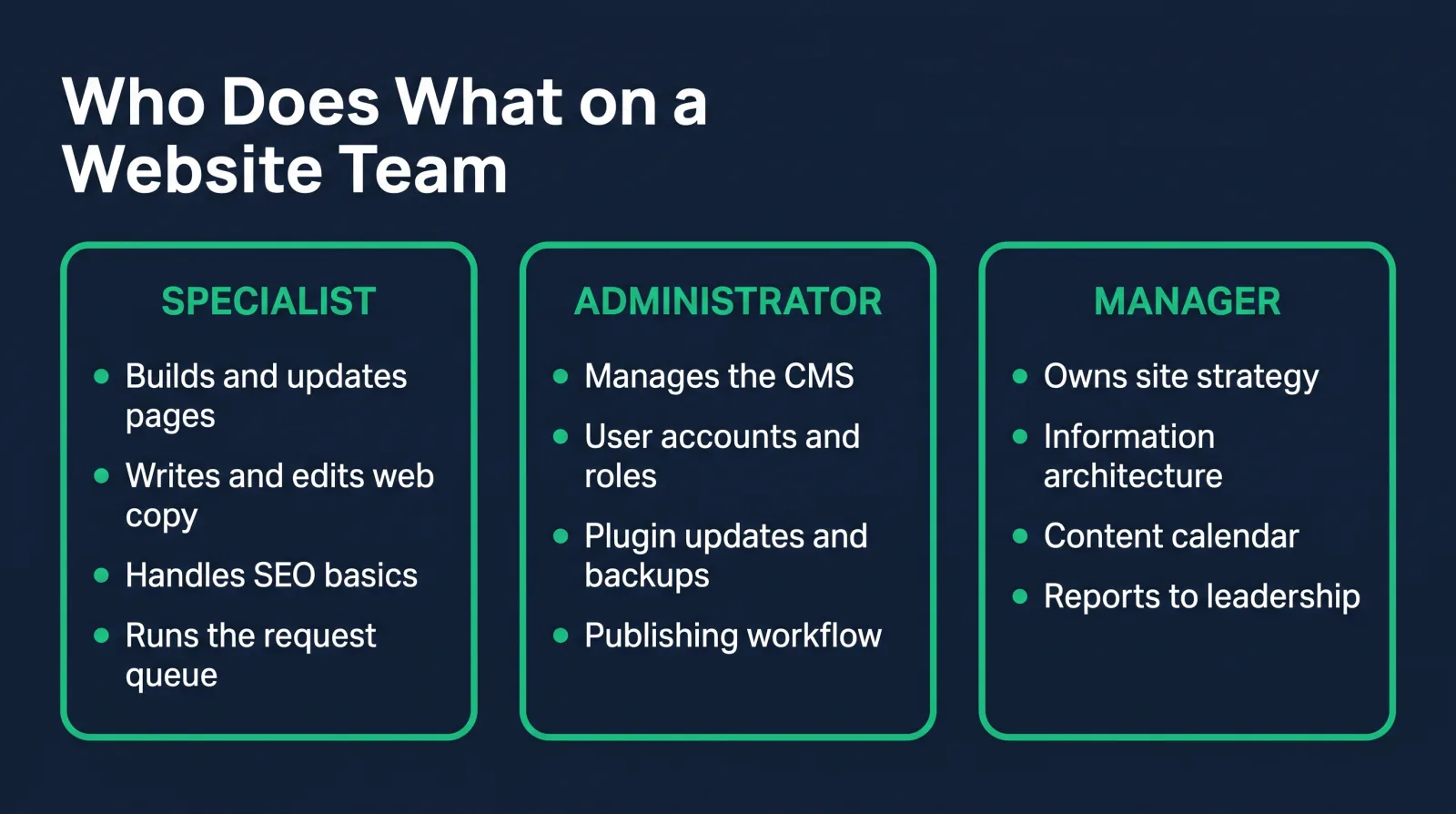
These titles overlap a lot. The difference is ownership: a specialist executes and maintains content, an administrator leans toward the CMS itself (users, permissions, plugins), and a manager owns the site's strategy and standards.
In practice, companies use the titles loosely. I've seen "web content administrator" postings that are really specialist jobs, and "web content manager" postings for a team of one. Read the duties, not the title.
A rough way to sort them:
- Web content specialist: builds and updates pages, writes and edits web copy, handles SEO basics, runs the request queue.
- Web content administrator: manages the CMS platform. User accounts, roles, plugin updates, backups, the workflow that decides who can publish what.
- Web content manager: decides what the site should be. Sets the information architecture, owns the content calendar, reports results to leadership, and often manages the specialists.
The specialist role is the usual way in, and the ladder runs straight up. A lot of people start as a content editor first, which is the same work with more of the focus on the words. If you want the full family of related titles, the web content manager job titles guide lists 26 of them and what each one really means.
The skills and tools on job postings
Web content specialist postings ask for a pretty consistent stack: one CMS (usually WordPress), basic HTML and CSS, SEO fundamentals, analytics and clear writing. Anything past that changes by industry.
A CMS. WordPress shows up the most. Drupal is common in government and higher education. HubSpot CMS, Contentful, Sitecore and Adobe Experience Manager show up at larger companies. Once you know one CMS well, the second one takes far less effort, because the concepts carry over: pages, templates, blocks, media library, users and roles.
HTML and CSS. Not to build sites from scratch. To open the code view, fix a heading structure, clean up pasted Word formatting, and adjust a layout without filing a developer ticket. This is the skill that separates specialists who get stuck from specialists who get promoted.
SEO basics. Title tags, meta descriptions, heading order, internal links, alt text, redirects, page speed. You don't need to be an SEO strategist. You need to not break the things an SEO strategist set up.
Analytics. Reading Google Analytics well enough to say which pages are working and which ones aren't.
Writing and editing. Web copy is short, scannable and specific. A lot of the job is turning a three-paragraph email from a subject-matter expert into a clean page section.
Accessibility. Heading structure, alt text, link text, color contrast. I'm seeing it on more postings lately, and in government and healthcare it's often a legal requirement.
Image tools (Canva, Photoshop) and a project tracker (Asana, Jira, Trello) round it out.
What web content specialists earn
Payscale's 2026 data puts the average web content specialist salary at $59,711 a year in the US. Add code and SEO skills, or move up to manager, and the number climbs: Payscale's 2026 average for a web content manager is $72,282.
The spread inside the title comes mostly from skills and scope. A specialist who can only edit text in a CMS sits near the bottom. One who can edit templates, fix layouts, handle SEO and report on analytics sits much higher, because they're doing what used to take two hires.
The title also matters. The same work posted as "web content manager" averages $72,282 in Payscale's 2026 data, and our own web content manager salary guide breaks down every title in this job family.
Our Web Content Manager career path is built to get students to roles paying $75k+, individual results vary. The specialist title is often the first rung on that ladder, not the last one.
Location shifts it too, though less than it used to. The work happens entirely in a browser, so a lot of these roles are remote or hybrid, and remote postings often keep a national pay band.
Who hires web content specialists
Any organization whose website needs daily updates hires for this role. Think universities, hospitals, government agencies, banks, software companies, ecommerce brands, and the agencies that serve them.
Hospitals and health systems hire specialists because their sites are huge and regulated. Universities run hundreds of department pages that all need someone. Banks and insurance companies need every rate and disclosure exactly right. Software companies ship product pages constantly.
Agencies hire specialists too, and an agency job is a fast way to learn several CMS platforms at once, because every client runs something different.
My favorite thing about this role is that fewer people chase it than chase developer jobs, mostly because they've never heard of it. That works in your favor.
How to get hired with no degree
Most web content specialist postings care more about proof than credentials. Show a site you built and maintain, talk through how you'd handle a real request, and a degree line in the posting often stops mattering.
Some postings list a bachelor's degree. Apply anyway when you match the duties. Many say "or equivalent experience" in the next line, and a working site counts as experience.
The route I'd take:
- Pick one CMS and go deep. WordPress first. Install it on real hosting instead of a tutorial sandbox, and build a site with actual pages and navigation.
- Learn enough HTML and CSS to stop being stuck: headings, links, images, tables, the box model, a little flexbox. Then use it on that site.
- Learn the SEO and analytics basics. Write meta titles, fix your heading order, connect Google Analytics and get comfortable reading the reports.
- Get one real site under your belt. A local business, a church, a friend's shop. Maintaining a site for a real organization moves you from "no experience" to "experience" on a résumé.
- Write your résumé around that site instead of your old job title. The web content manager résumé guide shows the structure, and if you want the whole move laid out step by step, read how to become a web content manager.
This is exactly the route our Web Content Manager career path walks you through, in order, with the courses for each step. If you want the WordPress credential question answered first, I wrote a separate post on whether a WordPress certification is worth it.
The portfolio that proves you can run a site
A web content specialist portfolio should show a site you run, a before-and-after content fix and a short audit of someone else's site, because that's the actual work.
Forget the generic "portfolio website with three projects" advice. Hiring managers for this role want to see you do the job.
- A live site you built and maintain. Link it. Show the CMS backend in a screenshot or two: your page structure, your media library, your user roles.
- A before-and-after. Take a messy page (your own old draft works) and show the cleaned-up version: tighter copy, proper headings, alt text, a meta description, a faster image. Write two sentences on why each change matters.
- A mini audit. Pick a real local business site. List the ten things you'd fix, ranked by impact. Broken links, missing titles, slow images, confusing navigation. This shows you can find problems, not just fix assigned ones.
Every CodingPhase career path comes with portfolio templates, so you're not designing this from a blank page.

Where the role leads next
Most people go up to web content manager, sideways into SEO, or toward the technical side as a CMS developer. Which one depends on what part of the job you liked.
If you loved owning the site and making decisions, the manager track is the obvious move. If the SEO work was your favorite part, SEO specialist and content strategist roles are a short step over. If you kept opening the code view because it was fun, that's a sign to push into templates, themes and CMS development.
All three usually pay more than where you started. And whichever you choose, you'll carry over the thing this job teaches best, which is how a website really runs inside a business.
FAQ
What does a web content specialist do day to day? They work through a queue of website requests: building and updating pages in the CMS, editing copy, adding images and alt text, fixing SEO issues and broken links, and checking analytics to see what's working.
Is web content specialist an entry-level job? Often, yes. It's one of the most common entry points into web content work. Some postings want a year or two of experience, but a live site you maintain usually counts toward that.
Do you need a degree to be a web content specialist? Not always. Some employers list a bachelor's degree, but many accept equivalent experience. A portfolio with a real site, a before-and-after and an audit often carries more weight than a diploma.
What CMS should a web content specialist learn? WordPress first, because it appears in the most postings. Then learn whatever your target industry uses: Drupal for government and higher ed, HubSpot or Contentful at SaaS companies, Sitecore or Adobe Experience Manager at large enterprises.
What's the difference between a web content specialist and a content writer? A content writer creates the words. A web content specialist publishes and maintains them on the website: building the pages, handling SEO and accessibility, fixing what breaks. Many specialists write too, but the CMS work is the core of the job.
If you read the Tuesday and Wednesday parts of that week and thought "I'd be good at that," trust the feeling. This job suits people who notice the broken link everybody else scrolls past.
You don't have to figure out the route alone. Diamond Membership gives you the full Web Content Manager career path, 90+ beginner-friendly courses, portfolio templates, an ATS-ready résumé builder, a job board, and a community of 80,000+ people working toward the same thing. You also get two live calls every week: Accountability on Wednesdays at 7 PM ET and Money Talk on Sundays at 8 PM ET.
It's listed at $60/month or $365/year, and there's always at least 30% off, so you'll pay about $42/month or $255/year, with a 7-day money-back guarantee. I've been teaching this stuff since 2016, and I'd love to help you get your first web content job.