How to Become a Web Content Manager in 90 Days

On this page
This is the job I'd point almost anyone at if they wanted out of retail or admin work and into something technical, and they wanted it this year rather than in three.
The reason is competition. Developer roles get 800 applicants. A web content specialist role at a regional hospital gets eleven, and four of them can't use a CMS.
Ninety days of focused work genuinely gets you into the running. Here's how I'd spend them.

Days 1 to 14: pick a CMS and live in it
WordPress first, because it powers a huge share of the web and shows up in more postings than everything else combined.
Install it somewhere real, not a tutorial sandbox. Get cheap hosting or use a free tier, and put up a site with at least fifteen pages of actual content. Build the navigation. Create categories. Add users with different permission levels and see what each one can do.
Then break things on purpose and fix them. Change the permalink structure and watch what happens to your links. Delete a page that's in the menu. Install a plugin that conflicts with your theme. Every one of those is a Tuesday afternoon in the real job.
By day 14 you should be able to sit down at an unfamiliar WordPress install and find your way around without clicking blindly. If you're weighing which platform to commit to, the best CMS platforms to learn compares the realistic options.
Days 15 to 30: learn enough HTML and CSS to stop being stuck
This is the step people skip and the reason half the field is capped at $65k.
You don't need to become a developer. You need to be able to open the code view, understand what you're looking at, fix a broken heading structure, adjust spacing, and edit a template file without panicking.
Learn HTML properly: semantic elements, headings, links, images, alt attributes, tables, forms. Then CSS: selectors, the box model, flexbox, and media queries. Then apply it directly to the site you built in the first two weeks. Change the theme's CSS. Edit a template. Add a custom section.
Three things you should be able to do by day 30: fix a page whose layout has collapsed, add a styled call-to-action box without a plugin, and explain why an H1 matters.
Days 31 to 45: SEO, accessibility, and analytics
These three are what turn a person who updates pages into a person who improves a website, and that distinction is most of your future salary.
SEO. Title tags, meta descriptions, heading hierarchy, internal linking, redirects, and why URL structure matters. Set up Google Search Console on your site and read what it tells you. If this is the part that hooks you, it's the core of the SEO specialist job, a common next step from content management.
Accessibility. WCAG basics: alt text, color contrast, keyboard navigation, form labels, heading order. This is legally required at public institutions and increasingly expected everywhere. It's also rare among applicants, which makes it a genuine edge in the university, hospital, and government segments where a lot of these jobs live.
Analytics. Google Analytics 4 well enough to answer real questions: which pages get traffic, where people land, where they leave, what's slow. Not the certification, the practical use.
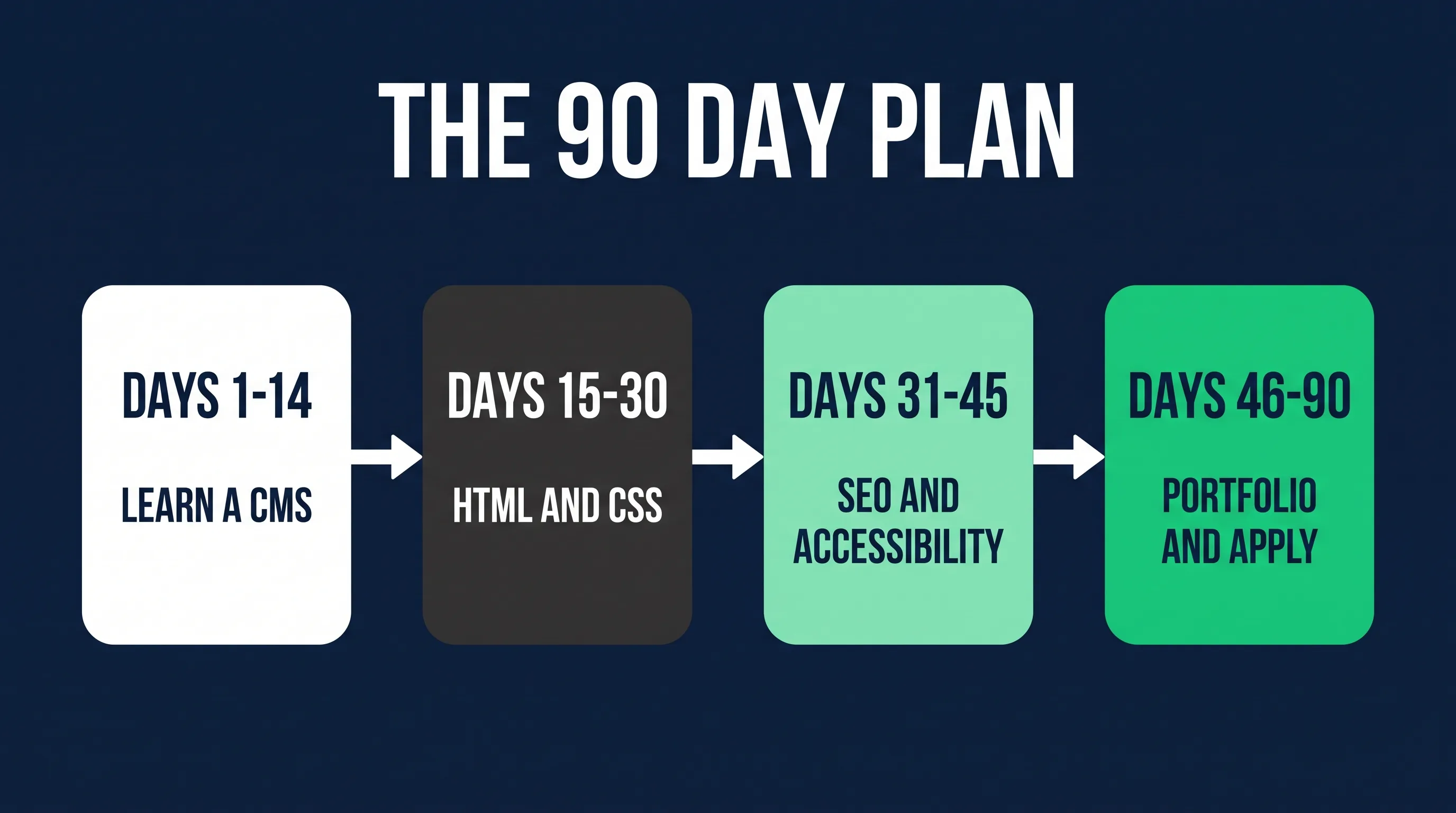
Days 46 to 75: build three portfolio pieces
Not screenshots. Three things a hiring manager can look at.
Project one: a real site you run. Extend the one you built. Real content, clean structure, fast, accessible, properly indexed. Write a short page explaining the choices you made.
Project two: an audit of somebody else's site. Pick a local business or a nonprofit and produce a genuine audit: broken links, missing meta descriptions, accessibility failures, page speed, heading structure, and what you'd fix in what order. Two or three pages, written plainly. This document does more work in interviews than anything else on the list, because it's exactly the deliverable the job asks for in week one.
Project three: a real site for a real person. A friend's business, a community group, a church, a club. Migrate them onto WordPress or clean up what they have. This gives you the sentence that beats every other applicant: "here's a site I run for an actual organization, and here's what changed after I took it over."
There's a longer list of ideas in web administrator portfolio examples, all of which apply to the manager titles too.
Days 76 to 90: search properly and apply
Set up ten to twelve job alerts, not one. Web content manager, website manager, web content specialist, website administrator, web administrator, digital content manager, digital producer, CMS specialist, web editor, website coordinator. They're all the same job with different labels, which is the whole argument of the 26 job titles guide.
Add the CMS names as search terms. "WordPress" plus "coordinator" surfaces roles no title search will find.
Target the right employers. Universities, hospitals, government agencies, nonprofits, and mid-sized B2B companies. That's where these roles concentrate and where competition is thinnest. Where the jobs hide breaks that down by sector, including how remote it really is.
Apply with the audit. Run your audit process on their site, find three real problems, and lead with those. Most applicants send a paragraph about being detail-oriented. You're sending evidence.

What you'll earn and how fast it moves
First roles usually land at $50k to $65k, often as a coordinator or specialist. Two or three years in, with code and SEO skills, you're at $70k to $85k. Manager and operations titles run to $95k and past $110k at large organizations.
The full picture by title is in the salary guide.
Whether that's worth it depends on where you're coming from. For someone leaving a $38k service job, it's life-changing and the ladder keeps going. For someone already earning $90k in another field, this is a sideways move you'd only make for the stability and the remote flexibility.
Where 90 days isn't enough
I'd rather be straight about this. Ninety days makes you employable for the coordinator and specialist titles at organizations that need hands more than credentials. It does not make you a digital experience manager at a Fortune 500.
Some people will need six months, especially if they're working full time and getting an hour a night. That's still fast.
And a small number of postings genuinely require a degree, mostly in government and higher education. Plenty of others in the same institutions don't, so don't let the first one you read set your expectations.
If you'd rather follow a built curriculum than assemble this yourself, our Web Content Manager path covers this exact sequence, code included, in order.
FAQ
How long does it take to become a web content manager? Three to six months of consistent work for a first role, depending on hours. The manager title itself usually comes one to three years after your first specialist or coordinator job.
Do I need a degree? Not in the private sector. Some public institutions list one, often with an experience substitution available. It's worth applying either way.
Do I need to know how to code? Not to get hired at entry level. HTML and CSS are what lift you past about $75k, so learn them early rather than later.
Which CMS should I learn first? WordPress, then look at what your target industry uses. Drupal is common in government and higher education, Sitecore and Adobe Experience Manager in large enterprises, and those enterprise platforms pay more.
What if I have no experience at all? That's what the third portfolio project is for. Running one real site for one real organization converts you from "no experience" to "experience" faster than any course.
Is this different from becoming a web administrator? Same job, different label. How to become a web administrator covers the same route under the older title, which still appears in plenty of postings.
What should my resume look like if I've never held the title? Lead with the site you run rather than your old job. The full structure, including what to cut, is in the web content manager resume guide.
What will the job description actually ask for? A predictable set of responsibilities, plus a few lines that mean more than they say. There's a full template with the subtext in the web content manager job description.
The reason I like this path is that nothing in it requires permission. You can install WordPress tonight, write your first audit next week, and have a real site for a real organization inside two months.
Ninety days from now you'll either have those three things or you won't, and that's genuinely the whole difference between the people who get these jobs and the people who keep reading about them.