How to Become a Web Administrator (The Career Nobody Talks About)

On this page
Everybody wants to be a developer. Nobody wants to be a web administrator. That's the whole opportunity, and I'm a little annoyed more people don't see it.
Walk into any coding community and you'll hear the same dream on repeat: build apps, grind LeetCode, land the six-figure software role. Beautiful goal. Also the most crowded lane in tech, where ten thousand bootcamp grads are elbowing each other for the same junior opening.
Meanwhile there's a job sitting right next to that one, quieter and far less crowded, where companies are practically begging for help. Someone who can just run the website. The CMS. The new landing page marketing needed by Friday. The promo that has to go live at 9am sharp. That person has a name, a salary, and a much shorter on-ramp than the one you've been killing yourself on.
It's called web administration, and almost nobody is fighting you for it.
I think that's a mistake on their part and an open door for you. So let me show you the whole thing.

What a web administrator actually does all day
Forget the job title for a second. The real job is this: a company has a website, and that website has to stay accurate, current, and on-brand every single day. You're the person who runs it through the CMS.
On a normal day you might:
- Publish and update pages and posts. New blog post from marketing? A pricing change? An updated bio for the leadership page? You get it live, formatted right, looking right.
- Build landing pages. Marketing needs a page for the spring campaign by Friday. You build it with the theme or page builder, drop in the copy and images, and ship it.
- Update products and promos. New products, price changes, seasonal banners, discount codes. On e-commerce sites this alone can fill a day.
- QA before and after publish. Click every link, check every form, view it on mobile, then check it again once it's live. You're the last set of eyes before the public sees it.
- Hunt down broken links. Old pages get deleted, URLs change, and somebody has to catch the 404s before Google and customers do.
- Check analytics and basic SEO fields. Which pages are getting traffic? Does the new page have a title tag and meta description? Nothing fancy, just the fundamentals kept clean.
- Coordinate with marketing and design. Half the job is translating "can we make it pop?" into an actual change on an actual page, on deadline.
This same job wears a lot of name tags: webmaster, web producer, web content manager, website manager, e-commerce specialist. Different titles, same core work.
And here's what the job is not: server security, uptime monitoring, and 2am incident response. That's hosting support and IT, not you. You should understand hosting well enough to talk to those people without sweating, but keeping the server alive is their pager, not yours.
It's part content, part light code, part coordination. You're closer to the editor-in-chief of the website than a software architect, and honestly that's the appeal. You ship real things that real people see the same day.
The skills to learn, in the order that actually works
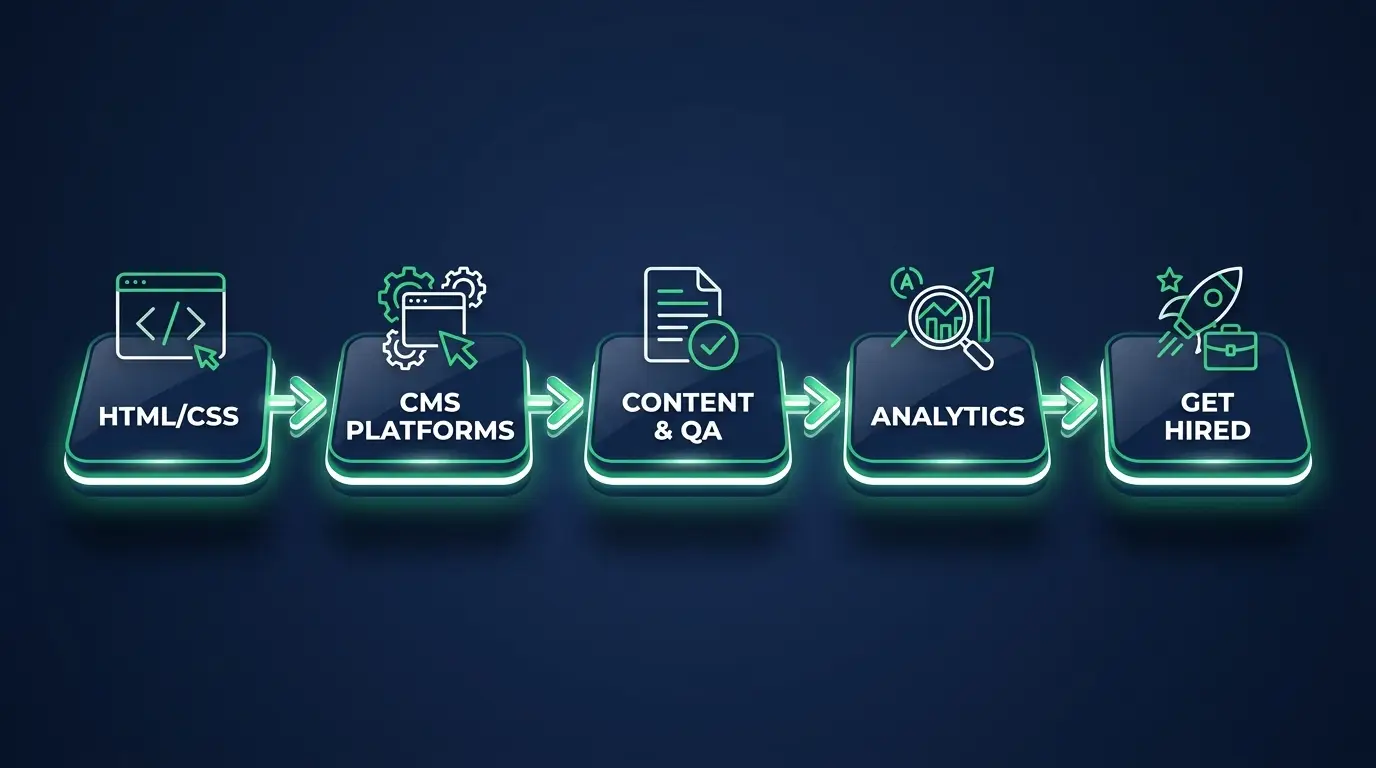
Most people learn this stuff in a random order and feel lost for months. Don't. Stack it like this.
1. HTML and CSS basics. Not to build apps. To read a page, fix a broken layout, and nudge a heading or a button when the page builder won't cooperate. A week or two, genuinely.
2. CMS platforms, WordPress first. This is the center of gravity. Roughly 4 out of 10 websites on the internet run WordPress, which means most web admin jobs are WordPress jobs in disguise. Learn the dashboard, the editor, the theme and page builder, plugins, users, menus, and media. If you only master one platform, master this one. (If you want the wider map, here's my take on the best CMS platforms to learn.)
3. Content and QA workflows. How a page goes from a Google Doc to live: drafts, staging, approvals, publish checklists, before-and-after QA, and catching broken links and typos before customers do. This is the skill that makes teams trust you with their site.
4. Analytics and SEO basics. Google Analytics and Search Console, plus the on-page fundamentals: title tags, meta descriptions, alt text, clean URLs. Enough to answer the question every boss eventually asks: "is the site actually working for us?"
5. Enough hosting and cPanel to be dangerous. Awareness level, not mastery. Know what cPanel looks like, what DNS records do, and how to talk to the hosting company without freezing up. You're not running servers. You just need to not be scared of the words "name servers."
Notice the shape. The code stays light and the server stuff sits at the end, as awareness rather than a job duty. That's the whole pitch of this role.
How long this really takes
Here's the honest answer people don't like to give you: with consistent, focused effort, you can be job-ready in roughly one to three months.
The variable isn't talent. It's hours per day.
Treat it like a part-time hobby, an hour here and there, and you're looking at the back end of that range. Treat it like a full-time push, three or four focused hours a day building real things, and you can compress it hard. The work is concrete and the feedback loop is fast, which is exactly why it moves quicker than chasing a full-stack developer title.
The trick is to stop watching and start doing the actual job. Spin up a cheap $5/month host, install WordPress, and run it like a real site: publish posts, build landing pages, rearrange menus, swap themes, break a layout and fix it. The goal is that nothing inside the CMS scares you anymore.
How to actually get hired
You don't get this job by listing skills. You get it by proving you've actually run a site.
- Build a portfolio of real sites. Two or three live WordPress sites you set up, filled with real content, and keep current. Document what you did. (I broke down what a strong web admin portfolio looks like if you want examples.)
- Manage a real client. A local business, a nonprofit, a friend's shop. Even free at first. "I manage three live sites" beats any certificate.
- Speak content ops, not just code. In interviews, talk about pages you shipped, a landing page you built on deadline, a QA checklist you follow, broken links you cleaned up. That's the language of the role.
- Apply wide. The title varies: web administrator, webmaster, web producer, web content manager, website manager, e-commerce specialist. Search all of them.
If you're not fully sure this is the lane for you yet, I'd read whether web administration is a good career before you commit. It's an honest gut-check, not a sales pitch.
What you'll get paid
In the US, the numbers land roughly here:
- Entry level: about $45k to $60k
- Mid level: about $60k to $78k
- Senior or lead: $80k to $100k and up
A typical working range for most web admins sits around $60k to $85k. Not founder money. But a very comfortable salary for a role you can break into in months, not years, and one where you're not competing against the entire bootcamp graduating class.
I keep a fuller, level-by-level breakdown in the web administrator salary guide if you want the granular version with how to push toward the top of the band.
Where the jobs are
Everywhere there's a website, which is everywhere. But the concentration is real:
- Agencies managing dozens of client sites at once. Great for fast reps.
- Mid-size companies with one or two important sites and no dedicated dev team.
- Universities, hospitals, and government running big, sprawling CMS setups with hundreds of pages that need steady hands.
- E-commerce brands where products, prices, and promos change constantly, so somebody has to keep the storefront current.
And a lot of it is location-flexible, because the work is mostly remote-friendly by nature. I rounded up where to find remote web administrator jobs separately.
The honest tradeoffs
I'm not going to sell you a fantasy.
Some of the work is repetitive. Updating fifty product pages or fixing the same kind of broken link for the tenth time is not thrilling. If you need constant novelty, the content side of this job will test you.
The title carries less prestige than "engineer." Some developers look down on the role because the coding is light. Their loss, honestly, but if your ego needs the engineer badge, know that going in.
The ceiling is lower than dev roles. You can grow into content strategy, SEO, e-commerce management, or lean harder into code and become a developer, and the pay climbs nicely. But if you want a $200k IC engineering ladder, this role alone won't get you there.
Here's the reframe I want you to keep: web administration rewards reliability, not brilliance, and reliability is a skill you can build on purpose. That's good news if you've ever felt like you weren't "smart enough" for tech. You don't need to be a genius. You need to be the person the site can't run without.
FAQ
Do I need a degree to become a web administrator? No. Most employers care far more about live sites you've run and your comfort inside WordPress than about a diploma. A strong portfolio outweighs a degree here.
Is web administration the same as web development? No. Developers build features and write a lot of code. Web admins run existing sites through the CMS: publishing content, building landing pages, keeping everything accurate and on-brand, with much lighter coding. There's overlap, but the day-to-day is different.
How much coding do I really need? Less than you fear. HTML and CSS to read a page and fix a layout when the page builder won't cooperate. The rest of the job is CMS fluency, QA habits, and coordination. If "I have to be a coding genius" is your blocker, this is one of the better tech jobs without heavy coding.
Can I become a web administrator with no experience? Yes. Build two or three live sites, manage one real (even free) client, and document what you did. That's enough to land an entry-level or junior role for most people. It's also the most beginner-friendly of the career paths I teach.
What's the fastest way to get job-ready? Pick WordPress, get a cheap host, and run a real site end to end: publish posts, build landing pages, update products, QA everything, and keep it fresh for a month. Reps beat tutorials.
Do I need certifications for this? Rarely, and only a few are worth the time. Which ones actually matter is covered in web administrator certifications.
If this is clicking for you, that's not an accident. This is the path I point students to when they're tired of grinding for a job that feels ten years away. It's reachable, it pays well, and it's wide open.
Start with the web content manager career path to see the full roadmap, then pick one site and start running it for real. I'll be here when you get stuck.