WordPress Certification: What Exists, What Employers Check, What to Do Instead
On this page
A lot of people who message me about web content jobs ask some version of the same question.
"Which WordPress certification should I get before I apply?"
It's a fair question. You're switching careers, you don't have the job title on your résumé yet, and a certificate feels like the thing that would make a recruiter take you seriously. I get it.
The answer surprises most people. After that comes the useful part: which WordPress certification programs exist, what employers check when a posting says "WordPress," and where I'd put your hours instead.
Is there an official WordPress certificate?
No. As of November 2026, WordPress.org doesn't run an official WordPress certification exam. Its Learn WordPress site has free courses, lessons and online workshops, and any "WordPress certification" you see for sale comes from somebody else.
WordPress is open source. There's no single company behind it selling exam vouchers the way Salesforce or Cisco do, so there's never been one official credential that says "this person knows WordPress."
That might be changing a little. The WordPress Training Team has been working on certificates for its live cohort courses, where students attend classes, complete assessments and pass an exam. A few cohorts are set up to end with one (the German-language "Getting Started with WordPress" cohort that kicked off in July 2026 is an example). That's still a certificate for a specific class you attended, and there's no standard exam you can go book. (If you're weighing other credentials for this kind of work, I ranked them in web administrator certifications.)
So when a job posting says "WordPress experience required," the employer wants to know whether you can run the thing. They know there's no official WordPress certification to ask for.
The third-party WordPress certifications people mean
When people say "WordPress certification," they usually mean a certificate of completion from a course. That course might live on a big marketplace, at a plugin maker's academy, or inside a career program that teaches WordPress as part of a job.
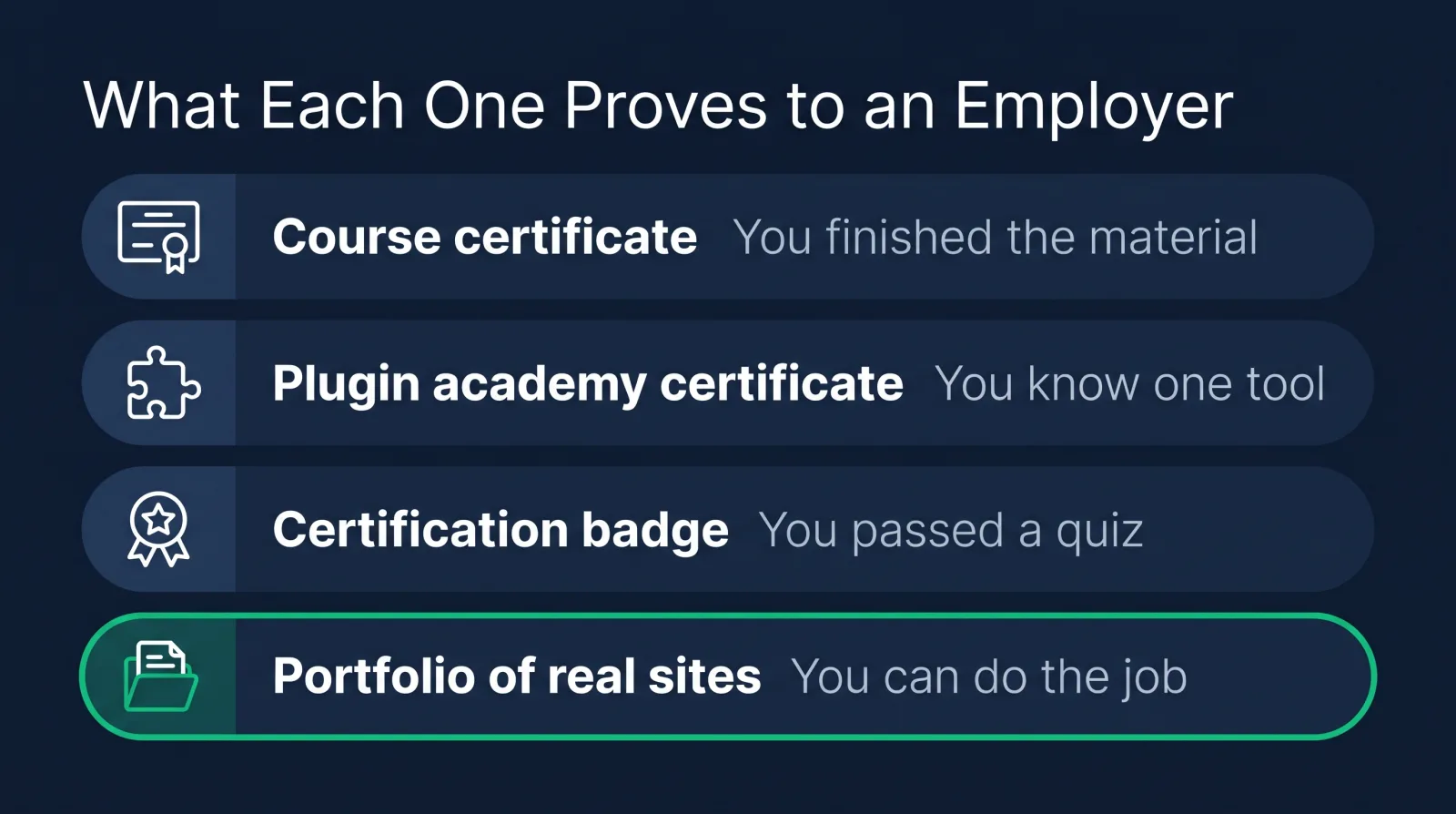
Course-marketplace certificates. Big online course sites hand you a certificate of completion when you finish a WordPress course. It shows you got through the material.
Plugin and tool academies. Some WordPress companies teach their own product. Yoast's academy, for example, offers five free SEO courses, each with a certificate, covering SEO basics, WordPress and the Yoast SEO plugin. That's useful, because SEO comes up constantly in web content jobs.
Certification-branded programs. Some training sites sell a WordPress certification with a quiz at the end and a badge for LinkedIn. Read the syllabus before you pay, because the badge matters a lot less than whether the lessons teach the work you'll be doing.
Career programs. These teach WordPress inside a job path: the CMS, plus the HTML, CSS, SEO and analytics that go with it, plus a portfolio. This is what CodingPhase does, and I'll get to that later.
I don't think any of these are a waste. They just prove different things to an employer, and it helps to know which is which before you spend money on one.
What employers actually check when a job says "WordPress"
Hiring managers check whether you can do the work: build and edit pages, handle plugins without breaking anything, fix basic layout problems and keep SEO intact. They find out from your portfolio and from what they ask in the interview.
Put yourself in the hiring manager's seat. They run a site with a few hundred pages. Their last content person left, and the request queue is piling up. They don't need someone who passed a quiz. They need someone who can open the dashboard on Monday and start clearing tickets.
So in the interview they ask things like:
- How would you build a new landing page from our existing templates?
- A plugin update broke the contact form. What do you do first?
- How do you make sure a new page shows up properly in search?
- Walk me through a site you've managed.
That last one is the big one. If you can pull up a site, show the backend, and talk about why you set it up the way you did, you've answered most of their questions before they ask.
A WordPress certification can still help a résumé get past a first screen, especially when you're switching careers and nothing else on the page says WordPress. I'd just never expect it to do the portfolio's job.
Certificates for content editors vs developers
Every WordPress certification falls on one of two tracks. Content-side courses teach the dashboard, blocks, media and SEO. Developer-side courses teach themes, PHP, custom post types and the REST API. Pick the one that matches the jobs you want.
Most career changers I talk to want the content side, and that's where most of the openings are. Web content specialist, content editor, web content manager, website coordinator. Those jobs live in the dashboard and the block editor, not in theme files.
The developer side is a different job. You'd be building themes, writing PHP, setting up custom fields and connecting WordPress to other systems through its REST API. It pays well, but the skill set is closer to web development.
The good news is that the content path and the developer path share a floor. Knowing a bit of HTML and CSS makes you a better content person, and knowing the dashboard inside out makes you a better developer. Lots of people start on the content side and drift toward templates later because they enjoy it.
Free options vs paid programs
Free WordPress resources teach you the software. A good paid program adds the order to learn it in, feedback, and help getting hired. Try WordPress with the free stuff, then join a program built around the job you want.
Learn WordPress is free, and it's a good place to poke around. So are the official docs and a mountain of tutorials.
What free resources don't give you is order. You end up with forty bookmarked videos, no idea which one comes next, and nobody to ask when something breaks at 11 PM. A lot of people stall right there, not because WordPress is hard, but because nobody told them what to learn after the basics.
That's what a structured program is for. A path that tells you what to learn in what order, projects that turn into a portfolio, people you can ask, and help with the résumé and the job search once you're ready. For a working adult with limited hours, that structure is usually the difference between finishing and quitting.
A WordPress portfolio beats a badge: what to build
The best proof of WordPress skill is a live site you built and maintain, plus a few small projects that copy the tasks web content jobs involve. Here's what I'd put in yours.
- A real site with at least ten pages. Real navigation, real categories, real content, a contact form that works. Install it on actual hosting so it lives at a real web address.
- A landing page built for a campaign. Pretend a company is launching a product. Build the page, write the meta title and description, compress the images, add alt text.
- A before-and-after content cleanup. Take a messy page and fix the heading structure, tighten the copy, fix the links. Show both versions and explain your changes in a few sentences.
- A short audit of a real site. Pick a local business running WordPress and list what you'd fix first, ranked by impact.
Every one of those is a task from a real job posting, which is why I'd take that portfolio over any WordPress certification on its own. If you want more ideas, our web administrator portfolio examples post goes deeper on what hiring managers like to see.

The CMS skills that go with WordPress on job postings
WordPress rarely appears alone in a job posting. It usually comes with HTML and CSS, SEO basics, Google Analytics and accessibility, and often a second CMS such as HubSpot, Drupal or Shopify.
W3Techs counts WordPress on 39.4% of all websites as of November 2026, which is why it shows up in so many postings. But the jobs want the skills around it too.
HTML and CSS let you fix what the block editor can't. SEO keeps your pages findable, and analytics tells you whether they're doing anything once people land. Accessibility matters more than beginners expect, since for a lot of employers it's a legal requirement.
And a second CMS makes you far more hireable. Once you understand WordPress, picking up HubSpot CMS or Shopify goes much faster, because the ideas carry over. If you're deciding which one to add, I compared the options in the best CMS platforms to learn.
Where WordPress skills lead: web content jobs and pay
WordPress skills lead into web content jobs. Payscale's 2026 data puts the average web content specialist at $59,711 and the average web content manager at $72,282.
The entry point for most people is a web content specialist role: publishing pages, keeping content accurate, handling SEO basics. From there you can move up to web content manager, where you own the site's strategy, or toward CMS development if you like the technical side.
Our Web Content Manager career path is built to get students into roles paying $75k+, individual results vary. The people who climb fastest tend to be the ones who add HTML, CSS and SEO on top of WordPress, because those skills let them do more of the work themselves.
Our pick for learning WordPress for a job
Disclosure: this is our own program, and I built it for exactly this reader.
If you want WordPress for a job rather than a hobby, I'd pick CodingPhase's Web Content Manager career path over a standalone WordPress certification. It teaches WordPress inside the whole job, with the other CMS platforms, SEO, the portfolio and the job search around it.
What's in it for a WordPress learner:
- Content Management Systems for Content Editors covers what a content editor does, WordPress for content editors, Contentful, Shopify and HubSpot CMS, then a content editor portfolio and résumé.
- Build any site into a WordPress Theme takes you from the WordPress admin and the basics to building a custom theme, working with the REST API, and deploying a live site, for when you're ready to go past the dashboard.
- The full Web Content Manager career path puts those in order with the HTML, CSS and SEO that go with them.
You finish each course with a completion certificate, and you finish the path with a portfolio, which is the part that gets you hired. Diamond Membership also gives you portfolio templates, an ATS-ready résumé builder, a job board, an 80,000+ member community, and two live calls every week: Accountability on Wednesdays at 7 PM ET and Money Talk on Sundays at 8 PM ET.
FAQ
Does WordPress offer an official certification? No. WordPress.org doesn't run an official certification exam. Learn WordPress offers free courses and workshops, and its Training Team issues certificates for some live cohort courses, but there's no standard exam you can book.
Is a WordPress certificate worth it for getting a job? It can help your résumé get noticed when you're switching careers. What gets you hired is proof you can do the work: a live WordPress site, a few real projects, and being able to talk through them in an interview.
How long does it take to learn WordPress well enough to get hired? It depends on your hours and where you're starting. The fastest route is to follow a structured path, build a real site as you learn, and start applying once your portfolio shows the tasks in the job posting.
What is the best WordPress course for beginners? For a job, pick a course that teaches WordPress inside a career path, with SEO, HTML, CSS and a portfolio. That's how our Content Management Systems for Content Editors course and the Web Content Manager path are built.
Do web content managers need WordPress? In most cases, yes. WordPress runs a huge share of the web, so it shows up in more web content postings than any other CMS. Learn it first, then add the CMS your target industry uses.
So, no, you don't need to hunt down the one perfect WordPress certification. It doesn't exist.
What you need is a site that proves the skill, and people in your corner while you build it. Helping people do exactly that is what we've been doing at CodingPhase since 2016.
Diamond Membership is listed at $60/month or $365/year, and it's always at least 30% off, so you'll pay about $42/month or $255/year. That gets you 90+ courses, the full career paths, the community and both weekly calls, with a 7-day money-back guarantee. If you're ready to stop collecting bookmarks and start building, I'd love to see you inside.