Web Administrator Certifications Worth Your Time (and the Ones That Aren't)
On this page
There is no official WordPress certification. None. WordPress runs something like 40 percent of the web and the organization behind it has never once issued a piece of paper that says "this person knows WordPress."
Sit with that for a second. The most in-demand skill in this job has no diploma attached to it, which means nobody getting hired is winning on paper. They're winning on proof. I've helped a lot of students land web admin roles and the pattern never breaks: certifications get the resume read, and then they quietly step aside.
One thing before we rank anything, because it decides which certs even count. A web administrator is a content operations role. You run websites through a CMS. Publishing pages, building landing pages, rolling out product and promo updates, QA-ing everything before it goes live, keeping the brand from drifting, filling in the SEO and analytics fields nobody else remembers exist. Same family as webmaster, web producer, web content manager, e-commerce specialist. Server security and uptime are somebody else's pager, and I mean that literally, somebody else carries it. So the credentials that pay off are the ones that match that job, not an IT support career.
Why there's no "WordPress certification" (and what to do instead)
WordPress is open source. There's no company with a certification revenue stream bolted to it the way Cisco has with networking or Salesforce has with CRM. Anyone can learn it, anyone can claim it, and the community has shrugged off every push to formalize it for two decades.
Which is good news for you, honestly.
When there's no official credential, hiring managers reach for two substitutes: adjacent certifications that prove you're serious, and visible evidence that you've done the work. You control both of them.
The substitute for a WordPress cert is a documented WordPress project. A live site you ran like a publisher. Pages shipped, a landing page built, a promo update rolled out, every change checked on desktop and on a phone before it went live, plus a short writeup explaining what you did and why you did it that way. It outranks everything else on this page and it isn't close. I broke down real examples in web administrator portfolio examples.
Now the certifications.
Google Analytics (GA4) certification
Google gives this one away free through Skillshop, and it's the one that surprises people. This little free credential shows up by name in web administrator and web content job postings more often than almost anything else I'm about to list. Not because it's hard. Because the teams hiring you genuinely open GA4 on a Monday morning and want to know if last week's landing page did anything.
That's the argument for it. A big chunk of this job is publishing something and then answering "so what happened?" A hiring manager reading GA4 on your resume reads it as "this person will not need me to explain what a session is."
Now the honest half. It is not a hard exam, and everyone knows it isn't. It proves familiarity, nothing close to mastery, and on its own it carries a resume about as far as the parking lot. Earn it anyway. There is no scenario, none, where I'd tell someone breaking into this role to skip a free credential they can finish in two weeks that appears verbatim in the postings they're applying to. It's the fastest legitimate line you can add this month.
HubSpot content and CMS certifications
HubSpot Academy also gives its certifications away, and a couple of them land almost exactly on this job: the content marketing certification and the CMS-focused tracks. HubSpot reshuffles course names and lineups fairly often, so go look at what's actually live in the Academy before you plan a month around a specific exam name.
The pros. Free, and genuinely recognized by marketing teams, which matters because marketing teams are who hire web administrators. IT mostly doesn't. The curriculum reads like a web admin job description with the serial numbers filed off: planning content, publishing pages, building landing pages, on-page SEO fields, reporting on what happened after. Each cert takes days.
The cons. HubSpot teaches HubSpot's worldview using HubSpot's tools. The concepts port over to WordPress or Shopify fine. The button-clicking does not. And these are not hard either, so they signal seriousness rather than skill.
I'd take these if you're aiming at the marketing-department version of the role, which is most of them. Pair one with GA4 and you've got two real, recognizable credentials on your resume inside a month, for zero dollars.
Google IT Support Professional Certificate (optional)
The Coursera program Google built for people walking into IT with nothing. Troubleshooting, networking basics, operating systems, security fundamentals.
It's respected as a beginner credential and the Google name does real work on a recruiter who's skimming forty resumes before lunch. But it's IT support, so you'll come out knowing what DNS is and knowing nothing about QA-ing a promo before launch. Budget several months of steady effort, and check the current pricing and format on Coursera before you commit to anything.
Worth it if you want one optional, IT-flavored anchor with brand weight on the resume. In-house roles where the web person also fields the occasional "my laptop is doing a thing" question, that's the case for it. You do not need this to do this job.
CompTIA A+ and Network+ (probably skip)
The classic vendor-neutral IT certifications. A+ covers hardware, operating systems, troubleshooting; Network+ goes deeper on networking.
I'll be blunt: these were built for IT support careers and they're heavier than this job needs. You'd sit through printer hardware and enterprise network topology to qualify for work that's mostly publishing pages and then checking them on a phone.
The exams cost real money and typically need renewing every few years, which is an ongoing tax for vocabulary you'll almost never use.
Worth it only if you're deliberately aiming at IT departments, government, healthcare, big enterprise, the places where the web role is a rung on an IT ladder and the HR filter looks for these by name. Agency work, marketing teams, freelance? Skip them.
cPanel and hosting certifications (awareness beats the badge)
This is the correction I make constantly. Keeping the server alive is not this job. A web administrator lives inside the CMS; the host or the IT team owns the machine.
What you need is awareness-level knowledge, the kind you can absorb from a $5-a-month hosting account over a weekend: what DNS is, roughly how SSL and staging work, and who you call when the site is down. A few questions in my web administrator interview questions guide poke at this territory, and awareness-level answers are exactly what the interviewer wants back.
Skip the cert unless you're deliberately going the hosting-support route, where cPanel-style training maps onto the actual daily work. And the Cloudflare/CDN/security learning paths people keep asking me about? Nice vocabulary, not the job. Skim a primer so "caching" and "DNS record" don't spike your heart rate, then get back to publishing.

The order I'd do them in
Starting from zero, my actual sequence:
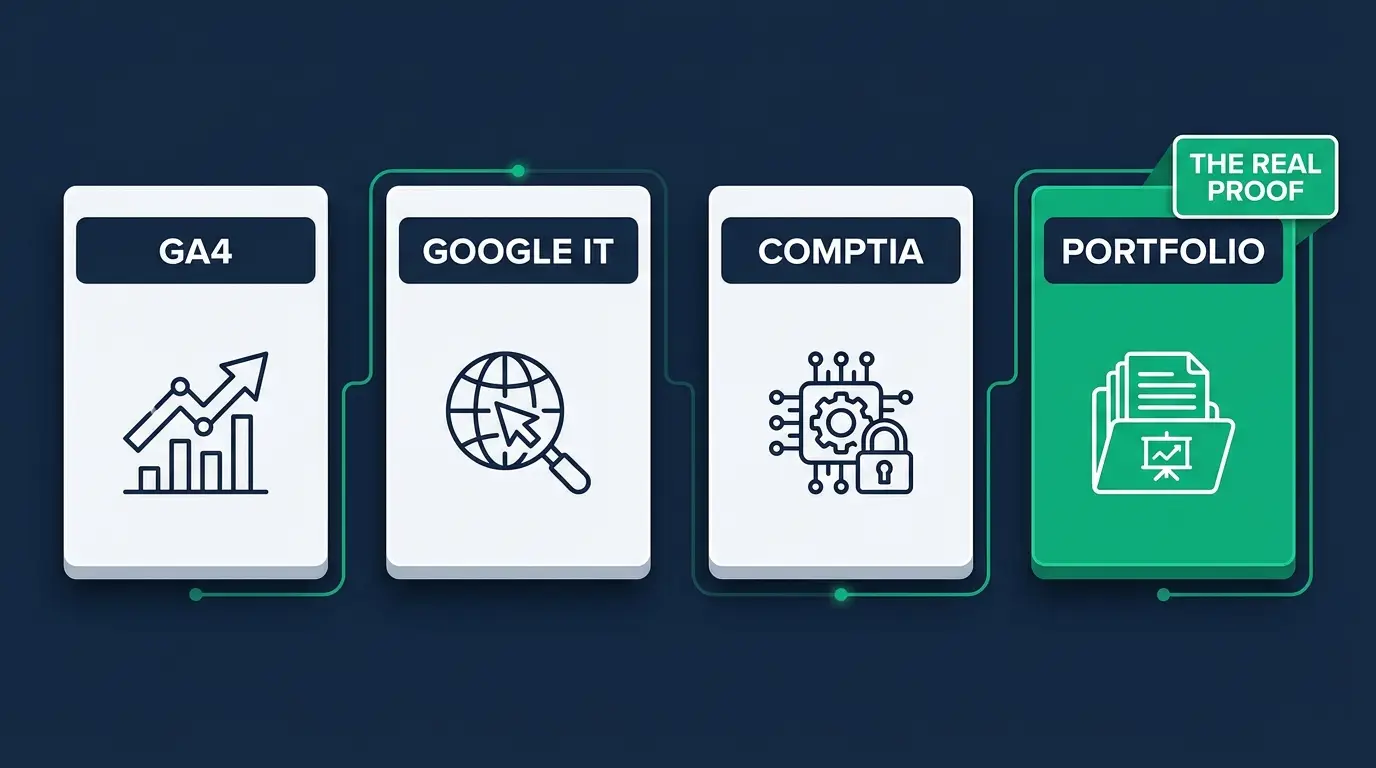
- GA4 certification first. Free, fast, a real keyword on your resume inside two weeks. Momentum matters a lot more than people admit when you're breaking in.
- A HubSpot content or CMS certification second. Also free, also fast, and it speaks the native language of the marketing teams doing the hiring.
- Google IT Support third, and only if you want it. An optional brand-name anchor for IT-flavored postings.
- The portfolio above all of it, started this week, not after. A clickable demo site: real pages published, a landing page, a product or promo update shipped, a written publish/QA checklist, GA4 wired up. This is your WordPress certification, the one you issue yourself, with evidence stapled to it.
Not sure which platform to build that project on? I ranked the ones employers actually run in the best CMS platforms to learn.
What certifications can't do for you
Nobody selling you an exam voucher is going to bring this part up.
A certification cannot prove you catch the typo in a headline before forty thousand people see it. It can't prove you keep a brand consistent across two hundred pages, or that you write a publish checklist another human can actually follow, or that you stay calm when the CEO wants the homepage changed an hour before a launch. That's what web administrators get paid for, and all of it gets demonstrated. None of it gets certified.
Certifications get your resume read. Proof gets you hired. If you keep one line from this post, keep that one.
I've watched students with two modest credentials and one obsessively documented portfolio project beat candidates carrying five certifications and nothing you could click on. The hiring manager isn't shopping for study habits. They want to stop worrying about the website.
So treat every cert here as a door-opener, then spend at least equal time building the thing that walks through the door. The full path from zero to hired is in how to become a web administrator.

FAQ
Is there an official WordPress certification? No. WordPress.org has never offered one. Third-party courses issue their own completion certificates, but there's no official credential. Employers substitute portfolios and adjacent certs like GA4 or HubSpot's free content certifications.
Which certification should a web administrator get first? GA4, then a HubSpot content or CMS certification. Both are free, both take days to weeks rather than months, and both appear in real content and web job postings.
Do I need CompTIA A+ to be a web administrator? Almost never. It's an IT support certification, and web administration is a content-operations role. It only helps when the position sits inside a formal IT department (government, healthcare, large enterprises).
How long does it take to get certified as a web administrator? GA4 takes a week or two. HubSpot certifications take a few days each. Google IT Support, if you choose to add it, takes a few months part-time. A strong portfolio project takes two to four weeks and matters more than any of them.
Are certifications worth it without a degree? Yes, arguably more so. Without a degree, a recognizable credential plus a documented portfolio is how you pass the initial screen.
You don't have to assemble this career alone. Inside CodingPhase, every course you finish comes with a completion certificate for LinkedIn, and the résumé builder is built to get you past ATS screening so a human actually lays eyes on your credentials and that portfolio you sweated over. The web content manager career path lays out the whole sequence, from first login to first offer.
Pick the free certs, start the portfolio project this week, and keep moving. Every site you've ever visited needs someone publishing to it. You can be one of them.