Ecommerce Skills Employers Hire For (and How to Learn Them)
On this page
When I searched "ecommerce skills" to write this, two of the top results on Google weren't about jobs at all. They were GitHub repositories full of instruction files for AI coding agents, the kind developers call "skills."
I laughed, and then I got a little annoyed on your behalf. Because if you're the person typing that search, you're probably sitting at a kitchen table after a shift, trying to figure out whether you have what it takes to work in ecommerce. And Google handed you config files.
These are the ecommerce skills that show up again and again when companies hire for store roles, what each one looks like on an actual Tuesday, and how to learn it without a degree.
Ecommerce specialist skills that show up on job postings
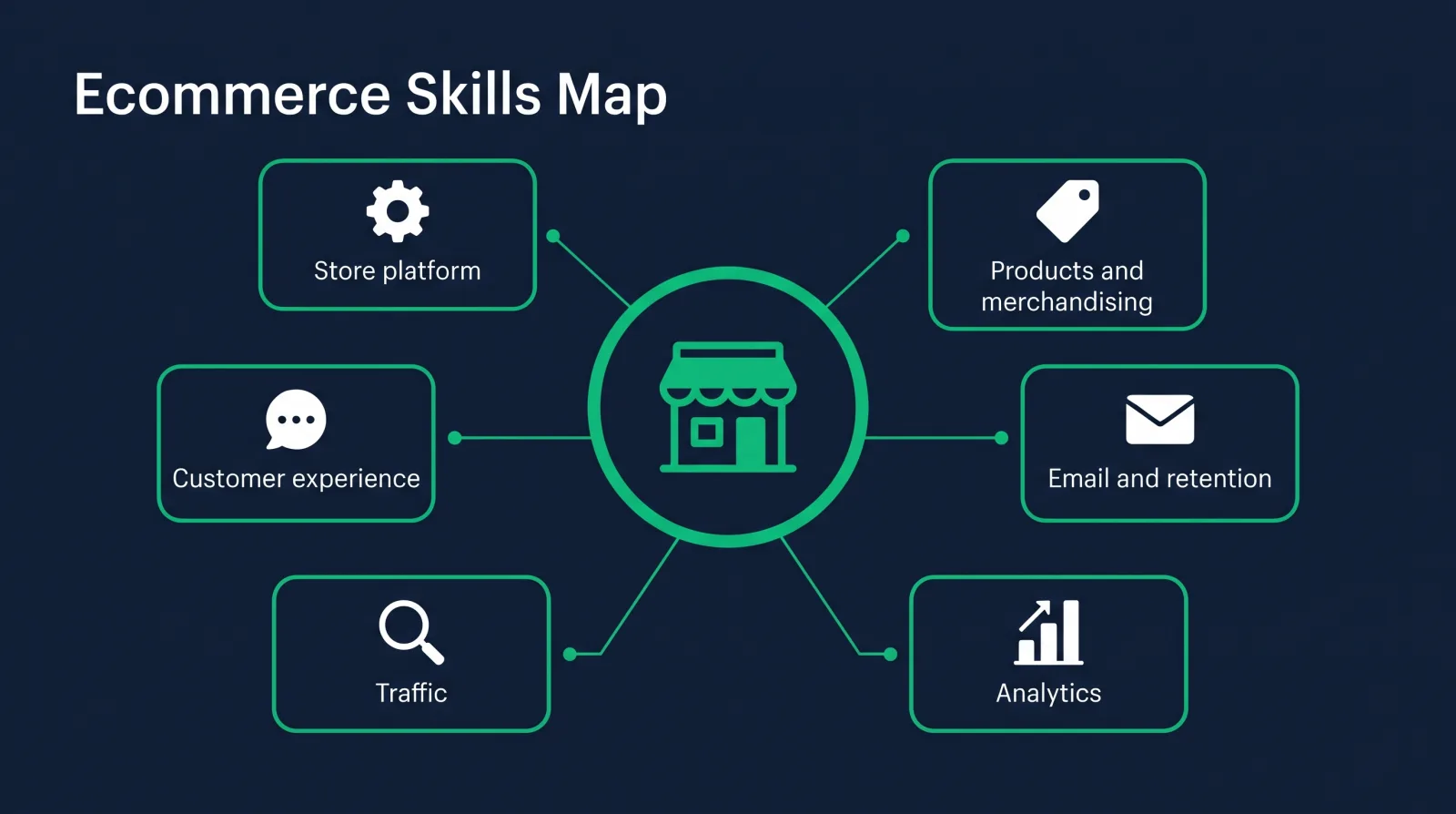
The skills for ecommerce jobs fall into six groups: running a store platform, product listings and merchandising, email and retention, analytics, traffic (SEO, paid social, marketplaces), and customer experience and operations. Add basic HTML and Liquid, and you stand out from most applicants.
Job titles move around a lot in this field. An ecommerce specialist at one company is an "online store coordinator" at the next and an ecommerce assistant at a third. The work underneath stays pretty stable, though. Somebody has to keep the store running, get products on it, bring people to it, sell to them again later, and read the numbers to see what's working.
Shopify's own guide to ecommerce skills splits them into hard skills and soft skills. That's a useful split, but I'd organize it by the parts of the store you'd actually touch, because that's how a hiring manager thinks about it. "Who's going to fix the collection page before Friday's sale?" That's the question your résumé has to answer.
Store platform skills (Shopify and the admin work)
Platform skill means you can open a store's admin and get things done without asking where anything lives. On Shopify, that's products and collections, orders, discounts, apps, sales channels, the theme editor, and the settings that quietly break things when someone changes them.
This sounds basic. It isn't, at least not at the level a job needs. I've watched technically strong developers lose a client's trust on a single screen-share because they couldn't find the discounts section. Knowing the admin cold is what lets you look professional in the first ten minutes.
Shopify is the platform I'd learn first, because so many small and mid-size brands run on it, and its development stores let you practice for free. Once you know one platform deeply, picking up another one (BigCommerce, WooCommerce, an in-house system) is mostly learning where they moved the buttons.
If you've never touched a store admin, My First Shopify Store Course walks the whole thing the way a merchant uses it, with no code. That's the step most people skip.
Product listings, merchandising and catalog work
A huge share of entry-level ecommerce work is the catalog. Writing product titles and descriptions, uploading photos, filling in variants and prices, tagging items so filters work, building collections, and keeping all of it accurate when inventory changes.
It's unglamorous and it matters a lot. A product page with a vague title, two blurry photos and a missing size chart doesn't sell, and nobody notices why until someone fixes it.
Merchandising is the next level up. Which products go at the top of a collection, what gets featured on the homepage this week, how a sale is presented, what gets bundled. Bigger teams have a dedicated ecommerce merchandiser for this, while smaller ones hand it to whoever runs the store.
You'll also hear about inventory management and product information management (PIM) systems at larger companies. Don't panic about the acronym. A PIM is a central spreadsheet-like system that feeds product data out to the store and the marketplaces. If you've kept a big spreadsheet clean, you understand the job it does.
Email, retention and lifecycle marketing
Email skill in ecommerce means setting up the automated flows and campaigns that bring customers back for a second and third order. Getting someone to buy once is expensive. Selling to them again is where a lot of stores make their money, and email is how most of them do it.
The core flows are the same at almost every store: a welcome series for new subscribers, abandoned cart and abandoned checkout reminders, a post-purchase follow-up, and win-back emails for customers who've gone quiet. Then there are the campaigns, the weekly sends for launches and sales.
Employers hiring for ecommerce roles love someone who can set these up in Klaviyo (or Shopify Email, or Mailchimp), segment the list sensibly, and read the results. If email is the part that clicks for you, it can become a whole career, and I wrote about that side in ecommerce email marketing.

Analytics and reading the numbers
Analytics in ecommerce means reading a store's numbers and saying what to do next. You should know conversion rate, average order value, traffic by source, cart abandonment, and repeat purchase rate, and be comfortable in Shopify's reports and Google Analytics.
You don't need to be a data scientist. You need to be the person who notices that mobile visitors from Instagram are adding to cart and then leaving at shipping, and says, "I think our shipping price is a surprise on mobile, can we show it on the product page?"
That one sentence is what conversion rate optimization (CRO) looks like in practice. Spot the leak, guess why, test a fix, check the number again.
If you find you love this part more than the rest, there's a whole role built on it. My ecommerce analyst guide covers what that job involves and how people get into it.
Traffic: SEO, paid social and marketplaces
Nobody buys from a store they never find, so every ecommerce team cares about traffic, even if a separate marketing person owns most of it.
Search engine optimization. For a store, this is mostly product and collection pages: page titles, descriptions, image alt text, clean URLs, and not letting the same product live at five addresses. It's slow and it compounds.
Paid social and search ads. Meta ads on Facebook and Instagram, and Google Ads, especially Shopping. At an entry-level job you probably won't own the budget, but you'll be asked to set up the product feed, check the pixel is firing, and build the landing page the ads point to.
Marketplaces. Amazon, Etsy, Walmart and others. Some brands make most of their money there, and listing products, managing reviews and keeping inventory in sync across channels is its own skill.
You don't have to master all of these. Knowing how they connect to the store is what makes you useful in a small team.
Customer experience and operations
The behind-the-scenes work keeps a store's reputation alive. Answering customer emails and chats, handling returns and exchanges, writing the shipping and return policy pages so they're clear, and working with whoever ships the orders.
If you're coming from retail or customer service, this is where you already have real experience. You've handled the angry customer, you know what makes people trust a store, and you've seen what happens when a policy is unclear. Put that on your résumé in ecommerce language and it counts.
Customer empathy also feeds every other skill on this list. The person who's read 200 support emails knows exactly which product description is confusing people.
Technical edge: the HTML and Liquid basics most candidates lack
Most applicants for ecommerce roles stop at the admin. The ones who can open a theme file and make a small change themselves, a new section, a fixed layout, a banner that works on mobile, are rarer, and they're worth more to a small team that can't afford to call a developer for every edit.
You don't need to become a software engineer for this. HTML and CSS let you read and adjust how a page is built and styled. Liquid, Shopify's template language, is what lets you edit theme files and pull product data onto a page. A little JavaScript on top covers the interactive bits, like a size selector or a cart drawer, and that's about where most store work stops.
This is the gap the Ecommerce Specialist path is built around. It starts with HTML and CSS, goes through JavaScript and Git, then into Liquid for Shopify and email developers and Shopify Theme Development 2.0, where you build and ship a custom theme.
Do you need coding to get hired in ecommerce? No. Lots of people get hired on admin, catalog and email skills alone. But if you're asking which ecommerce skills give you the most leverage, this is it, and the ecommerce developer vs ecommerce specialist breakdown shows where the technical side can take you.

How to learn and prove these skills
The fastest way to learn ecommerce skills is to run a real store, even a practice one, and document what you did. Build a development store, stock it, set up email flows, track the numbers, customize the theme, and turn each piece into a portfolio item you can link to.
That's the honest answer to "how do I get ecommerce experience with no job?" Make the experience. A hiring manager would much rather see a store you built, with a welcome flow and a fixed product page, than read that you're "passionate about ecommerce."
Here's the order I'd learn things in:
- The store admin. Products, collections, orders, discounts, apps.
- Listings and merchandising. Stock your practice store with 20 real-looking products and make the pages good.
- Email. Build a welcome flow and an abandoned cart flow.
- Analytics. Set up Google Analytics and learn to read the reports.
- HTML, CSS and Liquid. Customize the theme yourself.
Then put it in front of people. For picking where to learn, I ranked the options in best ecommerce courses for getting hired. For writing it up, read my guide to the ecommerce resume, which shows how to turn practice projects into bullet points with numbers.
This is also why I'd rather you learn inside a path than on your own. The Ecommerce Specialist path puts the courses in order, and Diamond Membership adds the job-hunt side: portfolio templates, an ATS-ready résumé builder, a job board, an 80,000+ member community, and two live calls every week (Accountability on Wednesdays at 7 PM ET, Money Talk on Sundays at 8 PM ET). It lists at $60/month or $365/year, always at least 30% off, so about $42/month or about $255/year, with a 7-day money-back guarantee. The path is free to start.
Our students land roles at $75k+ (individual results vary). I've been teaching since 2016, and in my experience the people who get there aren't usually the most naturally talented ones. They're the ones who built something and kept showing up.
The skill employers can't teach you is finishing.
FAQ
What skills do you need to work in ecommerce? You need to run a store platform like Shopify, manage product listings and merchandising, set up email and retention flows, read analytics, understand traffic from SEO, ads and marketplaces, and handle customer experience. Basic HTML and Liquid make you a stronger candidate.
Which ecommerce skills pay the most? The technical and numbers-heavy skills usually pay better, because fewer applicants have them. Theme customization in Liquid, analytics and conversion work, and running a store's email revenue are the ones that move people beyond entry-level admin roles.
Do you need coding skills for ecommerce jobs? Not for every role. Many ecommerce jobs focus on the admin, the catalog, email and marketing. But HTML, CSS and Liquid let you make changes without waiting on a developer, and that sets you apart on a small team.
How can I get ecommerce experience with no job? Build it. Open a free Shopify development store, stock it with products, set up email flows and analytics, customize the theme, and document each step as a portfolio project. Volunteering to help a friend's or a local shop's online store counts too.
What should an ecommerce specialist learn first? Start with the store admin, because everything else happens inside it. Then learn product listings, email flows and analytics, and add HTML, CSS and Liquid once you're comfortable. The Ecommerce Specialist path lays that order out for you.
You don't have to have all of these skills before you apply. Nobody does. You need enough of them to do the job in front of you, and a store that proves it.
If you want a plan instead of a pile of tabs, start the Ecommerce Specialist path for free this week. Then come to a Wednesday Accountability call and tell us what you're building. We'll help you finish it.