15 Business Process Automation Examples That Actually Save Time
On this page
A student sent me a Loom last month of her actual Tuesday. She works ops at a small e-commerce brand. The video was eleven minutes of her copying order numbers out of one tab and pasting them into a spreadsheet, then into a shipping tool, then into an email. Eleven minutes for what turned out to be forty orders. Every single day.
I watched it twice and thought, okay, we can give you your afternoons back.
That's what this post is. Not theory. Fifteen concrete things I've either built or watched get built, with enough detail that you could go recreate one this week.
What business process automation actually is
A process is a set of steps a person repeats. Automation is wiring those steps together so software does the boring parts and only pings a human when a real decision shows up. That's the whole idea.
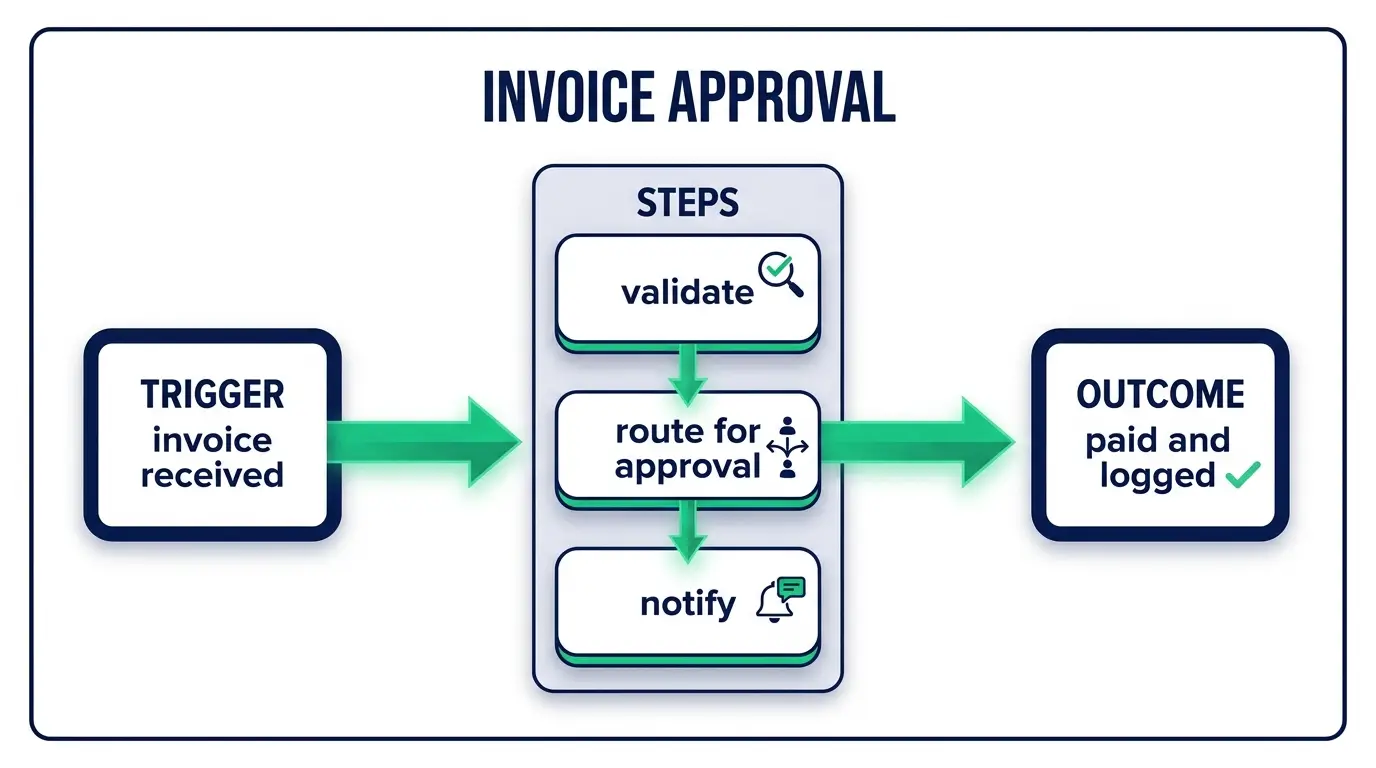
The pattern under every example below is the same three-part shape: something happens (the trigger), the software does a few things in response (the steps), and you get time or accuracy back (the outcome). Once you see that shape, you start noticing it everywhere in your own week.
Most of these run on the same handful of tools. n8n if you want to self-host and keep costs flat as volume grows. Make or Zapier if you'd rather not manage anything. A few need a bit of glue code, and honestly that's where knowing how to code stops being optional and starts paying for itself.

HR and people ops
1. New-hire onboarding
This is the one everybody forgets a step on. Someone signs the offer, and now IT needs to make accounts, the manager needs to send a welcome note, payroll needs the paperwork, and half of that falls through the cracks because it lives in one person's head.
Trigger: the offer gets marked "signed" in your HR tool, or a row lands in a hiring sheet.
Then the workflow creates their Google Workspace account, drops them into the right Slack channels, files a ticket with IT for a laptop, schedules the day-one intro call, and sends the manager a checklist. Tools: n8n or Zapier orchestrating BambooHR, Google Admin, and Slack.
The payoff isn't only speed. It's that nobody shows up on Monday without an email address anymore. Consistency is the real win here, and consistency is exactly what humans are bad at.
2. Time-off requests
Small one, big relief. An employee submits a PTO request in a form. The automation checks their remaining balance, routes it to their manager for a yes or no, updates the shared team calendar once approved, and notifies payroll. What used to be four Slack messages and a forgotten calendar block becomes one form submission.
3. Offboarding
Offboarding is onboarding's evil twin, and the stakes are higher because you're dealing with access to systems. When someone leaves, an account left active is a security hole nobody's watching.
Trigger: last day set in the HR system. The workflow revokes app access, transfers file ownership to their manager, pulls them from every distribution list, and generates the final-pay checklist for finance. Run it the same way every time and you stop leaving ex-employees with live logins for six months.
Finance and accounting
4. Invoice processing and accounts payable
A vendor invoice hits a shared inbox. Instead of someone opening the PDF, reading the total, and typing it into the accounting system, an automation reads the invoice (this is where AI document parsing earns its keep), pulls the amount, vendor, and due date, matches it against the purchase order, and creates the bill in QuickBooks or Xero.
If everything matches, it queues for payment. If something's off, it flags a human. That flag is the important part. The person stays; the automation just clears the ninety percent of invoices that are totally routine so they can actually look hard at the ten percent that aren't.
Tools: Make or n8n, plus a parsing step. This one saves finance teams entire days a month, and it's a great first paid build if you're freelancing.
5. Expense report approvals
Employee uploads a receipt. The system reads the amount and category, checks it against policy (anything over $75 needs a manager sign-off, say), auto-approves the small stuff, and routes the rest. No more finance chasing people for the coffee receipt from three weeks ago.
6. Recurring financial reports
Every Monday at 6am, before anyone's awake, a workflow pulls numbers from Stripe and your database, drops them into a formatted sheet, and posts the summary to the leadership channel. Revenue, refunds, new subscriptions, churn. The report that used to eat someone's Monday morning now just exists when they open their laptop.
Sales and marketing
7. Lead capture to CRM
Somebody fills out the contact form on your site. Right now, how fast does that lead get into your CRM and in front of a human? For most companies the honest answer is "eventually."
Trigger: form submission. The workflow enriches the lead with company data, scores it, drops it into HubSpot or Pipedrive, assigns it to the right rep by territory, and posts to the sales channel so someone can reach out while the lead is still warm. Speed-to-lead is a real number that maps to real revenue, and this is the cheapest way to move it.
8. Sales-to-onboarding handoff
Deal gets marked "closed won." That single event kicks off a chain: create the customer account, send the welcome sequence, generate the contract, schedule the kickoff call, and notify the delivery team. The gap between "they paid us" and "we started working" is where a lot of new customers get a bad first impression. Close that gap and you look sharp before you've done anything.
9. Follow-up sequences
A lead goes quiet after a demo. Instead of a rep trying to remember to follow up (they won't, they're busy), the automation waits three days, checks whether the deal stage moved, and if it hasn't, sends a personalized nudge or creates a task. Persistence without the mental load of remembering. Most deals die from silence, not rejection.
10. Content publishing
You finish a blog post. One trigger, and it gets scheduled across your social accounts, added to the newsletter queue, and pinged to the team. Small, but if you publish regularly the saved clicks add up fast. There are more of these in my roundup of n8n workflow examples if this is the direction you want to go.
Customer support
11. Ticket routing and tagging
Support tickets don't arrive sorted. A billing question, a bug report, and a refund demand all land in the same queue, and someone has to read each one and figure out where it goes.
Trigger: new ticket. An AI classification step reads the message, tags it (billing, technical, cancellation), sets a priority, and routes it to the right team or person. Urgent stuff jumps the line automatically. Your best support people stop spending their morning being a human switchboard and start actually solving things.
12. First-response and FAQ deflection
A chunk of support volume is the same five questions. "Where's my order," "how do I reset my password," "what's your refund policy." An automation can catch those, answer instantly from a knowledge base, and only escalate to a person when the question is genuinely new. Done honestly, this makes customers happier because they get an answer in two seconds instead of two hours. Done lazily, it's an infinite loop of "I'm sorry I didn't understand that," so build it with a fast escape hatch to a human.
13. Review and feedback collection
Order ships and gets delivered. A few days later, automatically, the customer gets a review request. Positive responses get pointed toward your public review page. Negative ones get routed straight to your team as a private ticket before they turn into a public one-star. Same trigger, two very different paths.
Operations and data
14. Data sync between tools
This is my student from the top of the post. Data lives in five systems that don't talk to each other, so a human becomes the integration, copying fields from one app to the next.
Trigger: a record changes in the source system (a new order, an updated contact). The workflow catches it and pushes the update everywhere it needs to go, so your CRM, your spreadsheet, and your shipping tool all agree without anyone touching a keyboard. This is the least glamorous automation on the list and probably the one that gives the most hours back. Boring and load-bearing.
15. Inventory and order fulfillment
An order comes in. The automation checks stock, sends the pick-and-pack instruction to the warehouse, generates the shipping label, emails the customer a tracking number, and decrements inventory. When stock drops under a threshold, it drafts a reorder to the supplier. For a small e-commerce team this is the difference between growth feeling exciting and growth feeling like drowning.
Which one should you actually start with
Start with the process that's high-volume and low-judgment. High-volume means the payoff is big. Low-judgment means the automation won't need to make hard calls you can't script.
That usually points at data entry, lead routing, or invoice intake. Skip anything that requires real human nuance for now: performance reviews, complex customer complaints, a hiring decision. Automate the copy-paste, keep the judgment.
And build one at a time. The people who get discouraged are the ones who try to automate their whole company in a weekend, hit one broken API, and quit. Ship one small workflow, watch it run for a week, trust it, then build the next.
How to spot an automatable process in your own work
Here's the reframe I want you to keep: if you can write down the steps, a computer can probably do the steps.
So write them down. For anything you do more than a few times a week, open a note and list exactly what you do, click by click. Two things jump out immediately. Any step that's "copy this, paste that" is begging to be automated. Any step where you actually stop and think, weigh something, make a call, that's the part you keep.
The tell is repetition plus rules. "Every time X happens, I do Y" is a sentence that describes a workflow you can build. Once you're hunting for that sentence, you'll find ten of them in a week.
FAQ
What is business process automation?
Using software to run a repeatable multi-step process with little or no manual work. A trigger fires, the software does the steps, and a person only steps in for the decisions that genuinely need a person. Onboarding a hire, processing an invoice, routing a support ticket.
What processes should I automate first?
The high-volume, low-judgment ones. Data syncing between tools, moving leads into your CRM, and invoice intake are the usual best starting points because they happen constantly and follow clear rules. Leave anything needing real human judgment alone until you've got a few working automations under your belt.
What tools do I need?
For most of these, a workflow tool covers it: n8n if you want to self-host and control costs, or Make and Zapier if you'd rather click it together with zero maintenance. The AI-heavy ones (parsing invoices, classifying tickets) add a model call in the middle. My rundown of the best AI automation tools breaks down when to reach for which. The more custom your needs get, the more a little coding ability opens up, which is exactly why so many people are moving into this work.
Which tools should I use to build these? Depends on the process and your budget. The realistic options, including where the no-code tools stop being enough, are compared in the best business process automation tools.
Automation stopped being a niche skill. It became one of the most practical things you can learn right now, whether you want to save your own team hours or get paid to build these for other businesses. Companies are hiring for it, agencies are booking it, and most people still don't know how any of it works.
If you want to actually learn to build this stuff instead of reading about it, that's what we do at CodingPhase. We'll teach you the coding foundation and the automation tools together, so you're not just dragging boxes around hoping they connect. Pick one process from this list, the most annoying one you do every week, and go automate it. That first one is the one that changes how you see all the rest. If you want a career out of it, here's how to become an AI automation specialist.
You've got this.