The Best Business Process Automation Tools in 2026 (Honest Roundup)
On this page
A logistics company I talked to last year signed a six-figure enterprise RPA contract. Bots, a "center of excellence," a consultant on retainer, the whole thing. I asked what the first bot did. It copied rows from a form into a spreadsheet and emailed a summary every morning.
That's a Zapier task. Twenty bucks a month. They spent a house on it.
I bring that up because the phrase "business process automation tools" covers a wild range of software, from a $0 open-source workflow builder to platforms that cost more than a salary. Most roundups flatten all of it into one ranked list, slap affiliate links under each, and never tell you the one thing that matters: most companies are shopping two tiers above what they need.
So this is the version I wish those companies had read. What to actually look for, the categories that exist, honest picks with real tradeoffs, and where the overkill trap swallows your budget.
First, what you're actually buying
Business process automation just means handing a repeatable process to software instead of a person. A form comes in, data moves somewhere, a notification fires, a record updates. No human clicking through it every time.
The catch is that "process" hides a lot. Wiring two cloud apps together is a different problem than making a bot click through a legacy desktop app that has no API, which is different again from mapping a loan-approval workflow across five departments with compliance sign-offs. Different problems, different tools, wildly different prices.
Before you look at any brand, get honest about a few things.
Do your apps have APIs? If everything you touch is modern SaaS with real integrations, you live in the easy, cheap world of workflow tools. If your process runs through some 2009 desktop program nobody can replace, you're in RPA territory, and it costs more.
How much volume? Ten runs a day and ten thousand runs a day price out completely differently. Some tools charge per task and quietly become brutal at scale. Others charge flat and reward volume.
Who's building this? If it's you and a marketing coordinator, you want something you can click together on a Tuesday. If you have engineers who'd rather write the logic, a dev-friendly tool makes them faster instead of boxing them in.
What happens when it breaks? Because it will. Good error handling and a clear log of what ran are worth more than a long feature list. A silent failure in an automation you trusted is how a hundred invoices don't get sent and nobody notices for a week.
Keep those four in your head. They matter more than any logo below.
General workflow automation (the tier most people actually need)
This is the connective tissue of the modern business. Trigger happens in app A, do something in apps B and C. Sales notification hits Slack, new customer lands in your CRM, a receipt gets logged. For the vast majority of small and mid-size teams, this category is the whole answer, and everything fancier is a distraction.
Zapier is the one your non-technical coworkers can actually use. Enormous app library, genuinely gentle learning curve, and if a popular tool exists, Zapier probably connects to it. That reach is the real product. The tradeoff lives in the pricing model: it tends to bill by task, so a workflow that fires constantly can get expensive faster than you'd guess, and the pricing shifts often enough that I won't quote you a number that's stale by the time you read this. Pick Zapier when you want the widest possible app support and you'd rather never think about the plumbing. It's the safe default for a team without a developer.
Make (the tool formerly called Integromat) hands you a visual canvas where you draw the whole flow as connected nodes. You see the data move. For anything with branches, loops, or a bit of logic, that picture is a real advantage, and Make usually stretches further per dollar at higher volume than the per-task model does. The cost is a steeper first hour. It asks you to understand your own data a little more than Zapier does. If your automations have gotten complicated and the bill on a per-task tool is starting to sting, Make is often the smarter home. I wrote a fuller Zapier vs Make breakdown if you're deciding between exactly these two.
n8n is the one I get most excited about, with a caveat. It's open source, you can self-host it, and when you run it on your own server your cost stops scaling with how many times a workflow runs. That is a genuinely different economic model, and at high volume it can be the difference between a rounding error and a real line item. It's also the most flexible of the three, with room to drop in real code when you need it. The caveat: self-hosting means someone maintains a server, handles updates, keeps it alive. If that person exists on your team, n8n is a gift. If not, the managed cloud version exists, or you're back to a hosted tool. Start with what n8n actually is, and if you're torn, the n8n vs Zapier comparison lays out who each one is really for.
Here's the honest summary of this whole tier: Zapier if you want easy and broad, Make if you want visual and cheaper at volume, n8n if you have a little technical muscle and want to own the thing. Nearly everyone reading this is done shopping right here.
RPA, and why it's usually more than you need
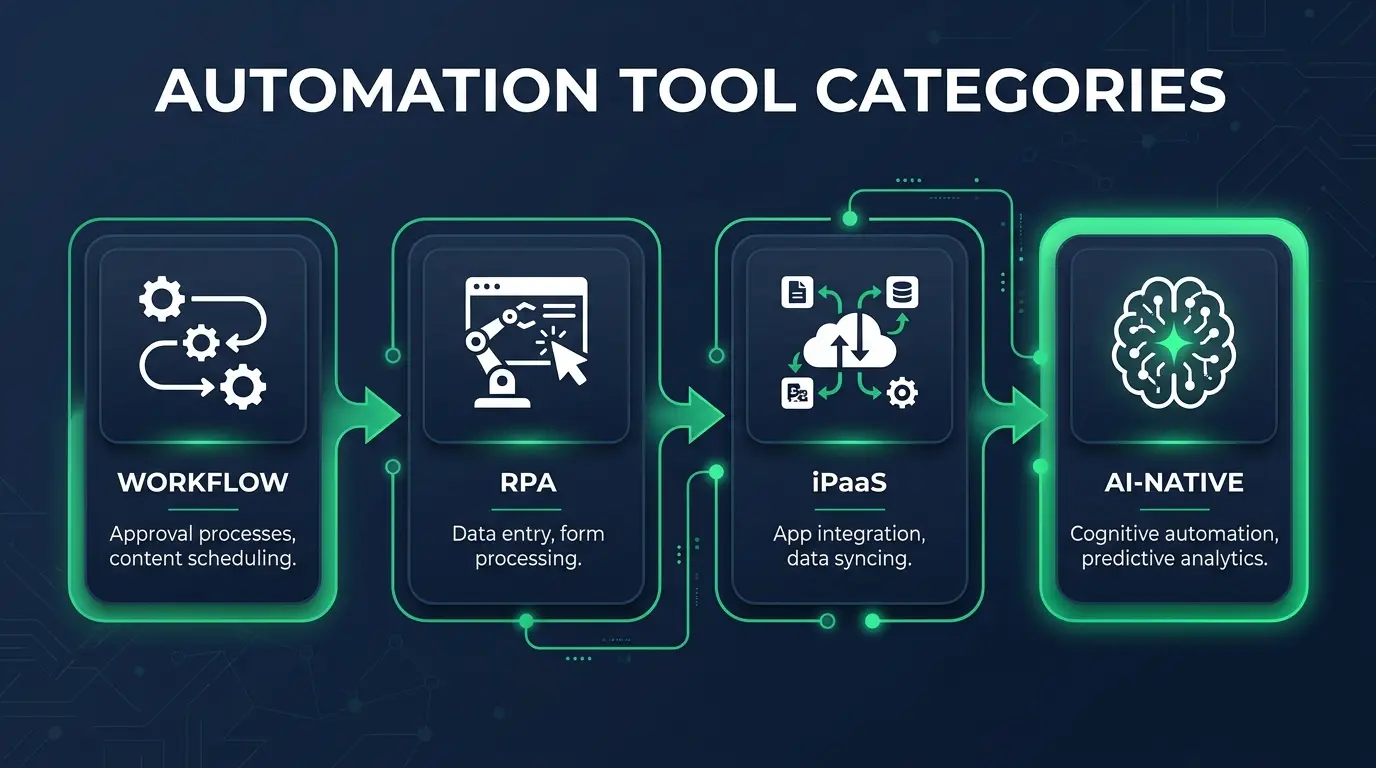
Robotic process automation is a different animal. Where workflow tools talk to apps through APIs, RPA bots imitate a human. They move the mouse, read the screen, click buttons, type into fields. That sounds like magic, and there's exactly one situation where it's the right call: when the software you're automating has no API and no other way in. Old banking systems, ancient ERPs, desktop programs from a vendor who stopped answering the phone in 2014.
UiPath is the enterprise name here. Powerful, mature, built for big organizations automating hundreds of processes across departments with governance and audit trails around the whole thing. It is also, for a small business, almost always overkill once you add up the licensing, the setup, and the specialists you need to run it well. If you're a ten-person shop eyeing UiPath to move data between two web apps, close the tab. You want the tier above.
Microsoft Power Automate is the more approachable door into this world, and it earns its spot for one reason: if your company already lives inside Microsoft 365, it's more or less already there. It does cloud flows like the workflow tools above, and it also does desktop RPA for the screen-scraping jobs. That combo, plus the fact that it's bundled into a stack you may already pay for, makes it the sensible pick for Microsoft-heavy teams. Outside that ecosystem its pull is weaker, and the licensing tiers get confusing fast, so read them slowly before you commit.
The reframe I want you to keep: RPA is a workaround for software that won't cooperate, not an upgrade over workflow automation. Reach for a bot only when there's genuinely no API to talk to. If there's an API, use the cheaper tier and save yourself the headache.

BPM and iPaaS, briefly, because you might not need to care
Two more categories exist, and I'll be quick because most readers can skip them.
BPM platforms, business process management, are for modeling and running big, multi-person workflows. Think a formal approval chain with stages and roles, like an insurance claim moving through intake, review, and payout. These platforms map the whole process, assign steps to people, and track it end to end. If your automation is really a workflow of humans handing work to each other under compliance rules, this is the shape you want. Most small teams never do.
iPaaS, integration platform as a service, is the enterprise-grade plumbing for connecting a lot of systems, often with heavy data transformation between them. When a big company needs its CRM, ERP, and a stack of databases to stay in sync at scale, an iPaaS platform is what the integration team reaches for. It's robust and it's not cheap, and if you're asking whether you need it, you probably don't yet. You'll know when you do, because a workflow tool will have started buckling under the load.
Ninety percent of people googling this phrase need the workflow tier, maybe a touch of RPA. If a BPM or iPaaS platform is genuinely your answer, you likely have a team whose whole job is to evaluate them.
AI-native automation, the newest tier
The thing that actually changed in the last couple of years is AI landing inside these tools. Not as a gimmick, as a real capability. Most of the platforms above now bolt on AI steps: summarize this email, classify this ticket, pull the total off this invoice, draft a reply. n8n in particular has leaned hard into chaining language models into workflows, which is why it shows up so often in the AI-agency world.
What's new is automation that can handle a little judgment. Old automation needed rules for everything, and a message that didn't fit the rules broke it. Drop an AI step in the middle and the workflow can read a messy support ticket, decide what it's about, and route it. That unlocks a class of processes that were too fuzzy to automate before.
The honest caveat, same as it's always been: AI in the loop means the automation can be confidently wrong. A rules-based flow fails loudly and obviously. An AI step can misread something and cheerfully keep going. Put a human check on anything where a mistake actually costs you, and don't wire a language model into a process where being wrong is expensive. If this tier is where your head's at, I went deeper in the best AI automation tools roundup, and the business process automation examples piece shows what these look like in practice.
So how do you actually choose
Match the tool to your size and your stack, not to the loudest brand.
If you're a solo operator or small team, start with Zapier or Make. You'll automate eighty percent of your busywork in an afternoon and never touch the heavier categories. Don't let anyone talk you up a tier.
If you're a growing team with some technical talent, look hard at n8n or Make. You get more control and better economics as volume climbs, with room to add logic before you hit a ceiling. n8n especially rewards a team that can run its own server.
If you're deep in the Microsoft world, Power Automate is the path of least resistance, and it quietly handles the RPA jobs too when a system won't cooperate.
If you're a large enterprise with legacy systems and formal, cross-department processes, that's when UiPath, real BPM, and iPaaS start to make sense. And if that's you, you're not choosing off a blog post, you've got a team for it.
One rule under all of it: start smaller than you think you need. It's easy to move up a tier when you outgrow a tool. It's painful and expensive to unwind a platform you never needed. That logistics company would've saved a fortune if someone had just told them to try the twenty-dollar tool first.
FAQ
What is the best business process automation tool? There isn't one, and anyone who names a single winner is selling something. For most small and mid-size teams the best tool is a general workflow platform like Zapier, Make, or n8n, because that tier covers the overwhelming majority of real processes. Zapier wins on ease and app support, Make on visual building and cost at volume, n8n on flexibility and self-hosting. Enterprises with legacy systems lean toward RPA. Best depends on your size, your stack, and whether your apps have APIs.
What is the difference between RPA and workflow automation? Workflow automation connects apps through their APIs, which is how modern tools like Zapier and Make talk to your software. RPA, robotic process automation, makes a bot mimic a human clicking through an interface, slower and more fragile but able to work on old software that has no API. Use workflow automation whenever you can, and reach for RPA only when there's no other way into a system.
What's the cheapest business process automation tool? Self-hosted n8n is about as cheap as it gets, since the software is open source and you mainly pay for the server it runs on, which barely moves as your volume grows. The catch is you need someone who can maintain that server. If you can't self-host, the free and entry tiers of Zapier and Make handle low-volume automation cheaply, though per-task pricing climbs as usage does. Cheapest at scale and cheapest to start are different questions.
Every one of these tools is a lever. What decides whether it pays off isn't the brand you pick, it's whether you understand the process well enough to know what should be automated and what shouldn't. The company that understands its own workflow beats the one with the fancier platform every time.
If you want to build that understanding, the kind that lets you look at a business process and see exactly where automation helps and where it just hides a mess, that's a skill worth owning. You can start learning at CodingPhase and build it from the ground up. The tools will keep changing. Knowing how systems actually fit together is what sticks.