Shopify Developer Interview Questions: What They Actually Ask (And How to Answer)
On this page
So what do they actually ask in a Shopify developer interview, and can you pass one without ever having worked at an agency?
Yes, you can. I've helped plenty of self-taught developers land their first Shopify role, and the interviews are more predictable than you think. Shopify is a constrained platform. There are only so many things worth asking about.
The catch: the questions are specific. If you've never touched Liquid, it shows in five minutes. But everything they ask can be learned and rehearsed in a week or two. Here are the real questions, what a good answer sounds like, and why they ask.
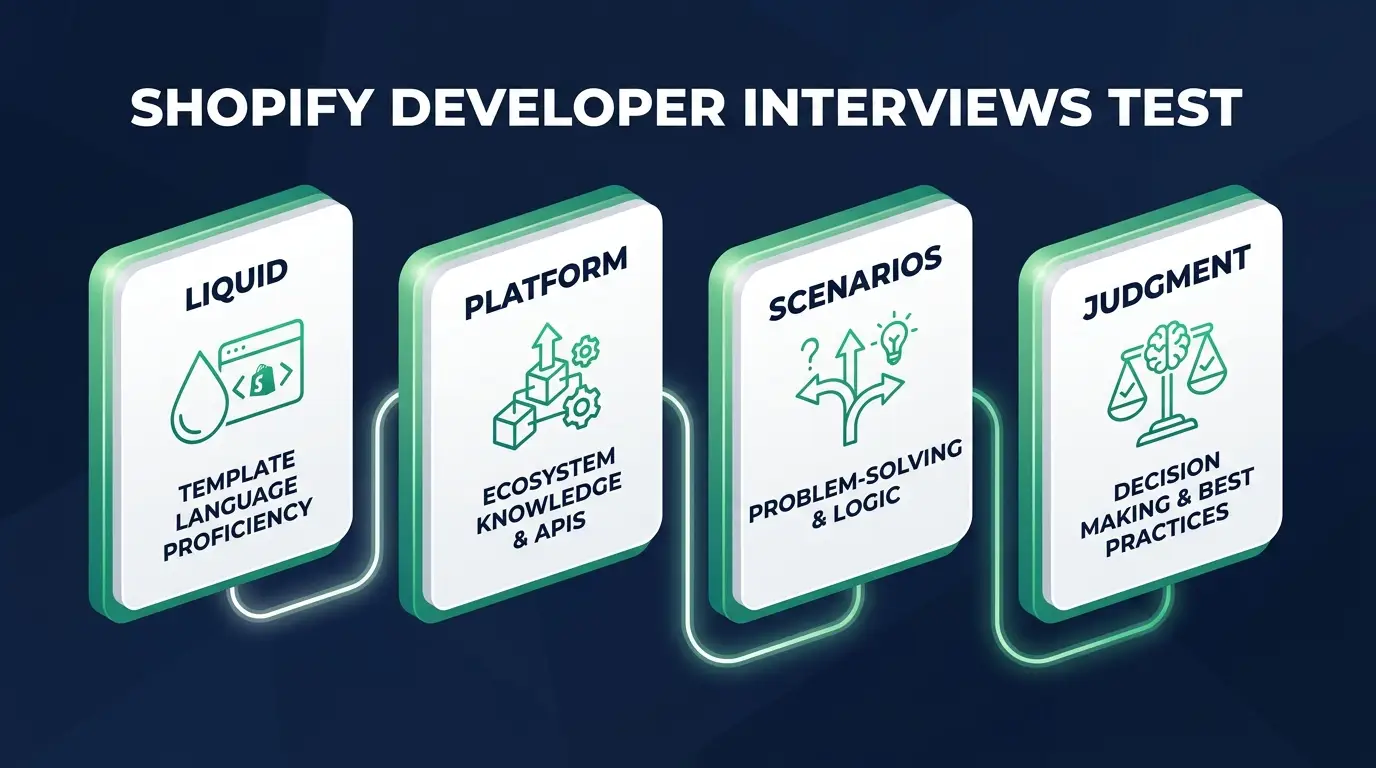
What Shopify interviews actually test
Liquid fluency. Can you read and write Shopify's templating language without Googling every filter? This is the floor.
Theme architecture. Do you understand how a modern Online Store 2.0 theme is put together? Sections, snippets, JSON templates, schema settings.
Judgment about the platform's constraints. Shopify tells you no a lot. Checkout is locked down. Apps can wreck performance. The best answers acknowledge what the platform won't allow and offer the workaround anyway.
At an agency, add a fourth: client communication. Expect at least one "how would you tell the client" question.
New to the path? Start with my guide on how to become a Shopify developer.
Liquid and theme fundamentals
These come first. The pool:
- Difference between a section and a snippet?
- How do Online Store 2.0 JSON templates work?
- What are schema settings in a section?
assignvscapturein Liquid?- What are Liquid filters? Name a few you use constantly.
- What are metafields and when would you reach for them?
- How would you add a custom badge to certain products?
- Why never edit Dawn directly without version control?
The ones that carry the most weight:
Sections vs snippets. A section is a modular block merchants can add, reorder, and configure in the theme editor because it has a schema. A snippet is a reusable chunk of Liquid you include with {% render %}, invisible to the merchant. They're checking whether you build for the merchant, because an all-snippet theme can only be changed by a developer, which means the merchant is emailing you every time they want a new banner.
Online Store 2.0 JSON templates. A template like product.json is just a list of section references and their settings, so merchants can compose any page from sections, not only the homepage. This one quietly filters out candidates who learned from a 2018 tutorial and still think in vintage-theme terms.
Metafields. Custom fields on products, collections, and other resources, for data Shopify has no native field for: size charts, care instructions, a "ships in X days" value. Use them when merchants need to edit the data per product. Never hardcode content a merchant will ask to change, because they will ask, usually on a Friday.
Adding a custom product badge. Store the badge text in a product metafield (or a tag, if the merchant already lives in tags), then render it conditionally in the product card snippet so it appears everywhere cards do. Small feature, merchant-editable, no plugin. That's the whole job in miniature.
Never editing Dawn without version control. Theme updates and merchant edits can collide with yours, and without Git you can't roll back. The workflow: a Git-tracked copy, changes in a development theme via Shopify CLI, then publish. I watched this go wrong on an apparel store two days before Black Friday. A developer had edited the live theme's cart.liquid in the admin to add a shipping threshold message. The merchant's VA, meanwhile, had duplicated the theme a week earlier as a "backup" and then published that backup to fix a typo in the footer. The threshold code vanished. Nobody noticed for six hours, cart abandonment climbed, and there was no Git history to restore from because there was no Git. They rewrote it from memory at 11pm. Interviewers who ask this question have usually lived some version of that night.
For the warm-ups: assign sets a variable, capture grabs a rendered block into one, and filters like money, image_url, and default should be in your fingers.
Platform and ecosystem questions
This round tests whether you understand Shopify as a business platform. The pool:
- Theme customization vs installing or building an app?
- What can't you customize in checkout without Shopify Plus?
- GraphQL Admin API vs Storefront API?
- What are webhooks and when have you used one?
- What actually slows down a Shopify store?
- How do you handle responsive image sizing in Liquid?
- What's Hydrogen, and when does headless make sense?
Have strong answers for these:
Checkout limitations without Plus. On standard plans, checkout is essentially locked: branding tweaks through admin settings and that's about it. Checkout UI extensions and Shopify Functions mostly require Plus. Every agency has been burned by a developer who promised custom checkout, then discovered the platform says no.
Admin API vs Storefront API. The Admin API manages the store itself (products, orders, inventory, customers) with authenticated access. The Storefront API powers custom buying experiences and is safe to expose client-side, which is why headless builds run on it. Mixing these up says you haven't built anything real against Shopify's APIs.
What slows a Shopify store. Not Shopify's servers. It's app bloat, where every installed app injects scripts whether the page needs them or not, plus oversized images and render-blocking code from whatever tag manager the marketing team added. Worth mentioning: plenty of apps leave leftover snippets in the theme after you uninstall them, so a store can be paying a performance tax on an app the merchant cancelled a year ago.
Hydrogen and headless. Hydrogen is Shopify's React framework for headless storefronts on the Storefront API. Headless buys you frontend freedom at the cost of rebuilding everything themes give you free. It probably fits large brands with dev teams and almost never fits a standard merchant. Saying "most stores don't need headless" beats pretending you've shipped three Hydrogen builds.
Webhooks and responsive images are quick ones. Know what a webhook is and have one story about using it.

Scenario questions
This is where interviews are won. They hand you a merchant problem and watch you think. Common ones:
- Client wants a different layout per product type. How do you build it?
- Speed score tanked after the merchant installed 12 apps. What do you do?
- Merchant wants checkout changes but isn't on Plus. What do you tell them?
- The "site is broken" after an app update. Where do you start?
- An app does the feature for $40/month. Build or buy?
- Sales dropped after a theme update. How do you investigate?
How I'd answer the big three:
Different layout per product type. Create alternate JSON templates like product.apparel.json, each composed of different sections, then assign them to products in the admin, or via the API if the catalog is huge. They're listening for the platform's built-in answer instead of a wall of if product.type == conditionals stuffed into one bloated template. The second approach works right up until someone else has to touch it.
Speed score tanked after 12 apps. Audit before you delete anything. Find which apps actually inject frontend scripts, since backend-only apps are innocent. Then sit with the merchant and rank each one by business value against performance cost, uninstall the losers, and go strip the leftover code out of theme.liquid. "Delete the apps" is the wrong answer. Some of those apps are printing money.
Checkout changes without Plus. Tell them the truth early: standard plans can't customize checkout beyond branding. Then offer real options. You can often hit the same goal pre-checkout with cart upsells, trust badges, or shipping messaging, or you can price out whether Plus is justified by their volume. They want to see you deliver a no with a path attached to it.
Questions you should ask them
Sharp questions signal experience more than almost anything else. My five:
- "What's your theme development workflow?" Git and CLI, or editing live in the admin? This tells you if you're joining professionals or firefighting.
- "Is there a staging or development theme, or do changes go straight to live?" If they hesitate, you know what your first month looks like.
- "Who decides which apps get installed, and does development get a say?" You'll own the performance consequences either way.
- "How much is new builds versus maintaining inherited themes?" A different job. Not worse, but different.
- "When a merchant asks for something the platform can't do, who has that conversation?" Good agencies have a clear answer.
How to prepare in the week before
My strongest opinion in this post: a live development store you can screen-share beats anything on your resume.
Dev stores are free through a Shopify Partner account. Spend the week building one. Install Dawn, create an alternate product template, add a metafield-driven badge, build one custom section with real schema settings. Then rehearse one theme customization end-to-end, out loud, until you can do it while talking.
When the interviewer asks about sections versus snippets and you say "want me to just show you?", the interview changes. You stop reciting answers and start demonstrating work. I've watched that move beat candidates with years more experience. Want the store to double as portfolio material? Steal ideas from these Shopify developer portfolio examples.
Know your numbers before the money conversation; the Shopify developer salary guide will keep you from lowballing yourself. Targeting remote roles? Expect async-communication questions too, covered in my guide to remote Shopify developer jobs.
What you can't prep for, honestly: someone will hit you with an edge case from their weirdest client. You won't know the answer, and that's fine. "I haven't hit that, but here's how I'd figure it out" passes when the process is sound. Bluffing doesn't.
Nobody expects you to know everything Shopify does. They want to know if you can find the platform's walls and still build something good inside them.
FAQ
What questions are asked in a Shopify developer interview? Liquid fundamentals, Online Store 2.0 architecture (JSON templates, sections, metafields), platform judgment (checkout limits, APIs, performance), and merchant scenarios that test communication.
Can I pass a Shopify developer interview without agency experience? Yes. A free Partner dev store with real customizations, demonstrated live on a screen-share, substitutes for agency experience. What you can't skip is Liquid fluency.
Do Shopify developer interviews include live coding? Usually practical if at all: modify a section, add a schema setting, walk through a template. Whiteboard algorithm rounds are rare.
Do I need to know Hydrogen for a Shopify interview? Conversationally, yes; hands-on, usually no. Most agency work is still theme work.
How long should I prepare for a Shopify developer interview? If you already know Liquid and have built on a dev store, one focused week: rehearse the question pools above and practice one customization end-to-end out loud.
You're closer to passing this interview than you think. The questions are predictable, and a week of honest practice on a dev store puts you ahead of most applicants.
For the structured version of that practice, the ecommerce specialist career path inside CodingPhase takes you from Liquid basics through real theme builds. When you're ready to apply, the membership's resume builder is built to pass ATS screening, and the job board surfaces Shopify roles.
Go build the dev store this week. Then walk into that interview and show them, don't tell them. I'm rooting for you.