5 AI Automation Portfolio Projects You Can Build (Zapier, n8n, Trigger.dev, Claude)

On this page
Some version of this question comes up on almost every Money Talk call I run. Someone has finished the lessons, they know what n8n is, they've watched the Zapier tutorials, and they unmute to ask: okay, but what do I actually build? Usually they've built a chatbot, and nobody was impressed.
A hiring manager looking at your portfolio is asking one thing: would this have saved my team money or time last month? If the answer isn't obvious in about ten seconds, they close the tab. So every project below starts from a problem a business already pays someone to deal with, like lost leads, an inbox nobody can keep up with, or invoices typed in by hand.
Five builds in four tools: Zapier, n8n twice, Trigger.dev, and a Claude Skill. For each one you get the steps (named the way they show up in the tool today), where the AI decides something, how it breaks, the guardrail, and what to measure.
If you want the write-up template itself, I covered that in AI automation portfolio examples. This post is the build sheet.
What makes an AI automation project portfolio-worthy
Start with a named business problem. "A lead waits nine hours for a reply" is a problem. "I wanted to try the AI step" is a hobby. Then give the AI a real judgment call to make, the kind a person used to make with their brain: scoring a lead, sorting an email, pulling numbers out of a messy PDF.
And then the part beginners skip, which is honestly the part that gets you hired: a guardrail. Any automation that touches customers needs a place where a human approves, a retry when an API hiccups, or a queue for the stuff the model isn't sure about.
I'm also not going to tell you a build "saves 20 hours a week." I don't know your test data. I'll tell you what before-and-after to measure instead, so the number in your case study is one you can defend in an interview.
Project 1 (Zapier): speed-to-lead that replies in under a minute
The problem. A small business runs ads, someone fills out the contact form at 9 PM, and the owner sees it at 10 the next morning. Ask most sales managers and they'll tell you the first company to respond usually wins, and a lot of them will admit their own response time is embarrassing.
The build. One Zap. I'd build this first because it's mostly business logic and very little plumbing.
- Trigger: your form tool's new-submission trigger (Typeform "New Entry," a Webflow form, or Webhooks by Zapier → Catch Hook if the form can post JSON). Use an instant trigger. Polling triggers check on an interval set by your Zapier plan, which quietly kills the "under a minute" promise.
- AI by Zapier → Analyze and Return Data. Give it the form fields and a short description of the ideal customer. Define output fields for
score(1 to 10),tier(hot, warm or cold), a one-sentencereason, and a personalizedfirst_line. - Paths by Zapier. Path A runs when
tieris hot. Path B catches everything else. - Path A: HubSpot → Create Deal (or your CRM's equivalent), then Slack → Send Channel Message to #sales, then Gmail → Send Email to the lead using
first_lineplus a booking link. - Path B: add them to your nurture list (Mailchimp "Add/Update Subscriber" or whatever the business uses), tagged with the reason.
The AI makes its call in step 2. It reads free text like "we're a 12-person agency drowning in client onboarding" and turns it into a score your Paths step can branch on, which is a judgment a sales rep used to make.
It will get some wrong: a real buyer scored cold, or a first line that reads weird. Two guardrails handle that. The reason field goes into the CRM so a rep can see why someone landed in nurture and pull them back out. And for the first two weeks, send the hot-lead email to yourself instead of the lead. When you've stopped editing them, flip it live.
For your case study, screenshot the full Zap with both paths visible, one AI step output (score, tier, reason), and the Slack message. The number to measure is median minutes from form submit to first reply. Get the "before" from the timestamps on 20 old submissions and their replies, and the "after" from Zap History.

Project 2 (n8n): support inbox triage with Gmail drafts a human approves
Picture a three-person support team, one shared inbox, and every morning someone spends the first hour just sorting. Billing questions, bug reports, a sales inquiry that got sent to the wrong place, and a pile of spam. Meanwhile the angry customer with a broken checkout sits in the same pile as the newsletter unsubscribe.
This is an n8n project, and it's my favorite one on the list because it shows the move I think most hiring managers want to see: AI does the sorting and the first draft, and a person keeps the final say.
The workflow:
- Gmail Trigger (On Message Received), polling the support inbox.
- AI Agent node with a chat model attached (Claude, OpenAI, whatever you have a key for). Turn on Require Specific Output Format and attach a Structured Output Parser with fields for
category(billing, bug, sales, spam),urgent(true/false),summary, anddraft_reply. The system message holds your tone and refund rules. - Switch node on
category. Spam stops, sales gets forwarded, billing and bug continue. - Gmail node, resource Draft, operation Create, using
draft_replyas the body. Nothing gets sent. - Google Sheets → Append Row logging the timestamp, sender, category, urgency and summary.
- If node on
urgent, then Slack → Send Message to the support channel with the summary and a link to the thread.
n8n's Text Classifier node can do the labeling alone, but the AI Agent gets you the label and the draft in one pass.
The guardrail is the Drafts folder, on purpose. The AI drafts, a person sends. n8n's own docs warn that structured parsing with agents isn't always reliable, so add an error branch that logs any failed email as needs_review for a human to sort.
What to measure: median time to first response, before and after, plus the share of AI drafts sent with no edits. Nobody expects that one to be 100%, and "here's the policy line I added to the prompt after the misses" is a better interview story than a perfect score. Screenshot the canvas, one email next to its generated draft, and the log sheet.
There are more patterns like this one in my roundup of n8n workflow examples.

Project 3 (n8n): a review monitor that catches the one-star before it festers
Businesses live and die on reviews, and nobody has time to read all of them. A negative review that gets a thoughtful public reply within a day reads very differently from one that sits there for three weeks.
Two n8n workflows.
Workflow A, the watcher. A Schedule Trigger runs every hour and pulls new reviews with an HTTP Request node (or a Webhook node if your review platform can push them). Check each review ID against a Google Sheet of ones you've already processed so nothing gets handled twice. Then an Information Extractor node pulls sentiment, topic (shipping, product quality, support, price) and severity out of the review text. An If node sends negative ones down a branch where a Basic LLM Chain drafts a public response, and a task with the review and the draft gets created in Asana, Trello or whatever the team uses. Everything else just gets logged.
Workflow B, the digest. Every Monday at 9 AM, a second Schedule Trigger reads last week's rows, an Aggregate node bundles them, and an LLM chain writes a short summary of themes ("four reviews mentioned slow shipping to Canada") that posts to Slack.
n8n also has a dedicated Sentiment Analysis node, which works fine. I use the Information Extractor here because it pulls sentiment, topic and severity in one call.
Same rule as before: the AI never posts a public reply. It drafts, a person approves. A defensive reply is worse than none.
One practical warning. Getting live reviews out of Google requires access to the Business Profile API, which you have to apply for. For a portfolio build, it's completely fine to feed workflow A from a sheet of 40 sample reviews you wrote yourself, mixed good and bad. Say so in your write-up. Pretending you had API access you didn't is the kind of thing that comes out in a technical interview.
Measure hours from a negative review landing to a drafted response sitting in someone's task list, and show one Monday digest.
Project 4 (Trigger.dev): an invoice processor that knows when it's unsure
This is the one that proves you can go past no-code. You'll write some TypeScript, and that's exactly why it stands out.
The problem: someone in accounts payable opens every vendor invoice PDF, types the vendor, amount, invoice number and due date into a spreadsheet or QuickBooks, and does it again tomorrow. It's slow, it's error-prone, and a typo in an amount is a real money problem.
Why Trigger.dev and not another Zap: reading a multi-page PDF with a model and validating the result can take a while and can fail halfway through. Trigger.dev runs it as a durable background task with retries built in, and its tasks are just TypeScript files in your project. That's a tradeoff worth having an opinion on in an interview.
The flow: a PDF lands in storage, your upload handler triggers the task, Claude extracts the fields to JSON, your code validates them, and then the task either writes a row to the accounting sheet or parks the invoice in a human-review queue.
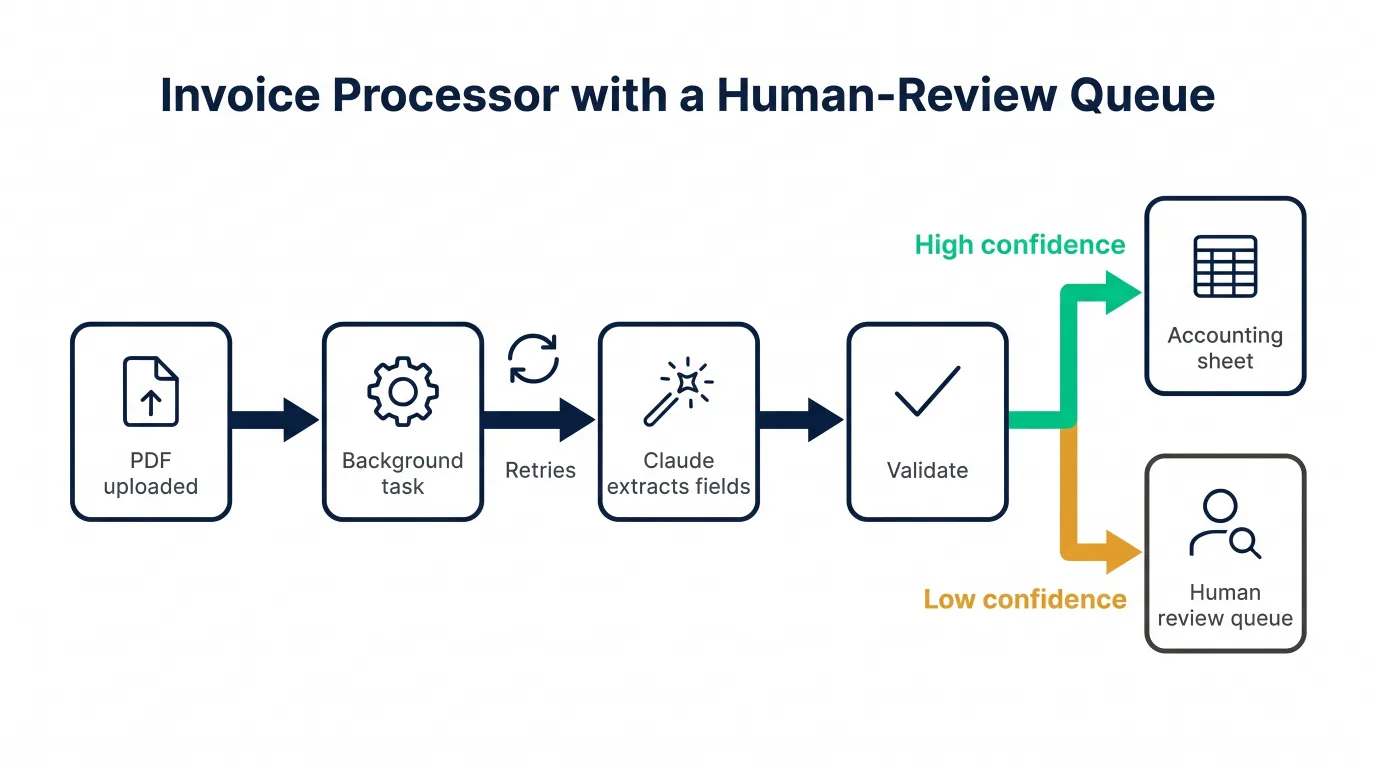
Here's the core task, trimmed down. extractInvoice is your function that sends the PDF to Claude and asks for JSON back with a confidence field, and appendToSheet and notifyReviewer are your own helpers.
import { schemaTask, wait } from "@trigger.dev/sdk";
import { z } from "zod";

export const processInvoice = schemaTask({
  id: "process-invoice",
  schema: z.object({ fileUrl: z.string().url() }),
  retry: { maxAttempts: 3 },
  run: async ({ fileUrl }) => {
    const invoice = await extractInvoice(fileUrl); // Claude returns JSON

    const looksRight =
      invoice.confidence >= 0.85 &&
      invoice.amount > 0 &&
      !Number.isNaN(Date.parse(invoice.dueDate));

    if (!looksRight) {
      const token = await wait.createToken({ timeout: "3d" });
      await notifyReviewer(invoice, token.id); // Slack or email with approve link
      const review = await wait.forToken<{ approved: boolean }>(token.id);
      if (!review.ok || !review.output.approved) return { status: "rejected" };
    }

    await appendToSheet(invoice);
    return { status: "posted", vendor: invoice.vendor };
  },
});
A technical reviewer will look for two things here.
schemaTaskchecks the payload before the run starts, so a bad payload fails right away without burning retries, whileretry: { maxAttempts: 3 }covers the boring failures like a model API timeout or a rate limit.- The low-confidence branch uses a waitpoint token. The run pauses, a person gets a link, and when they approve (your approve endpoint calls
wait.completeToken), the same run picks up where it left off. If nobody responds in three days, the token times out and nothing gets posted.
That pause is your human-review queue. The model will misread a smudged scan, and this way the system admits it.
To write this up, make a test set of 20 invoices, including a few ugly ones on purpose (a phone photo, a two-page invoice, one in euros). Report field accuracy against what you typed by hand, how many went to review, and whether any wrong amount slipped through unreviewed. That last one should be zero. If it isn't, your case study is about how you fixed the threshold. Screenshot the Trigger.dev run view with the retries visible and one paused run waiting on a token.
Project 5 (Claude Skill): brand-voice QA for every marketing email
Once more than one person writes a company's emails, one of them uses "leverage" in every paragraph, another ships a link with no UTM, and the brand starts sounding like a committee. The usual fix is a style guide PDF nobody opens.
A Claude Skill turns that style guide into something that actually runs. A Skill is a folder with a SKILL.md file at the top. The front matter needs a name (lowercase letters, numbers and hyphens, 64 characters max, and it can't contain the words "claude" or "anthropic") and a description that says what the skill does and when to use it. Claude loads only that name and description up front and reads the rest when a request matches. Scripts in the folder run on their own, and only their output comes back.
The folder:
brand-voice-email-qa/
  SKILL.md
  voice-rules.md
  banned-phrases.txt
  scripts/
    check_email.py
And the SKILL.md:
---
name: brand-voice-email-qa
description: Reviews a marketing email draft against our brand voice rules, banned phrases and send checklist, then returns a pass/fail report with exact fixes. Use when someone shares an email draft, subject line or newsletter and asks for a review, QA, or a voice check before sending.
---

# Brand voice email QA

## Steps
1. Run `python scripts/check_email.py <draft file>`. It flags banned phrases from banned-phrases.txt, links missing UTM parameters, images missing alt text, and any em dash.
2. Read voice-rules.md and review the draft for tone: first person, one reader as "you", short paragraphs, no hype.
3. Return a report with three sections: Blockers (must fix before send), Suggestions, and a rewritten subject line if the current one breaks a rule.

## Rules
- Quote the exact sentence for every issue and give the replacement.
- Never change prices, dates or offer terms. Flag them for a human instead.
Look at the split. The script handles the checks that need to be exact every time (a banned word is either there or it isn't). The model handles the judgment calls a script can't, like "this paragraph sounds pushy." Explaining that split is worth more in an interview than the skill itself.
Custom Skills work in Claude Code (drop the folder in .claude/skills/), on claude.ai (upload it as a zip in settings, on plans with code execution turned on), and through the API. On the API, skills run without network access, so keep the script to plain file checks.
The guardrail is built in: the skill reports, a person decides.
For the case study, take ten old emails the business really sent. Run each through your own manual checklist first and write down what you caught. Then run the skill. Report what it caught that you missed, what it flagged wrongly, and the before/after for one email side by side. Screenshot the folder, the SKILL.md, and one report.
Which tool for which job
| Build | Tool | Why this tool |
|---|---|---|
| Speed-to-lead | Zapier | Fastest to ship, huge app library, business owners already know it |
| Inbox triage | n8n | AI Agent with structured output, self-hostable, usually cheaper at volume |
| Review monitor | n8n | Two scheduled workflows plus an LLM chain, all on one canvas |
| Invoice processor | Trigger.dev | Long-running code with retries and a pause for human approval |
| Brand-voice QA | Claude Skill | Packages rules plus a script so the same review happens every time |
None of this is a religion. You could build project 1 in n8n and project 2 in Zapier. If you want the full head-to-head, read n8n vs Zapier. What matters for your portfolio is that you can say why you picked the tool, in one sentence, with a tradeoff in it.
How to present all five without boring anyone
Lead with whichever project fits the job. Marketing ops role? Speed-to-lead and brand-voice QA go first. Support-heavy company? Inbox triage leads. Each write-up gets the four beats from the portfolio examples guide, but let them run different lengths. The invoice processor deserves a code walkthrough, while the Zap needs two screenshots and a paragraph.
And put your failures in. "The first version scored every agency lead as cold because my ideal-customer description said 'ecommerce,' so I rewrote it and re-ran 20 test leads" is the kind of line that makes a hiring manager think, okay, this person has actually run this thing.
FAQ
Do I need real clients to build these? No. Use sample data you create yourself and say so in the write-up. A fake bakery's inbox with a real, working triage flow is a legitimate portfolio piece. A real client with a made-up result is not.
Do I need to know how to code for the Trigger.dev and Claude Skill projects? Some. The Trigger.dev task is TypeScript, and the skill's script is a short Python file. You don't need a CS degree, but you should be able to read every line you ship and explain it.
How many n8n projects should be in my portfolio? Two is plenty, as long as they show different patterns. Five n8n projects that all do "trigger, AI, Slack" read as one project five times.
Build even two of these properly, with the guardrails and an honest number, and you'll have more to talk about in an interview than most people who've been "learning automation" for a year. The builds aren't fancy. They just solve problems the person across the table actually has.
If you'd like the guided version, with lessons and people building the same things alongside you, the AI Automations career path is free to start. And if you want the bigger picture first, I wrote up how to become an AI automation specialist step by step.
Pick one project this week and build the ugly version first. Then bring it to a call and show us what broke, because that's usually where the good part of the case study comes from. I'll be there.