Content Migration: How to Move a Website Without Losing Anything

On this page
Somewhere in a meeting this week, someone is saying, "We'll just move the content over."
Nobody in that room has opened the 2017 press release section. Nobody knows how many PDFs are linked from pages that aren't in the menu, or that the old CMS stores the author's name inside the body text on half the blog. The sentence sounds like a Tuesday afternoon. It's usually a project with a budget line.
A content migration is one of those jobs that looks like clerical work from the outside and turns out to be the moment a company finds out what's really on its website. I like it as a career move for that reason, and I'll get to why. First, the plan.
What moving content to a new CMS involves
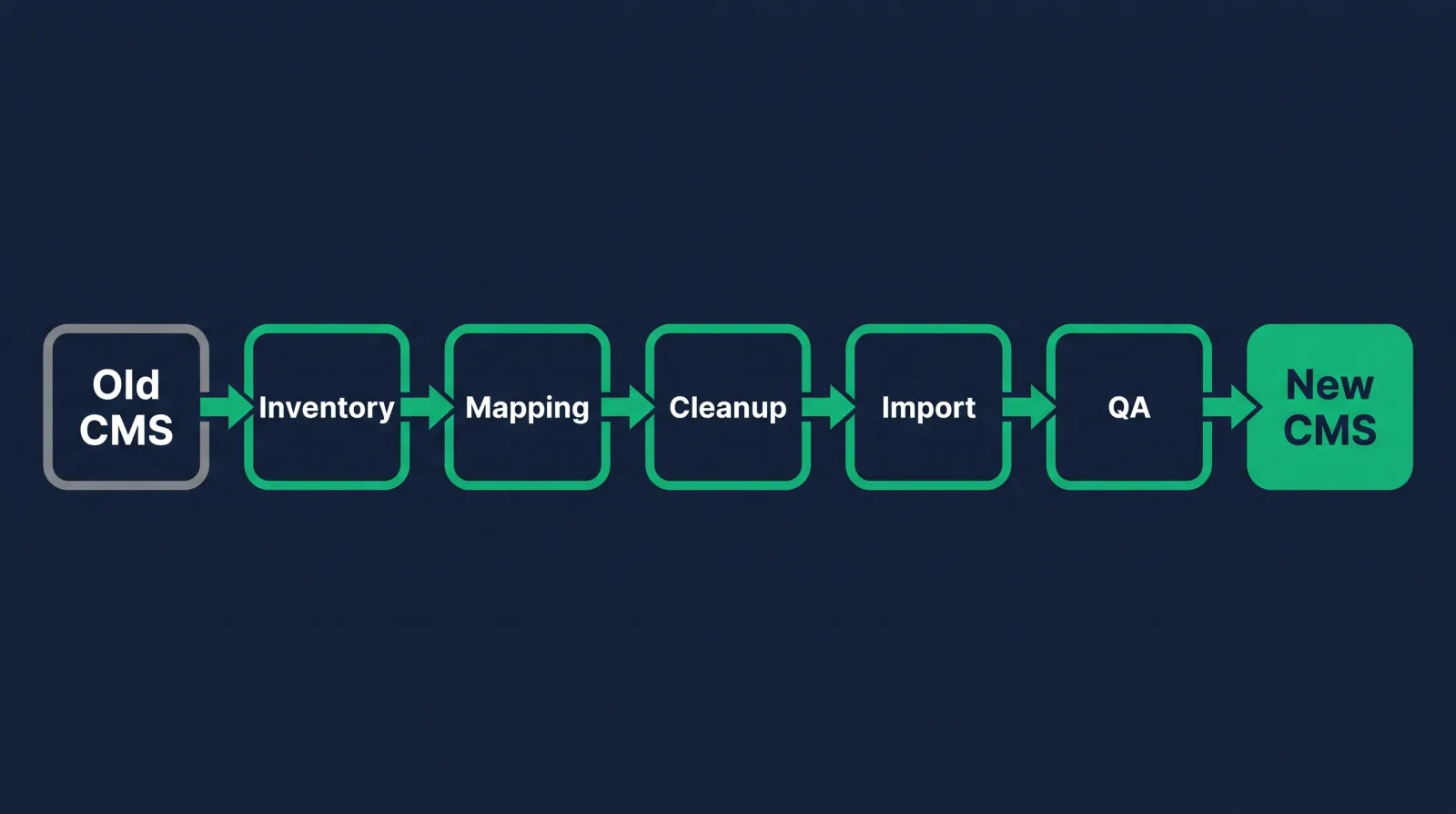
Moving content to a new CMS means deciding what deserves to move, restructuring it to fit the new system's fields, transferring it manually or by script, redirecting every old URL, and checking the result page by page before anyone sees it.
Notice how little of that is the transfer. The copying is the short middle of the project. Most of the risk lives on either side of it, in decisions made too quickly before the move and checks skipped after it.
People also use "content migration" and "website migration" as if they're the same thing. They overlap, but they answer different questions. A content migration asks, what are we moving and what shape should it be in when it lands? The other kind asks, how do we change platforms, domains or URLs without losing search traffic? If you own the second job, work through this website migration checklist too. On a small team you'll probably own both.
Before you touch anything, write a one-page content migration plan. It needs a list of what's in scope, who signs off on each section, the launch date, and a freeze date after which nobody edits the old site. That last one matters more than it sounds. Without a content freeze, marketing keeps publishing on the old CMS while you're moving things to the new one, and you find out at launch.
Content inventory and audit: what to keep, fix or drop
A content inventory is a spreadsheet of every URL and file on the site. The audit is the judgment pass that marks each row keep, rewrite, merge or delete, based on traffic, accuracy, ownership and whether the page still has a job to do.
Start with a crawl. Screaming Frog's free version handles up to 500 URLs, and a paid license covers bigger sites. Then compare the crawl against an export from the CMS itself, because each one catches what the other misses. A crawler can't find orphaned pages nothing links to. A CMS export doesn't know about the PDFs sitting in a folder on the server.
Give your spreadsheet these columns at minimum:
- URL and page title, so every row can be found again
- Content type, such as blog post, product page, landing page or PDF
- Traffic and backlinks, pulled from analytics and Search Console
- Last updated and owner, which is often the first time anyone has asked who owns it
- Decision, one of keep, rewrite, merge or delete
- New URL, filled in during the mapping step
Be ruthless in the audit. Every page you carry over costs someone time to map, clean and QA, and a thin page from 2014 doesn't get better on a nicer platform. Still, never delete on traffic alone. A page with four visits a month might be the one legal requires, or the one with a link from a government site.
Stakeholder sign-off belongs here, while changes are cheap. Send each department its own filtered list and a deadline, and write that deadline into the migration plan. People who ignore a spreadsheet in March tend to get very interested in June when their page is gone, so keep the emails.

Mapping old fields and URLs to the new CMS
Content mapping is a document that says where each piece of old content goes in the new CMS: which content type, which field, which template and which URL. It's the blueprint a person or a script follows, so gaps here become errors at scale.
On the old site, a staff bio might be one big rich-text box holding a photo, a job title and three paragraphs. On the new CMS, that's four separate fields. Somebody has to decide how that gets split, and what happens to the 30 bios that don't follow the pattern.
A simple mapping table looks like this:
| Old CMS | New CMS | Notes |
|---|---|---|
| Body (rich text) | Summary + Body | Split at first paragraph |
| Author in body text | Author reference field | Needs a script or manual pull |
| Category tag | Taxonomy: Topic | 84 old tags merge to 12 |
| /news/2019/title | /blog/title | Add to redirect list |
| Meta keywords | None | Drop it |
Those numbers are only an example, but that third row is real life. Old sites collect tags like a junk drawer. A migration is your one good chance to fix the taxonomy, since nobody will ever fund a project to clean tags for their own sake.
Map the metadata as carefully as the body. Page titles, meta descriptions, alt text, publish dates, canonical tags and Open Graph images are the fields that get forgotten, and metadata you lose in the move is metadata someone has to retype. Dates are the sneaky one. If every article suddenly shows the import date, your 2019 post looks brand new and your readers get confused.
Decide your URL pattern now as well, before any content moves. Keep URLs the same wherever you can. The fewer that change, the fewer redirects you need and the less you're asking search engines to relearn.
Cleanup before the move
Clean content before migrating it. Migrating junk just gives you junk with a newer logo. Fixing broken formatting, outdated copy and heavy images in the old system or an export file means you fix each problem once, instead of finding the same mess spread across a new site.
Common cleanup jobs:
Inline styles and old HTML. Pasted-from-Word markup and hardcoded font tags will fight your new template. Strip them.
Images and other assets. Rename files like IMG_4471.png, compress what's huge and delete what's unused. Asset libraries are often bigger than the pages that use them.
Internal links. Links typed as full URLs to the old domain will keep pointing at it. Search for them and plan the replacement.
Accessibility gaps. Missing alt text and skipped heading levels are much easier to fix in a batch during a project than one at a time later.
Rewrites are where timelines go to die, I think. If a page needs a full rewrite, move it as is, flag it, and put it on a post-launch list unless it's truly wrong or a legal risk. Otherwise you've quietly turned a move into a redesign of every sentence on the site.
Manual, scripted or vendor migration
Migrate content manually when you have a few hundred pages or messy structures, by script when you have thousands of consistent records, and through a vendor when the volume is big and nobody internal can own it. Most real projects combine the first two.
Manual gets a bad name, but it's often right for your 40 most important pages, where a person should look at every heading anyway. Do the math before you commit. If you've got 800 pages at around 12 minutes each, that's 160 hours, which is four weeks of one person doing nothing else. Your real per-page time will come from a timed test of 20 pages, and I'd run that test before giving anyone a date.
To migrate content by script, you export from the old CMS (CSV, XML or the API), transform it to match your mapping, and import it into the new system. WordPress has a built-in importer and a REST API, and most platforms have something similar. Run the script against a staging site first and expect the first few passes to look terrible. That's normal, and it's why you test on staging.
Vendors make sense for large, regulated or multilingual sites. They still can't decide what your content should be. You'll need someone in-house who understands the content, and that person is often the most valuable one on the project.
Whichever content migration route you pick, take a full backup of the database and media before anything else. Assume you'll need it.
Redirects and handoff to SEO
Every old URL that changes needs a permanent 301 redirect to its closest new equivalent, and the redirect list should come straight from your mapping sheet. Hand it to whoever owns SEO before launch so it can be tested, instead of being discovered afterward.
Because you built a New URL column back in the inventory, your redirect file is nearly done already. Export two columns, old and new, and you've got it.
A few habits save a lot of pain. Point each redirect at the best matching page, since dumping everything on the homepage throws away relevance. Avoid chains, where one redirect leads to another. And run the old URL list through a crawler against staging before launch to confirm that each one resolves.
Deleted pages need a decision too. If a page has a sensible replacement, send people there. If it truly has none, let it return a 404 or 410 and move on.
Content QA, page by page
In a content migration, QA means comparing migrated pages against the originals for missing text, broken formatting, wrong metadata, dead links and bad images. Check every high-value page by hand and a meaningful sample of the rest, then fix repeating problems in the script.
On a 12,000-page site, nobody reads everything, so split the work. Automated checks can compare word counts between old and new, flag empty fields and find broken links. A person handles what a machine can't judge, like a table that's technically present and completely unreadable on a phone.
My checklist for each page type:
- Headings came across at the right levels
- Images load, have alt text and aren't stretched
- Tables, embeds and videos work on mobile
- Title, meta description and canonical are correct
- Publish date and author are the originals
- Links go to the new URLs
- Forms submit somewhere real
When you find a bug, ask whether it's one page or a pattern. A broken table on one page gets fixed by hand. The same broken table on 400 pages goes back to the script. Log everything in one shared sheet with a status column, and get the department owners to sign off on their own sections, because they'll spot the wrong phone number you'd never notice.
After launch, keep the old site reachable behind a login for a while. Someone will ask where a paragraph went.
Why this project pays off for your career
A content migration touches content, CMS configuration, SEO, stakeholders and project management all at once, so it gives you evidence of nearly everything a web content manager gets hired to do. It's also work most teams are happy to hand over.
Here's the thought I'd guess you're having: I'm not technical enough to run something like that. You can start smaller than you think. Help with the inventory. Own the QA for one section. A spreadsheet and a careful eye get you in the room, and most of what's on this page is organization and judgment.
No employer asking you to run one yet? Make your own. Take a small local nonprofit's site or a practice site, export it, map it to a WordPress install and document what you changed. Then write it up with the before and after, the way these web administrator portfolio examples do. An inventory spreadsheet and a mapping doc are real work samples, and very few people applying for a web content specialist role can show one.
If you're still choosing a platform to get good at, this guide to the best CMS platforms to learn will save you some time.

FAQ
How long does a content migration take?
It depends on page count, how consistent the content is and how many people have to approve it. Time yourself on 20 pages, multiply by your total, then add time for QA and sign-offs. Anyone quoting a number before seeing the inventory is guessing.
Can you migrate content automatically?
Partly. Scripts and import tools handle consistent, structured records well. They struggle with odd formatting and can't judge whether a page should exist at all, so plan on people reviewing what the script produced.
Who owns a content migration?
Usually a web content manager or digital project manager, working with a developer and an SEO. Someone has to have final say over scope, and it should be one named person.
What's the difference between content migration and website migration?
Content migration covers what moves and how it's restructured. A site move covers changing the platform, domain or URLs while protecting search traffic. A CMS replatform usually involves both at the same time.
If you've read this far, you can probably tell whether this kind of work suits you. I think it's some of the most underrated work on the web, and companies pay real money for it when it goes right.
We teach it in the Web Content Manager career path, starting with Content Management Systems for Content Editors, a course built for this exact role. Diamond Membership lists at $60/month or $365/year and there's always at least 30% off, so it's about $42/month or $255/year, and that gets you all 90+ courses, portfolio templates, an ATS-ready résumé builder, the job board and an 80,000+ member community. You also get two live calls every week, Accountability on Wednesdays at 7 PM ET and Money Talk on Sundays at 8 PM ET. Our students go after roles paying $75k+, individual results vary, and there's a 7-day money-back guarantee if it isn't for you.
Come say hi on a Wednesday. We've been doing this since 2016, and you won't have to figure it out alone.